







Question: Hello, https://www.chegg.com/homework-help/Programming-with-Microsoft-Visual-Basic-2015-7th-edition-chapter-8.LC-problem-9E-solution-9781285860268 On that page, When I execute the program.. I get the error code on step 6, that I was suppose to get in
Hello, https://www.chegg.com/homework-help/Programming-with-Microsoft-Visual-Basic-2015-7th-edition-chapter-8.LC-problem-9E-solution-9781285860268 On that page, When I execute the program.. I get the error code on step 6, that I was suppose to get in step 8. I keep getting the same error code "Card number should be 5 digits" for anything I put. My code is no different than from what's on the page. May I please get help on figuring out why this is happening? Please check the screenshot I've included.
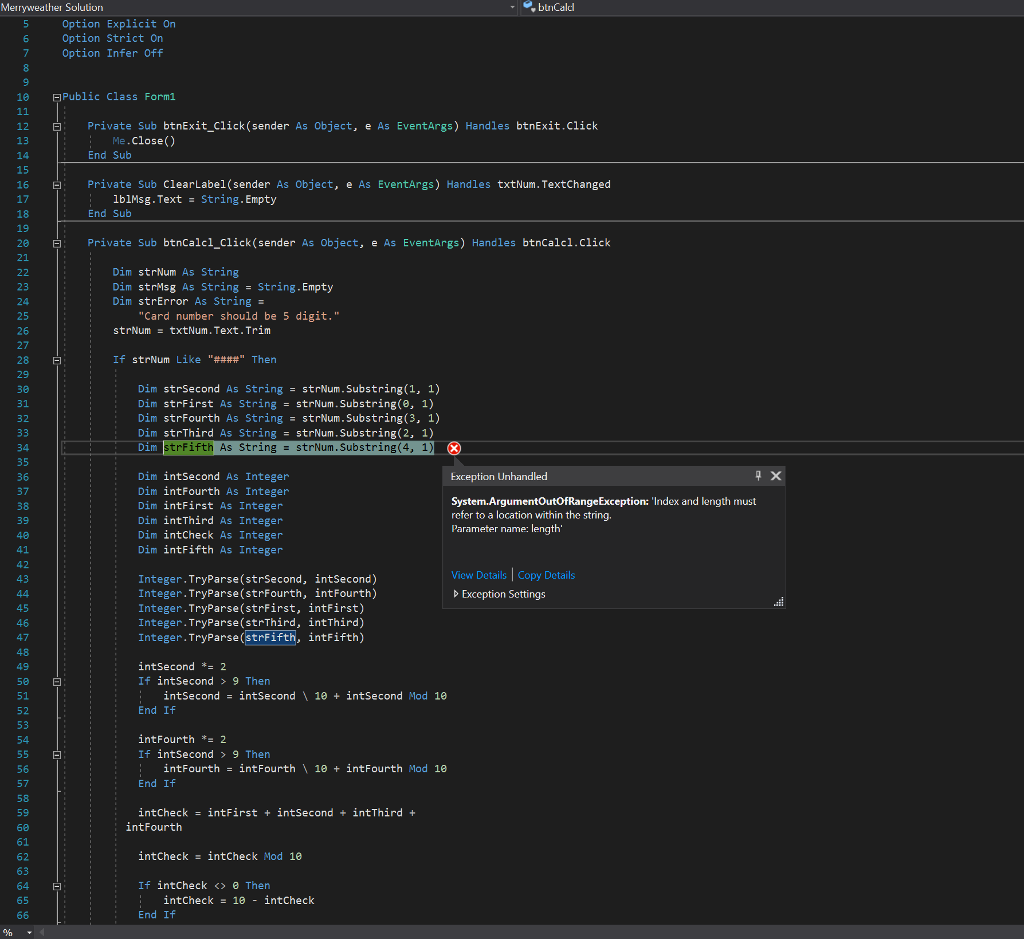
Merryweather Solution buicald Option Explicit On Option Strict On Option Infer Off 16 Public Class Form1 Private Sub btnExit_Click (sender As Object, e As EventArgs) Handles btnExit.Click Me.Close() End Sub 14 15 16 17 18 19 28 21 Private Sub ClearLabel(sender As Object, e As EventArgs) Handles txtNum. TextChanged 1b1Msg. Text String. Empty End Sub Private Sub btnCalcl_Click (sender As Object, e As EventArgs) Handles btnCalcl.Click Dim strNum As String Dim strMsg As String String. Empty Dim strError As String = 23 24 25 26 27 28 29 30 31 32 "Card number should be 5 digit.'" strNumtxtNum.Text.Trim If strNum Like "####" Then Dim strSecond As String = strNum-substring(1, 1) Dim strFirst As String = strNum . Substring(8, 1) Dim strFourth As StringstrNum.Substring(3, 1) Dim strThird As String strNum.Substring(2, 1) Dim strFifth As String strNum . Substring(4, 1) 34 35 36 37 38 39 48 41 = >
Step by Step Solution
There are 3 Steps involved in it

Get step-by-step solutions from verified subject matter experts
 Study Help