







Question: Hello, I am trying to accomplish this task using MATLAB for image processing and am having quite a bit of trouble. The project is as
Hello, I am trying to accomplish this task using MATLAB for image processing and am having quite a bit of trouble. The project is as follows:
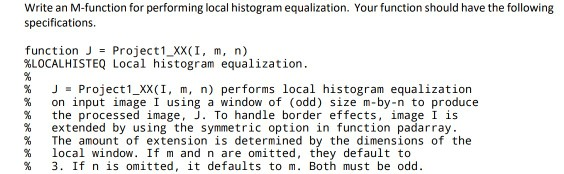
I am struggling to find out how local equalization works. I only know histeq and equalizing the entire image however it seems as though I must use this function on small subsamples of a larger photo. Can anyone help me out with this?
Write an M-function for performing local histogram equalization. Your function should have the following specifications function J Project1 XX(I, m, n) %LOCALHISTEQ Local histogram equalization. %Project1_xX (I, m, n) performs local histogram equalization % on input image 1 using a window of (odd) size m-by-n to produce % the processed image, J. To handle border effects, image I is extended by using the symmetric option in function padarray %The amount of extension is determined by the dimensions of the %local window. If m and n are omitted, they default to % 3. If n is omitted, it defaults to m. Both must be odd. Write an M-function for performing local histogram equalization. Your function should have the following specifications function J Project1 XX(I, m, n) %LOCALHISTEQ Local histogram equalization. %Project1_xX (I, m, n) performs local histogram equalization % on input image 1 using a window of (odd) size m-by-n to produce % the processed image, J. To handle border effects, image I is extended by using the symmetric option in function padarray %The amount of extension is determined by the dimensions of the %local window. If m and n are omitted, they default to % 3. If n is omitted, it defaults to m. Both must be odd
Step by Step Solution
There are 3 Steps involved in it

Get step-by-step solutions from verified subject matter experts
 Study Help