







Question: Hello, I am trying to create a payment form with a logo in the header using HTML & CSS, but I have run into some
Hello, I am trying to create a payment form with a logo in the header using HTML & CSS, but I have run into some problems.
Problem One: My logo is not in the center of the webpage
Problem Two: My texts and text boxes are jumbled.
So, I'm kindly asking you to help me with... (I made a mockup of what it should look like below!)
- Centering the logo for my webpage
- Make my text appear on the left side and the textboxes go on the right side and are displayed evenly/in alignment with the other text boxes.
- The 'month' & 'year' textboxes should be side by side, and, of course, on the right-hand side of the 'Expiration Date' text. All 12 months should be reflected in the drop-down box and the years 2000 to 2010 should be reflected in the year drop-down box.
- my radio buttons under 'Credit Card Type' should be vertical (one after the other); also only one radio button may be active at a time.
- my submit button should be at the bottom left of the webpage
Please note: the image is only a mock-up and does not represent the actual spacing of the form. So, use any spacing that will look neat.
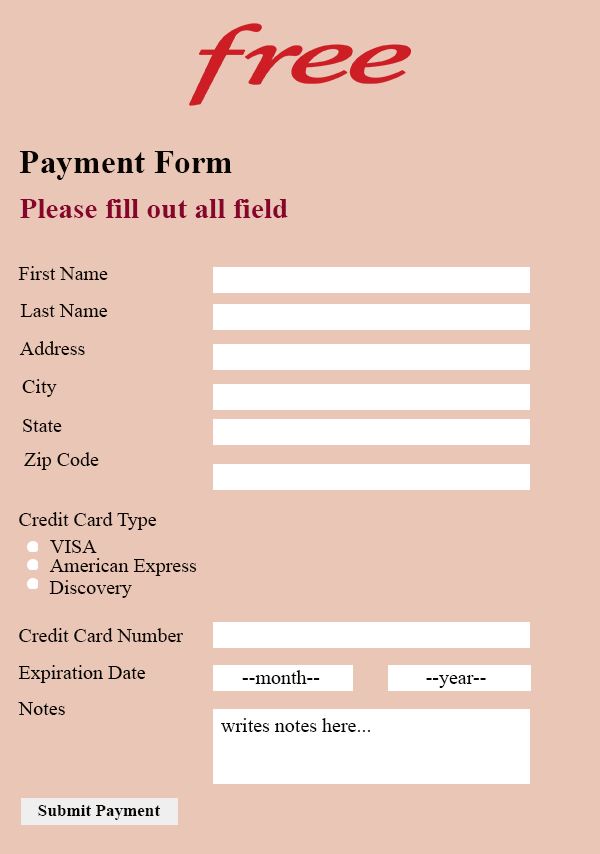
This image is ONLY a mock-up of what it should look like in HTML/CSS.
Thank you so much for your help!
free Payment Form Please fill out all field First Name Last Name Address City State Zip Code Credit Card Type VISA American Express Discovery Credit Card Number Expiration Date --month-- --year-- Notes writes notes here... Submit Payment
Step by Step Solution
There are 3 Steps involved in it

Get step-by-step solutions from verified subject matter experts
 Study Help