







Question: Hello I am working on a quickbooks assignment and I am stuck on step 4 - I have started my first journal entry, but cannot
Hello I am working on a quickbooks assignment and I am stuck on step 4 - I have started my first journal entry, but cannot figure out how it wants me to input step 4 into quickbooks online.
ACC-250 Topic 5
STEP 1:
Import your chart of accounts.
Go to QuickBooks and login to your company. Choose the settings cog at the upper right hand of the screen. Select "Import Data" under the "Tools" list. Click on the "Chart of Accounts" box. Using the "Browse" function, select the "ACC250 QuickBooks Import File" provided in your LoudCloud classroom. Click "Next", click "Next" again, and then click "Import".
STEP 2:
Enter the beginning account balances.
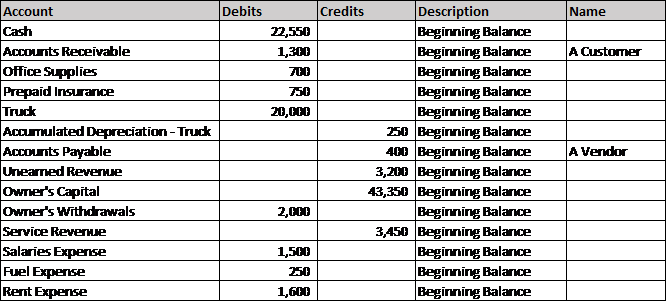
Click the "+" (Create) button at the upper right hand corner of the screen. Choose "Journal Entry" under the "Other" column. Enter Journal Entry #1 with the date of 1/1/2017. The journal entry appears below.
Under "Description", type "Beginning Balance". For Accounts Receivable and Accounts Payable, you will need to fill in the "Name" column. For Accounts Receivable, click "Add New" from the drop-down menu in the "Name" column. Enter "A Customer" as the name and choose "Customer" as the type. Click "Save". For Accounts Payable, click "Add New" from the drop-down menu in the "Name" column. Enter "A Vendor" as the name and choose "Vendor" as the type. Click "Save".
Step by Step Solution
There are 3 Steps involved in it

Get step-by-step solutions from verified subject matter experts
 Study Help