







Question: Hello, I have a one-page assignment that should be done on VDI Environment that I could not figure out. I would be happy if someone
Hello, I have a one-page assignment that should be done on VDI Environment that I could not figure out. I would be happy if someone could help me with this.
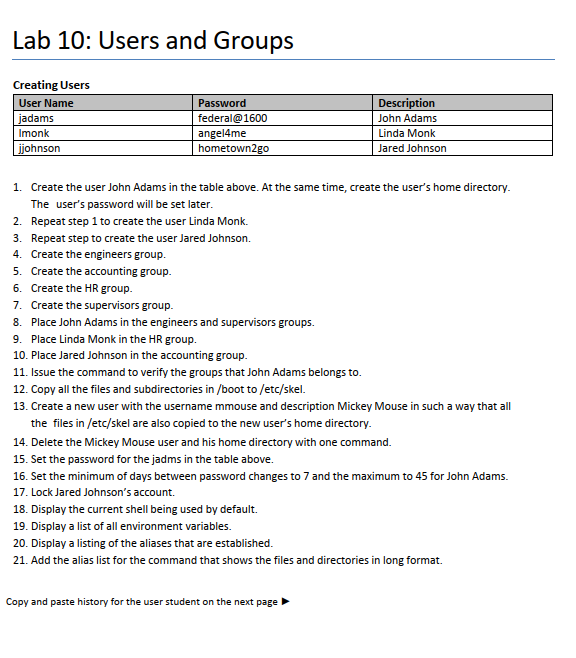

Lab 10: Users and Groups Creating Users 1. Create the user John Adams in the table above. At the same time, create the user's home directory. The user's password will be set later. 2. Repeat step 1 to create the user Linda Monk. 3. Repeat step to create the user Jared Johnson. 4. Create the engineers group. 5. Create the accounting group. 6. Create the HR group. 7. Create the supervisors group. 8. Place John Adams in the engineers and supervisors groups. 9. Place Linda Monk in the HR group. 10. Place Jared Johnson in the accounting group. 11. Issue the command to verify the groups that John Adams belongs to. 12. Copy all the files and subdirectories in /boot to/etc/skel. 13. Create a new user with the username mmouse and description Mickey Mouse in such a way that all the files in /etc/skel are also copied to the new user's home directory. 14. Delete the Mickey Mouse user and his home directory with one command. 15. Set the password for the jadms in the table above. 16. Set the minimum of days between password changes to 7 and the maximum to 45 for John Adams. 17. Lock Jared Johnson's account. 18. Display the current shell being used by default. 19. Display a list of all environment variables. 20. Display a listing of the aliases that are established. 21. Add the alias list for the command that shows the files and directories in long format. Copy and paste history for the user student on the next page History for user student
Step by Step Solution
There are 3 Steps involved in it

Get step-by-step solutions from verified subject matter experts
 Study Help