







Question: Hello, I have the Linux assignment, which should be done on the VDI environment. I only need commands for each step. For Lab 11, 16
Hello, I have the Linux assignment, which should be done on the VDI environment. I only need commands for each step. For Lab 11, 16 commands; for Lab 12, 12 commands; for Lab 13, 16 commands. Thank you for your help in advance.
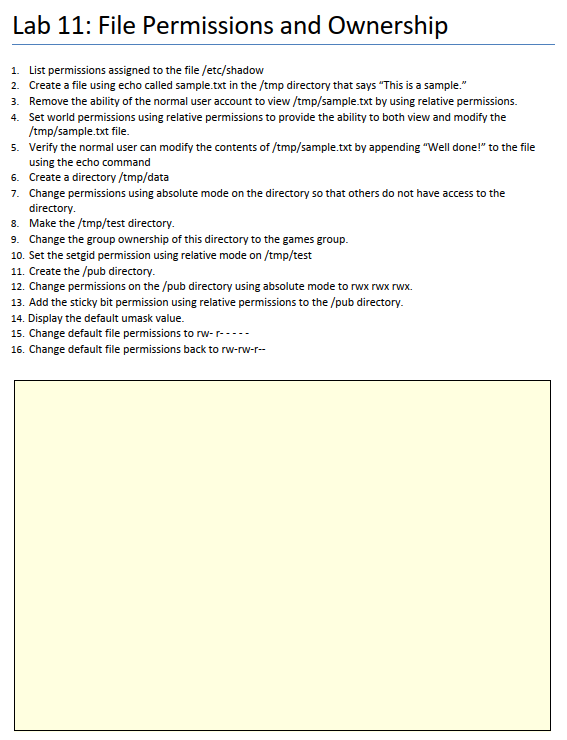
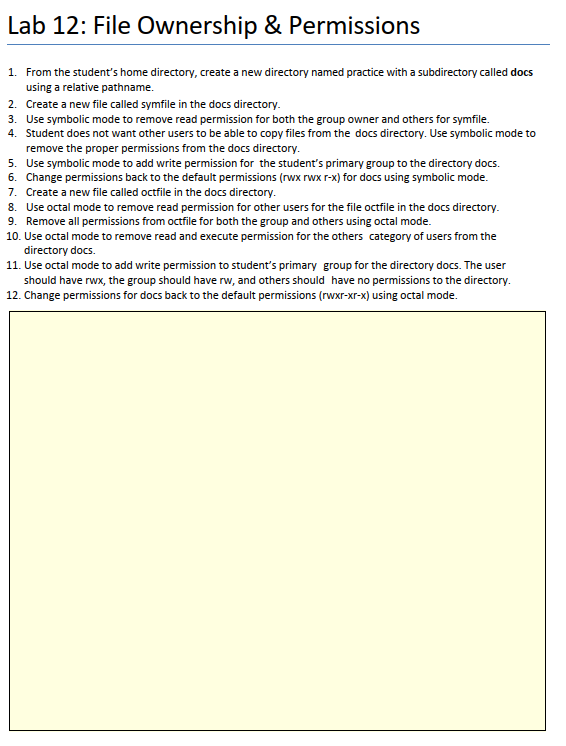
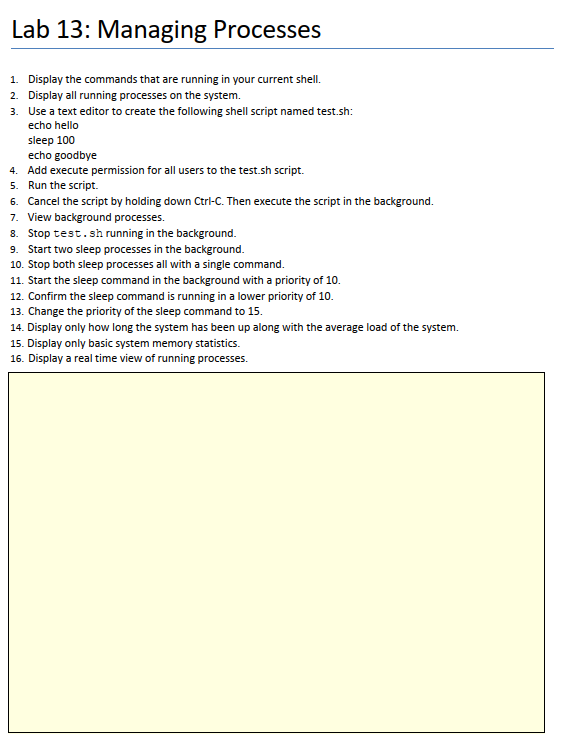
1. List permissions assigned to the file /etc/shadow 2. Create a file using echo called sample.txt in the /tmp directory that says "This is a sample." 3. Remove the ability of the normal user account to view / tmp/ sample.txt by using relative permissions. 4. Set world permissions using relative permissions to provide the ability to both view and modify the /tmp/sample.txtfile. 5. Verify the normal user can modify the contents of /tmp/sample.txt by appending "Well done!" to the file using the echo command 6. Create a directory /tmp/data 7. Change permissions using absolute mode on the directory so that others do not have access to the directory. 8. Make the /tmp/ test directory. 9. Change the group ownership of this directory to the games group. 10. Set the setgid permission using relative mode on / tmp/ test 11. Create the /pub directory. 12. Change permissions on the /pub directory using absolute mode to rwx rwx rwx. 13. Add the sticky bit permission using relative permissions to the /pub directory. 14. Display the default umask value. 15. Change default file permissions to rwr 16. Change default file permissions back to rw-rw-r- Lab 12: File Ownership \& Permissions 1. From the student's home directory, create a new directory named practice with a subdirectory called docs using a relative pathname. 2. Create a new file called symfile in the docs directory. 3. Use symbolic mode to remove read permission for both the group owner and others for symfile. 4. Student does not want other users to be able to copy files from the docs directory. Use symbolic mode to remove the proper permissions from the docs directory. 5. Use symbolic mode to add write permission for the student's primary group to the directory docs. 6. Change permissions back to the default permissions (rwx rwx r-x) for docs using symbolic mode. 7. Create a new file called octfile in the docs directory. 8. Use octal mode to remove read permission for other users for the file octfile in the docs directory. 9. Remove all permissions from octfile for both the group and others using octal mode. 10. Use octal mode to remove read and execute permission for the others category of users from the directory docs. 11. Use octal mode to add write permission to student's primary group for the directory docs. The user should have rwx, the group should have rw, and others should have no permissions to the directory. 1. Display the commands that are running in your current shell. 2. Display all running processes on the system. 3. Use a text editor to create the following shell script named test.sh: echo hello sleep 100 echo goodbye 4. Add execute permission for all users to the test.sh script. 5. Run the script. 6. Cancel the script by holding down Ctrl-C. Then execute the script in the background. 7. View background processes. 8. Stop test. sh running in the background. 9. Start two sleep processes in the background. 10. Stop both sleep processes all with a single command. 11. Start the sleep command in the background with a priority of 10 . 12. Confirm the sleep command is running in a lower priority of 10 . 13. Change the priority of the sleep command to 15. 14. Display only how long the system has been up along with the average load of the system. 15. Display only basic system memory statistics. 16. Display a real time view of running processes
Step by Step Solution
There are 3 Steps involved in it

Get step-by-step solutions from verified subject matter experts
 Study Help