







Question: Hello I need help finishing up this code in VisualStudio 2015 Web Form. I have included a screenshot of the GUI, please reffer to the
Hello I need help finishing up this code in VisualStudio 2015 Web Form. I have included a screenshot of the GUI, please reffer to the //TODO comments that show the parts that need to be completed. I have been unavailable to produce the code with any erros, if you could test the code before submitting that would be great. Thank you for your help!!!
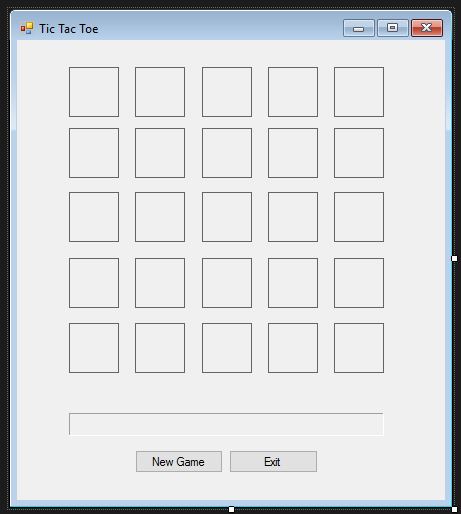
Here is the code:
namespace TicTacToe { public partial class TTTForm : Form { public TTTForm() { InitializeComponent(); }
const string USER_SYMBOL = "X"; const string COMPUTER_SYMBOL = "O"; const string EMPTY = "";
const int SIZE = 5;
// constants for the 2 diagonals const int TOP_LEFT_TO_BOTTOM_RIGHT = 1; const int TOP_RIGHT_TO_BOTTOM_LEFT = 2;
// constants for IsWinner const int NONE = -1; const int ROW = 1; const int COLUMN = 2; const int DIAGONAL = 3;
// This method takes a row and column as parameters and // returns a reference to a label on the form in that position private Label GetSquare(int row, int column) { int labelNumber = row * SIZE + column + 1; return (Label)(this.Controls["label" + labelNumber.ToString()]); }
// This method does the "reverse" process of GetSquare // It takes a label on the form as it's parameter and // returns the row and column of that square as output parameters private void GetRowAndColumn(Label l, out int row, out int column) { int position = int.Parse(l.Name.Substring(5)); row = (position - 1) / SIZE; column = (position - 1) % SIZE; }
// This method takes a row (in the range of 0 - 4) and returns true if // the row on the form contains 5 Xs or 5 Os. // Use it as a model for writing IsColumnWinner private bool IsRowWinner(int row) { Label square = GetSquare(row, 0); string symbol = square.Text; for (int col = 1; col
//* TODO: finish all of these that return true private bool IsAnyRowWinner() { return true; }
private bool IsColumnWinner(int col) { return true; }
private bool IsAnyColumnWinner() { return true; }
private bool IsDiagonal1Winner() { return true; }
private bool IsDiagonal2Winner() { Label square = GetSquare(0, (SIZE - 1)); string symbol = square.Text; for (int row = 1, col = SIZE - 2; row
private bool IsAnyDiagonalWinner() { return true; }
private bool IsFull() { return true; }
// This method determines if any row, column or diagonal on the board is a winner. // It returns true or false and the output parameters will contain appropriate values // when the method returns true. See constant definitions at top of form. private bool IsWinner(out int whichDimension, out int whichOne) { // rows for (int row = 0; row
// I wrote this method to show you how to call IsWinner private bool IsTie() { int winningDimension, winningValue; return (IsFull() && !IsWinner(out winningDimension, out winningValue)); }
// This method takes an integer in the range 0 - 4 that represents a column // as it's parameter and changes the font color of that cell to red. private void HighlightColumn(int col) { for (int row = 0; row
// This method changes the font color of the top right to bottom left diagonal to red // I did this diagonal because it's harder than the other one private void HighlightDiagonal2() { for (int row = 0, col = SIZE - 1; row
// This method will highlight either diagonal, depending on the parameter that you pass private void HighlightDiagonal(int whichDiagonal) { if (whichDiagonal == TOP_LEFT_TO_BOTTOM_RIGHT) HighlightDiagonal1(); else HighlightDiagonal2();
}
//* TODO: finish these 2 private void HighlightRow(int row) { }
private void HighlightDiagonal1() { }
//* TODO: finish this private void HighlightWinner(string player, int winningDimension, int winningValue) { switch (winningDimension) { case ROW:
break; case COLUMN:
break; case DIAGONAL: HighlightDiagonal(winningValue); resultLabel.Text = (player + " wins!"); break; } }
//* TODO: finish these 2 private void ResetSquares() { }
private void MakeComputerMove() { }
// Setting the enabled property changes the look and feel of the cell. // Instead, this code removes the event handler from each square. // Use it when someone wins or the board is full to prevent clicking a square. private void DisableAllSquares() { for (int row = 0; row
// Inside the click event handler you have a reference to the label that was clicked // Use this method (and pass that label as a parameter) to disable just that one square private void DisableSquare(Label square) { square.Click -= new System.EventHandler(this.label_Click); }
// You'll need this method to allow the user to start a new game private void EnableAllSquares() { for (int row = 0; row
//* TODO: finish the event handlers private void label_Click(object sender, EventArgs e) { int winningDimension = NONE; int winningValue = NONE;
Label clickedLabel = (Label)sender;
}
private void button1_Click(object sender, EventArgs e) { }
private void button2_Click(object sender, EventArgs e) { } } }
Tic Tac Toe New Game Exit
Step by Step Solution
There are 3 Steps involved in it

Get step-by-step solutions from verified subject matter experts
 Study Help