







Question: Hello, I need help with assignment 4. Thank you! (Would like to see images) Assignment 4: Practice Exm 1 Instructions (Word) Practice Exm 1 (Excel
Hello, I need help with assignment 4. Thank you! (Would like to see images)
Assignment 4:
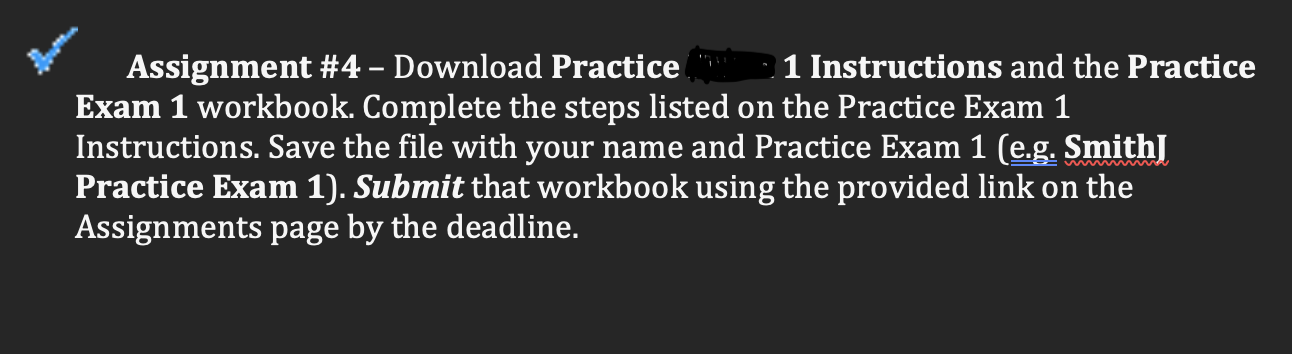
Practice Exm 1 Instructions (Word)
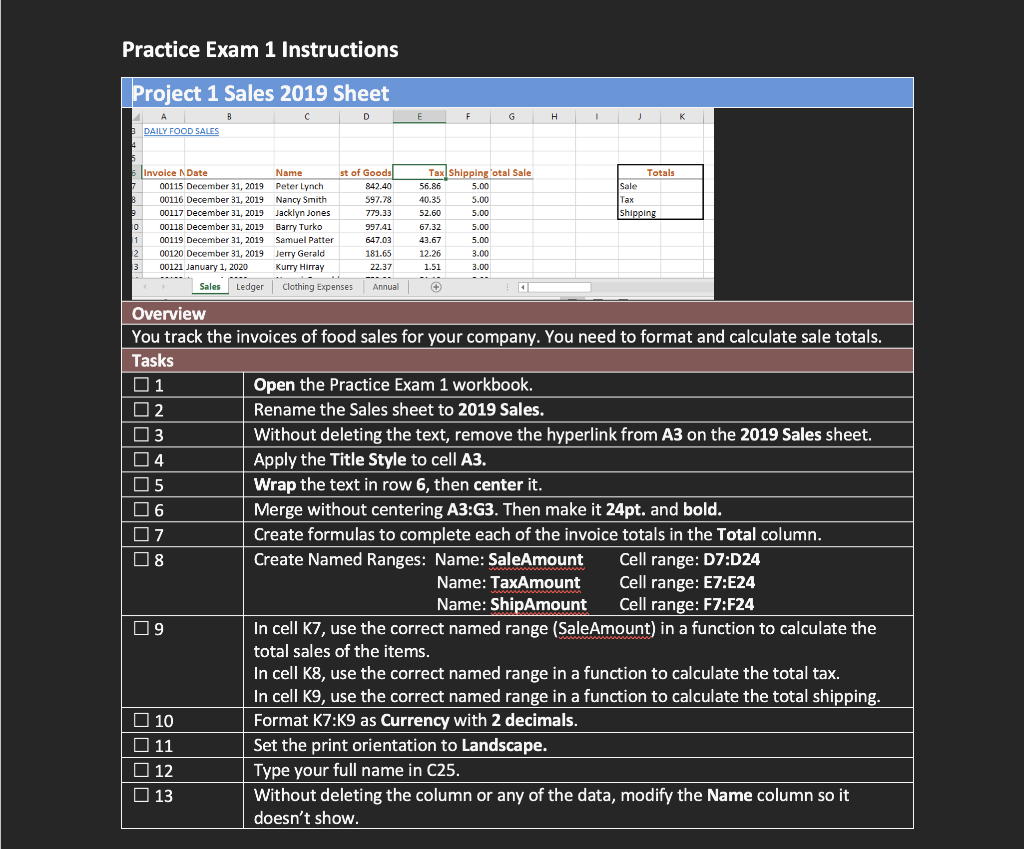
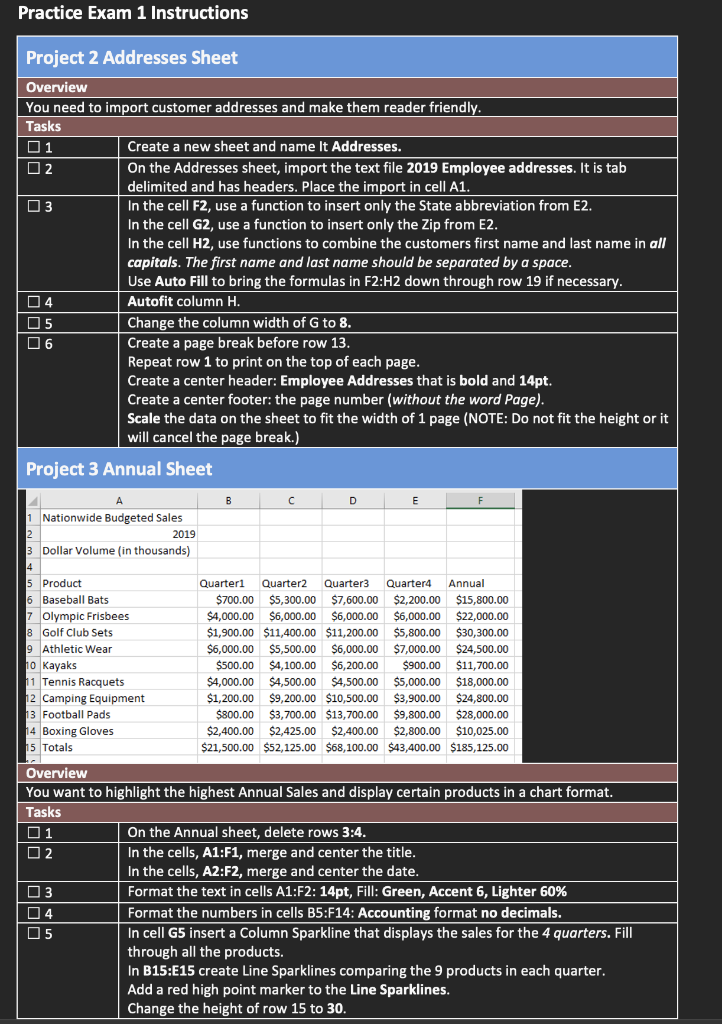
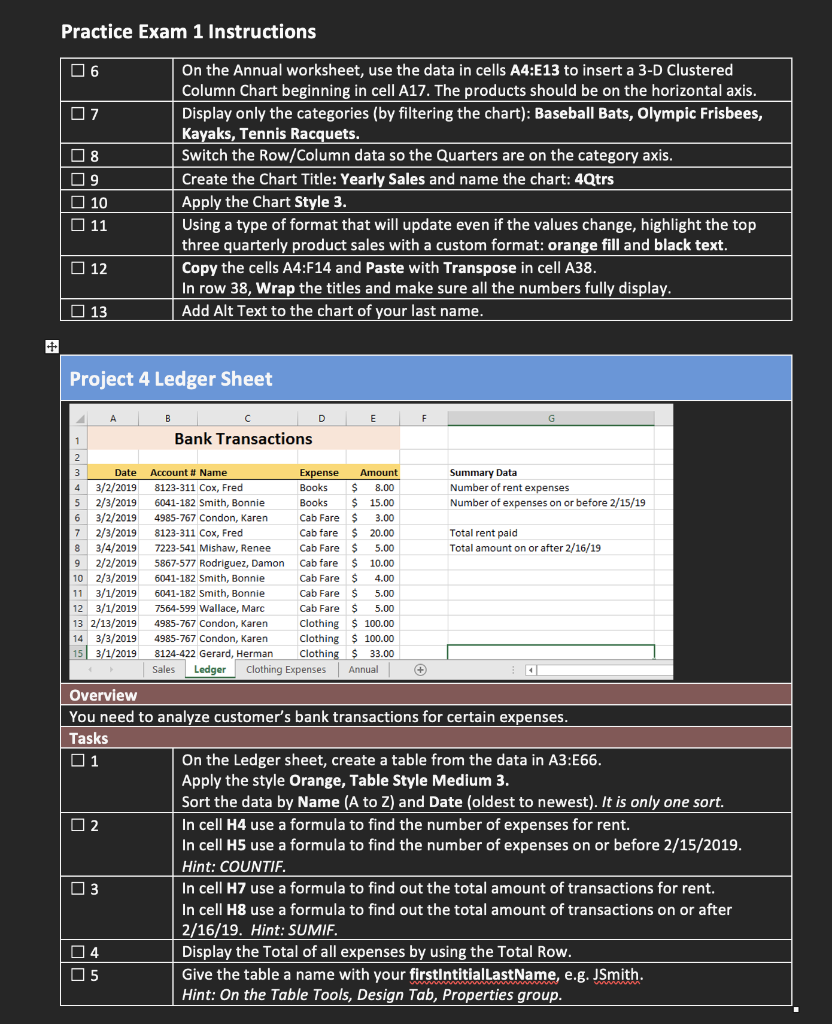
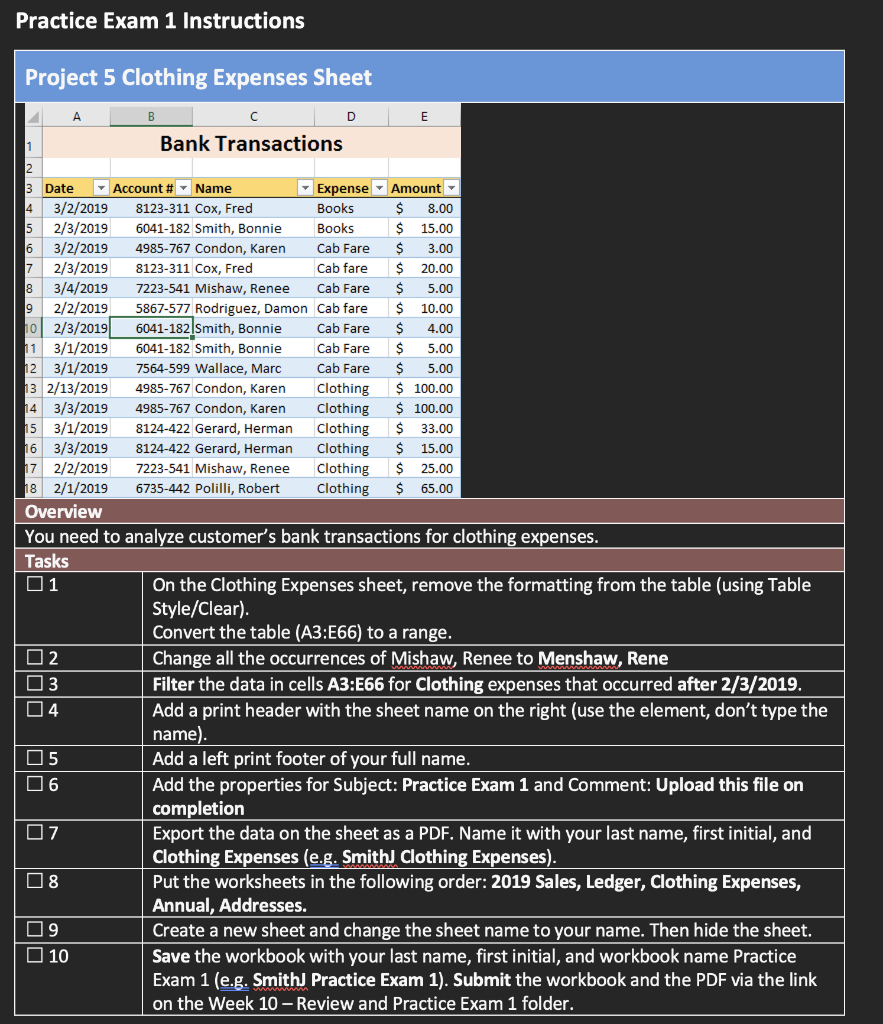
Practice Exm 1 (Excel sheet):
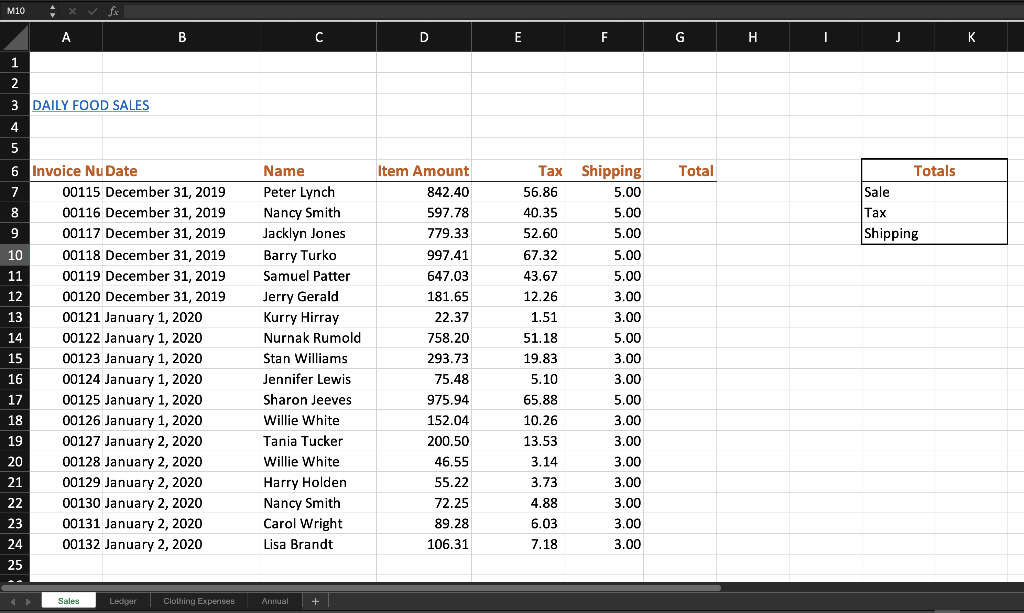
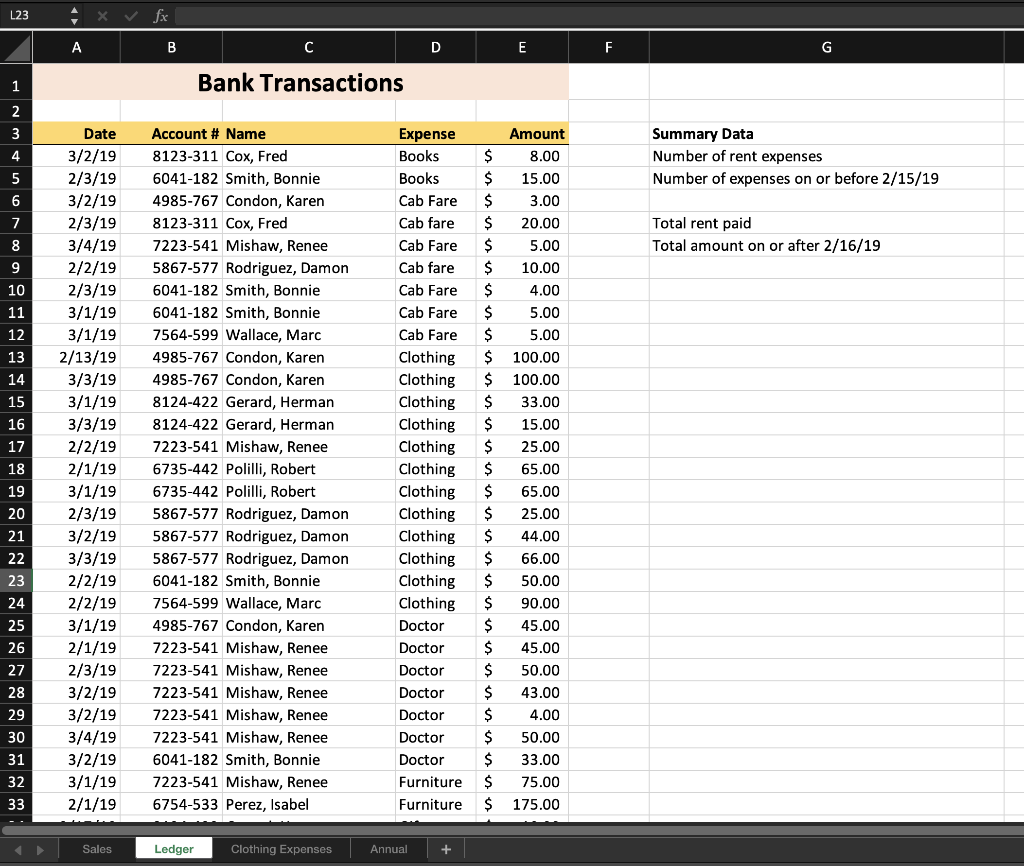
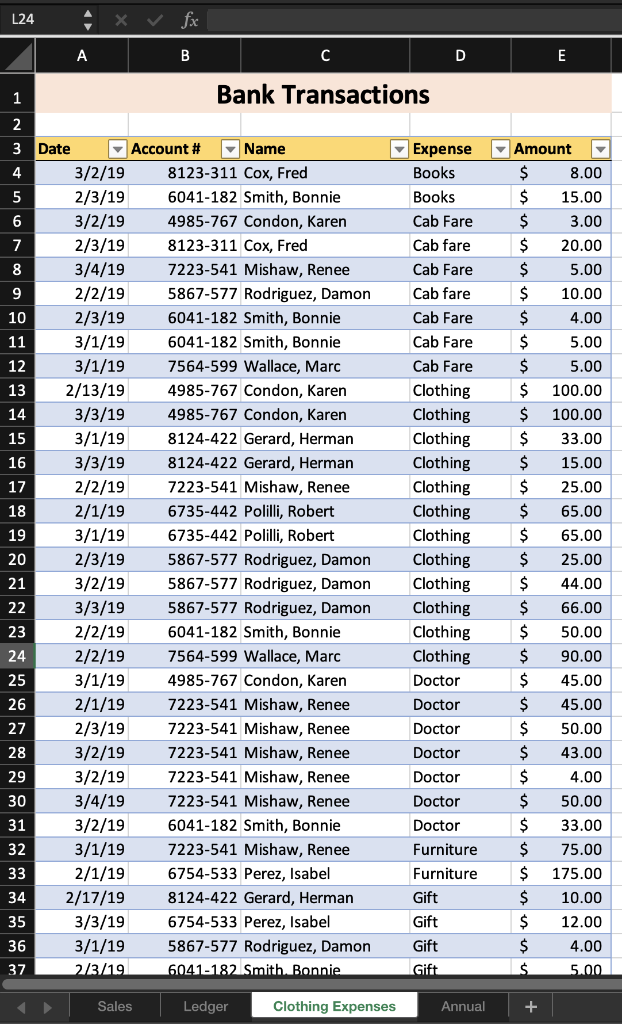
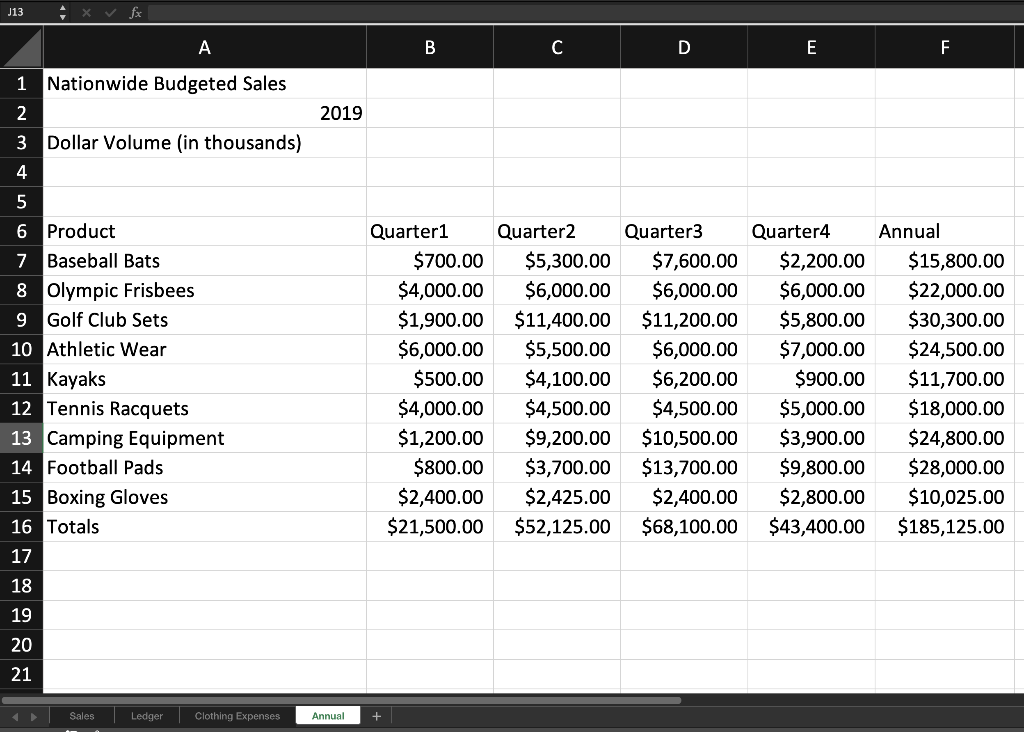
Assignment \#4 - Download Practice 1 Instructions and the Practice Exam 1 workbook. Complete the steps listed on the Practice Exam 1 Instructions. Save the file with your name and Practice Exam 1 (e.g. Smith J Practice Exam 1). Submit that workbook using the provided link on the Assignments page by the deadline. Practice Exam 1 Instructions | Project 1 Sales 2019 Sheet Practice Exam 1 Instructions Project.2Addresses Sheet | Project 3 Annual sheet Practice Exam 1 Instructions \begin{tabular}{|l|l|} \hline6 & On the Annual worksheet, use the data in cells A4:E13 to insert a 3-D Clustered Column Chart beginning in cell A17. The products should be on the horizontal axis. \\ \hline7 & Display only the categories (by filtering the chart): Baseball Bats, Olympic Frisbees, Kayaks, Tennis Racquets. \\ \hline8 & Switch the Row/Column data so the Quarters are on the category axis. \\ \hline9 & Create the Chart Title: Yearly Sales and name the chart: 4Qtrs \\ \hline10 & Apply the Chart Style 3. \\ \hline11 & Using a type of format that will update even if the values change, highlight the top three quarterly product sales with a custom format: orange fill and black text. \\ \hline12 & Copy the cells A4:F14 and Paste with Transpose in cell A38. In row 38, Wrap the titles and make sure all the numbers fully display. \\ \hline13 & Add Alt Text to the chart of your last name. \\ \hline \end{tabular} Project 4 Ledger Sheet Project 5 Clothing Expenses Sheet \begin{tabular}{|l|} \hline \multicolumn{1}{|c|}{ Totals } \\ \hline Sale \\ Tax \\ Shipping \\ \hline \end{tabular} J13^fx A B C D E F Nationwide Budgeted Sales 2019 Dollar Volume (in thousands) Assignment \#4 - Download Practice 1 Instructions and the Practice Exam 1 workbook. Complete the steps listed on the Practice Exam 1 Instructions. Save the file with your name and Practice Exam 1 (e.g. Smith J Practice Exam 1). Submit that workbook using the provided link on the Assignments page by the deadline. Practice Exam 1 Instructions | Project 1 Sales 2019 Sheet Practice Exam 1 Instructions Project.2Addresses Sheet | Project 3 Annual sheet Practice Exam 1 Instructions \begin{tabular}{|l|l|} \hline6 & On the Annual worksheet, use the data in cells A4:E13 to insert a 3-D Clustered Column Chart beginning in cell A17. The products should be on the horizontal axis. \\ \hline7 & Display only the categories (by filtering the chart): Baseball Bats, Olympic Frisbees, Kayaks, Tennis Racquets. \\ \hline8 & Switch the Row/Column data so the Quarters are on the category axis. \\ \hline9 & Create the Chart Title: Yearly Sales and name the chart: 4Qtrs \\ \hline10 & Apply the Chart Style 3. \\ \hline11 & Using a type of format that will update even if the values change, highlight the top three quarterly product sales with a custom format: orange fill and black text. \\ \hline12 & Copy the cells A4:F14 and Paste with Transpose in cell A38. In row 38, Wrap the titles and make sure all the numbers fully display. \\ \hline13 & Add Alt Text to the chart of your last name. \\ \hline \end{tabular} Project 4 Ledger Sheet Project 5 Clothing Expenses Sheet \begin{tabular}{|l|} \hline \multicolumn{1}{|c|}{ Totals } \\ \hline Sale \\ Tax \\ Shipping \\ \hline \end{tabular} J13^fx A B C D E F Nationwide Budgeted Sales 2019 Dollar Volume (in thousands)
Step by Step Solution
There are 3 Steps involved in it

Get step-by-step solutions from verified subject matter experts
 Study Help