







Question: Hello I need some help with this code. here is the link https://sites.google.com/site/uiccs141/programs/2-mastermind i have got some of the program done and just need help
Hello I need some help with this code. here is the link https://sites.google.com/site/uiccs141/programs/2-mastermind
i have got some of the program done and just need help with one of the outputs.
this is my program
#include
#include
using namespace std;
// int d1 = 0, d2 = 0, d3 = 0;
char d1, d2, d3;
void generateRandomDigits() {
int d[10] = {0};
int count = 0;
d1 = rand() % 10;
d[d1] = 1;
d2 = rand() % 10;
while(d[d2]) {
d2 = rand() % 10;
}
d[d2] = 1;
d3 = rand() % 10;
while(d[d3]) {
d3 = rand() % 10;
}
}
int main() {
cout
cout
cout
cout
cout
char choice;
cout
cin >> choice;
if(choice == 's') {
cout
int num;
cin >> num;
d3 = num % 10;
num = num/10;
d2 = num % 10;
num = num/10;
d1 = num % 10;
} else {
generateRandomDigits();
}
cout
int attempts = 0;
int guess;
cout
cout
while(attempts
attempts++;
cout
cin >> guess;
int x1 = guess/100;
int x2 = (guess % 100)/10;
int x3 = guess % 10;
int inPlace = 0, outOfPlace = 0;
if(x1 == d1) {
inPlace++;
} else if(x1 == d2 || x1 == d3) {
outOfPlace++;
}
if(x2 == d2) {
inPlace++;
} else if(x2 == d1 || x2 == d3) {
outOfPlace++;
}
if(x3 == d3) {
inPlace++;
} else if(x3 == d2 || x3 == d1) {
outOfPlace++;
}
// cout
// cout
cout
if(inPlace == 3) {
cout
cout
cout
return 0;
}
}
cout
cout
return 0;
}
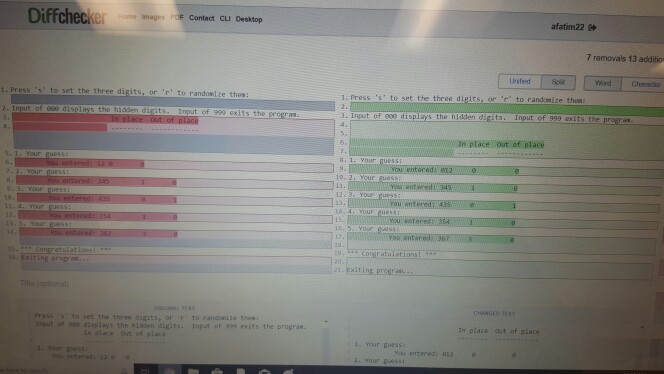
this is my output on the left in the first image, and the expected output is on the right. I am having problem with the first guess. It is not printing out '012' and is just printing '12' ignoring the 0. can you help me with that?
I also need help with the 2nd part of the program "
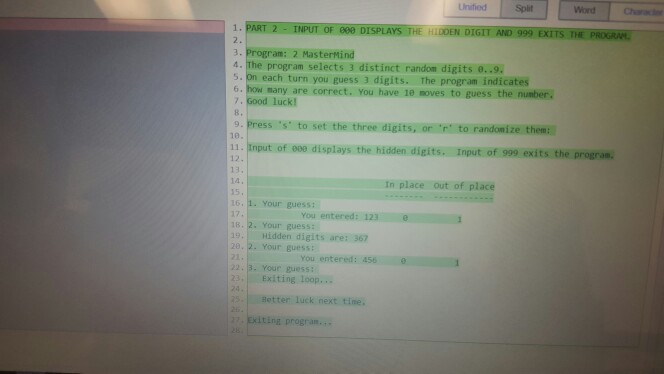
Input of 000 displays the hidden digits. Input of 999 exits the program." in the second image the expected output is on the right.
Can you please edit the program in that way? I would really appreciate it.
ome images POF Contact CLI Desktop afatin22 7 removals 13 additio rsfedSpi Word Cheraclor t. Press 's" to set the three digits, or 'r to randosize the: 1. Press 'sto set the three digits, or 'r'to rand enize thons out of 999 exits the pregran 3. Input of e20 displays the hidden digits. Input of 999 exits the its the prora place out of place 012 rou vou entened 354 Presss to set the Three digits, orr to ranoe thes: Ieeut of 0 dsplays the hidden dlgits. Input of 999 exits the progras nslace out of place In place out of place 1. Your quess you entered: 012
Step by Step Solution
There are 3 Steps involved in it

Get step-by-step solutions from verified subject matter experts
 Study Help