







Question: Hello, I would like some python troubleshooting help. Below I have a python code that I constructed on Jupyter Notebooks. This code will run fine
Hello, I would like some python troubleshooting help. Below I have a python code that I constructed on Jupyter Notebooks. This code will run fine one time, but if I immediately run it a second time I get this error and will continue to get this error thereafter. I've noticed that it will only run one time correctly on a fresh new file, or running the code for the first time after opening the file.
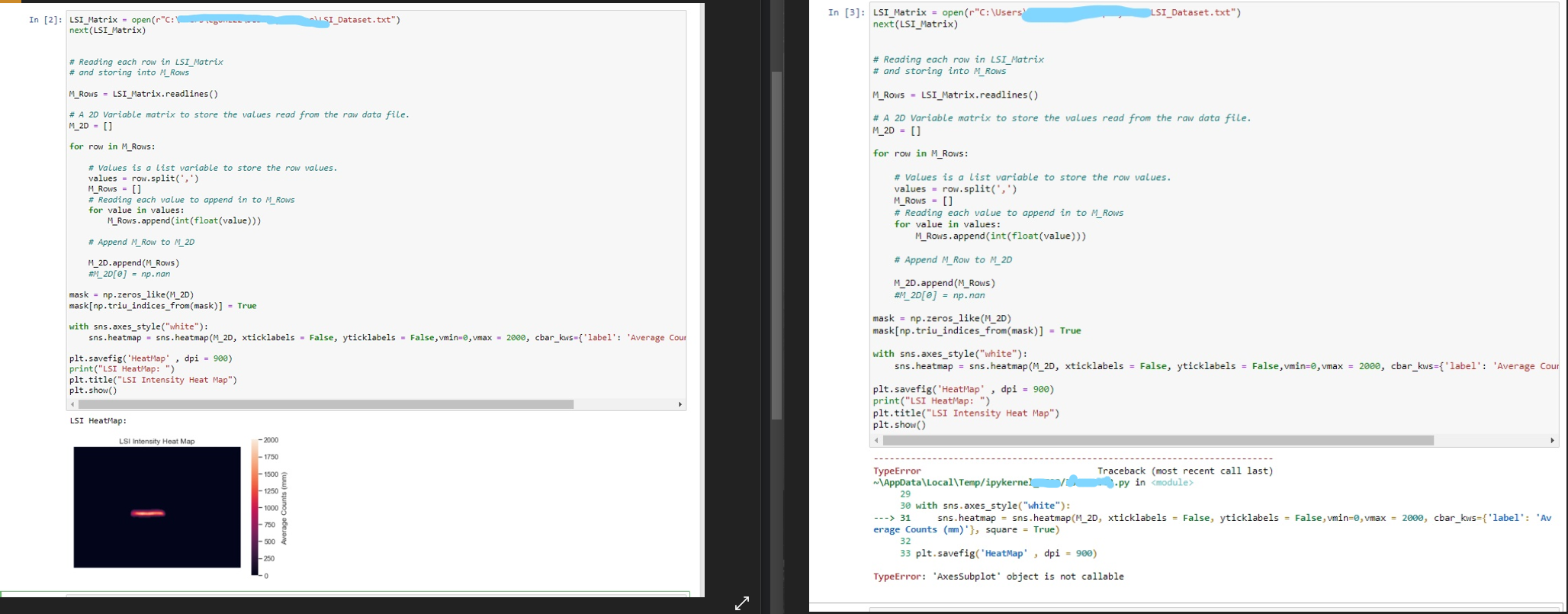
These are the packages that I have installed:
from scipy.stats import norm from scipy import stats from scipy.stats import linregress
import matplotlib.mlab as mlab import matplotlib.pyplot as plt import scipy
import numpy as np import pandas as pd import seaborn as sns %matplotlib inline
from scipy import stats
import os import matplotlib.pyplot as plt
from pandas import DataFrame from pandas import Series from nptdms import TdmsFile
import numpy as np; np.random.seed(0) import seaborn as sns; sns.set_theme()
LSI_Dataset.txt") VISI_Dataset.txt") In [2]: LSI_Matrix = open(r"C: next(LSI_Matrix) In [3]: LSI_Matrix = open(r"C:\Users next(LSI_Matrix) # Reading each row in LSI_Matrix # and storing into M_Rows # Reading each row in LSI_Matrix # and storing into M_Rows M_Rows - LSI_Matrix.readlines() M_Rows = LSI_Matrix.readlines() # A 2D Variable matrix to store the values read from the raw data file. M_2D - [] # A 20 Variable matrix to store the values read from the raw data file. M_2D = [] for row in M_Rows: for row in M_Rows: # Values is a list variable to store the row values. values - row.split(';') M_Rows = [] # Reading each value to append in to M_Rows for value in values: M_Rows.append(int(float(value))) # Values is a list variable to store the row values. values - row.split(',') M_Rows - [] # Reading each value to append in to M_Rows for value in values: M_Rows.append(int(float(value))) # Append M_Row to M 2D # Append M_Row to M_2D M_2D.append(M_Rows) #M_20[@] = np.nan M_2D.append(M_Rows) #M_20[@] = np. nan mask = np.zeros_like(M_2D) mask [np. triu_indices_from(mask)] = True with sns.axes_style("white"): sns.heatmap - sns.heatmap(M_2D, xticklabels - False, yticklabels - False,vmin-, vmax - 2000, cbar_kws={'label': 'Average Cour plt. savefig('HeatMap', dpi = 900) print("LSI HeatMap: ") plt.title("LSI Intensity Heat Map") plt.show() mask = np.zeros_like(M_2D) mask[np.triu_indices_from(mask)] = True with sns.axes_style("white"): sns.heatmap = sns.heatmap(M_2D, xticklabels = False, yticklabels = False, vmin=0, vmax = 2000, cbar_kws={'label': 'Average Cour plt.savefig('HeatMap', dpi = 900) print("LSI HeatMap: ") plt.title("LSI Intensity Heat Map") plt.show() LSI HeatMap: LSI Intensity Heat Map - 1750 - 1500 1250 1000 Average Counts (mm) -750 TypeError Traceback (most recent call last) \AppData\Local\Temp/ipykernel 3.py in
Step by Step Solution
There are 3 Steps involved in it

Get step-by-step solutions from verified subject matter experts
 Study Help