







Question: Hello. I've been working on this for hours over 3 days and can't get it to work so I've come here to ask for assistance.
Hello. I've been working on this for hours over 3 days and can't get it to work so I've come here to ask for assistance. I have the gui made and a couple buttons working but most of it is a mess. Below is the full project in detail in both text and image form. It's due in like 6 hours so I know this being done in time is a very long shot so I'll keep working on it in the meantime but help would be *VERY* much appreciated.
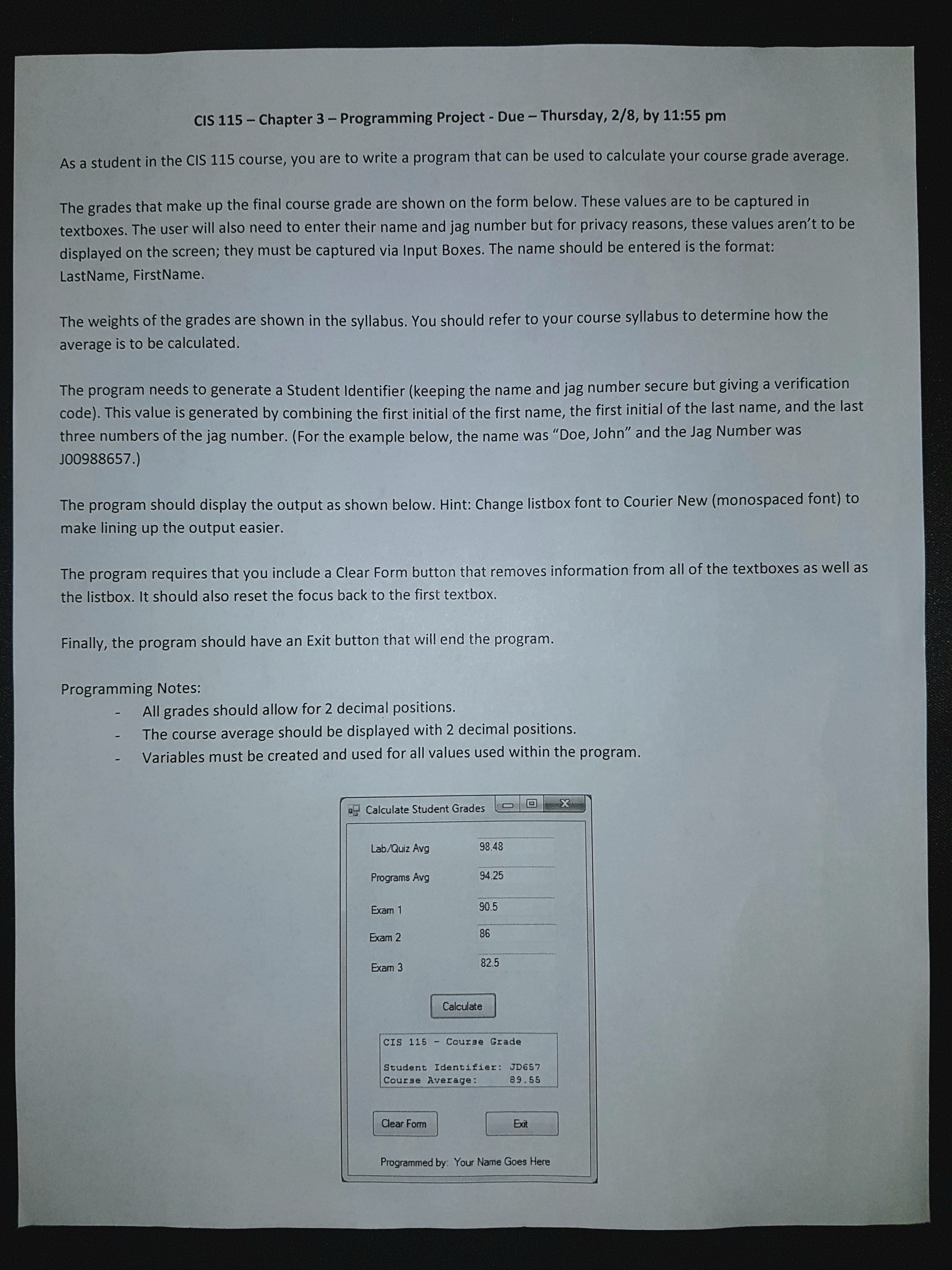
---- As a student in the CIS 115 course, you are to write a program that can be used to calculate your course grade average.
The grades that make up the final course grade are shown on the form below. These values are to be captured in textboxes. The user will also need to enter their name and jag number but for privacy reasons, these values arent to be displayed on the screen; they must be captured via Input Boxes. The name should be entered is the format: LastName, FirstName.
The weights of the grades are shown in the syllabus. You should refer to your course syllabus to determine how the average is to be calculated.
The program needs to generate a Student Identifier (keeping the name and jag number secure but giving a verification code). This value is generated by combining the first initial of the first name, the first initial of the last name, and the last three numbers of the jag number. (For the example below, the name was Doe, John and the Jag Number was J00988657.)
The program should display the output as shown below. Hint: Change listbox font to Courier New (monospaced font) to make lining up the output easier.
The program requires that you include a Clear Form button that removes information from all of the textboxes as well as the listbox. It should also reset the focus back to the first textbox.
Finally, the program should have an Exit button that will end the program.
Programming Notes:
All grades should allow for 2 decimal positions.
The course average should be displayed with 2 decimal positions.
Variables must be created and used for all values used within the program.
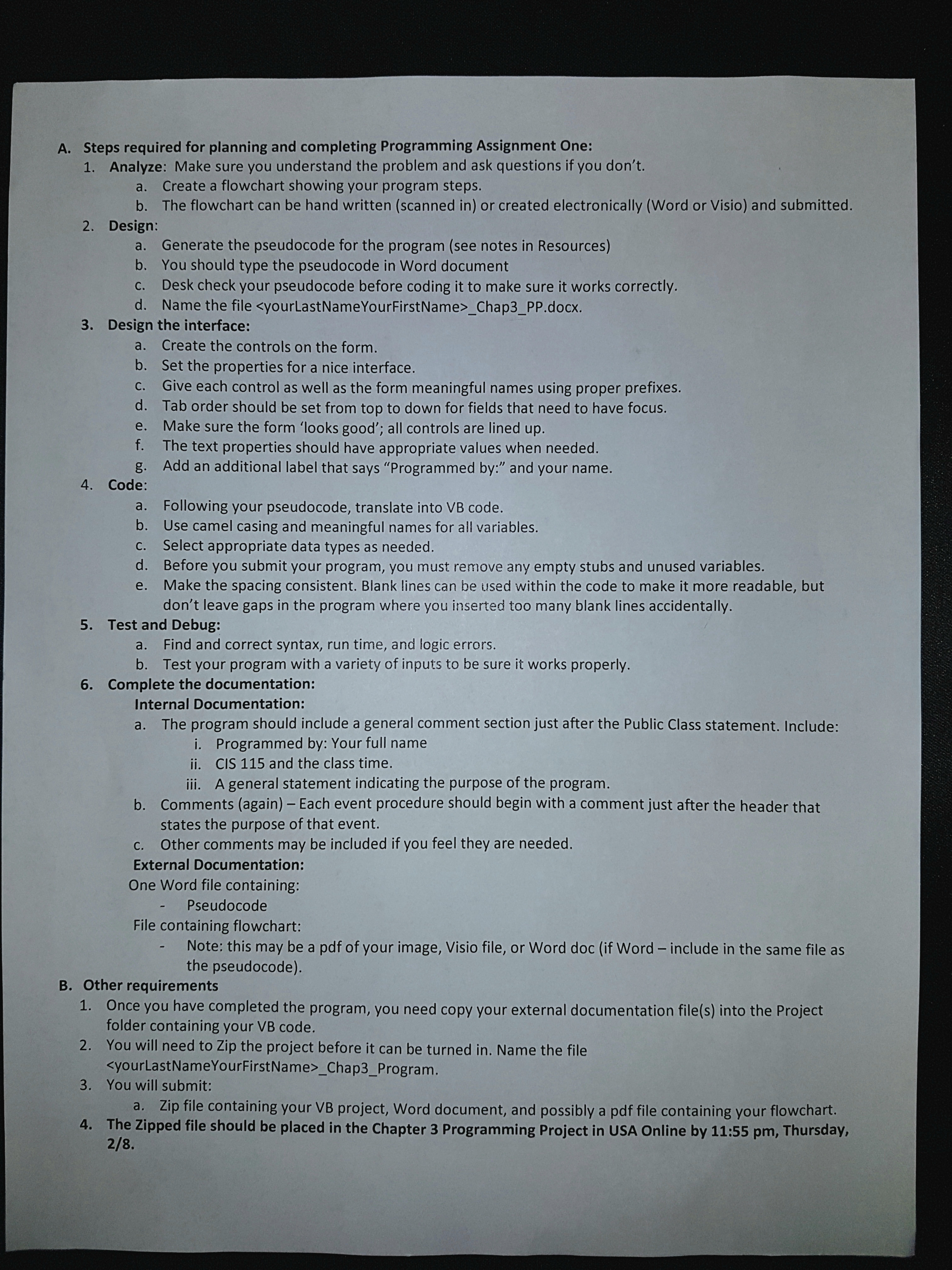
Steps required for planning and completing Programming Assignment One:
Analyze: Make sure you understand the problem and ask questions if you dont.
Create a flowchart showing your program steps.
The flowchart can be hand written (scanned in) or created electronically (Word or Visio) and submitted.
Design:
Generate the pseudocode for the program (see notes in Resources)
You should type the pseudocode in Word document
Desk check your pseudocode before coding it to make sure it works correctly.
Name the file ParkerMason_Chap3_PP.docx.
Design the interface:
Create the controls on the form.
Set the properties for a nice interface.
Give each control as well as the form meaningful names using proper prefixes.
Tab order should be set from top to down for fields that need to have focus.
Make sure the form looks good; all controls are lined up.
The text properties should have appropriate values when needed.
Add an additional label that says Programmed by: and your name.
Code:
Following your pseudocode, translate into VB code.
Use camel casing and meaningful names for all variables.
Select appropriate data types as needed.
Before you submit your program, you must remove any empty stubs and unused variables.
Make the spacing consistent. Blank lines can be used within the code to make it more readable, but dont leave gaps in the program where you inserted too many blank lines accidentally.
Test and Debug:
Find and correct syntax, run time, and logic errors.
Test your program with a variety of inputs to be sure it works properly.
Complete the documentation:
Internal Documentation:
The program should include a general comment section just after the Public Class statement. Include:
Programmed by: Your full name (Mason Parker)
CIS 115 and 6:00.
A general statement indicating the purpose of the program.
Comments (again) Each event procedure should begin with a comment just after the header that states the purpose of that event.
Other comments may be included if you feel they are needed.
External Documentation:
One Word file containing: Pseudocode
File containing flowchart:
Note: this may be a pdf of your image, Visio file, or Word doc (if Word include in the same file as the pseudocode).
Other requirements
Once you have completed the program, you need copy your external documentation file(s) into the Project folder containing your VB code.
You will need to Zip the project before it can be turned in. Name the file
You will submit:
Zip file containing your VB project, Word document, and possibly a pdf file containing your flowchart.
CIS 115 -Chapter 3 - Programming Project - Due - Thursday, 2/8, by 11:55 pm As a student in the CIS 115 course, you are to write a program that can be used to calculate your course grade average The grades that make up the final course grade are shown on the form below. These values are to be captured in textboxes. The user will also need to enter their name and jag number but for privacy reasons, these values aren't to be displayed on the screen; they must be captured via Input Boxes. The name should be entered is the format: LastName, FirstName. The weights of the grades are shown in the syllabus. You should refer to your course syllabus to determine how the average is to be calculated The program needs to generate a Student Identifier (keeping the name and jag number secure but giving a verification code). This value is generated by combining the first initial of the first name, the first initial of the last name, and the last three numbers of the jag number. (For the example below, the name was "Doe, John" and the Jag Number was J00988657.) The program should display the output as shown below. Hint: Change listbox font to Courier New (monospaced font) to make lining up the output easier The program requires that you include a Clear Form button that removes information from all of the textboxes as well as the listbox. It should also reset the focus back to the first textbox. Finally, the program should have an Exit button that will end the program Programming Notes All grades should allow for 2 decimal positions. The course average should be displayed with 2 decimal positions. Variables must be created and used for all values used within the program Calculate Student Grades Eelelt Lab/Quiz Avg Programs Avg Exam 1 Exam 2 Exam 3 98.48 94.25 90.5 86 82.5 Calculate CIS 115 -Course Grade Student Identifier: JD657 Course Average 89.55 Eat Programmed by: Your Name Goes Here CIS 115 -Chapter 3 - Programming Project - Due - Thursday, 2/8, by 11:55 pm As a student in the CIS 115 course, you are to write a program that can be used to calculate your course grade average The grades that make up the final course grade are shown on the form below. These values are to be captured in textboxes. The user will also need to enter their name and jag number but for privacy reasons, these values aren't to be displayed on the screen; they must be captured via Input Boxes. The name should be entered is the format: LastName, FirstName. The weights of the grades are shown in the syllabus. You should refer to your course syllabus to determine how the average is to be calculated The program needs to generate a Student Identifier (keeping the name and jag number secure but giving a verification code). This value is generated by combining the first initial of the first name, the first initial of the last name, and the last three numbers of the jag number. (For the example below, the name was "Doe, John" and the Jag Number was J00988657.) The program should display the output as shown below. Hint: Change listbox font to Courier New (monospaced font) to make lining up the output easier The program requires that you include a Clear Form button that removes information from all of the textboxes as well as the listbox. It should also reset the focus back to the first textbox. Finally, the program should have an Exit button that will end the program Programming Notes All grades should allow for 2 decimal positions. The course average should be displayed with 2 decimal positions. Variables must be created and used for all values used within the program Calculate Student Grades Eelelt Lab/Quiz Avg Programs Avg Exam 1 Exam 2 Exam 3 98.48 94.25 90.5 86 82.5 Calculate CIS 115 -Course Grade Student Identifier: JD657 Course Average 89.55 Eat Programmed by: Your Name Goes Here
Step by Step Solution
There are 3 Steps involved in it

Get step-by-step solutions from verified subject matter experts
 Study Help