







Question: Hello, please create this c# program. Create a C# GUI application based on the following: 1) Design a form based on the following: Change the
Hello, please create this c# program.
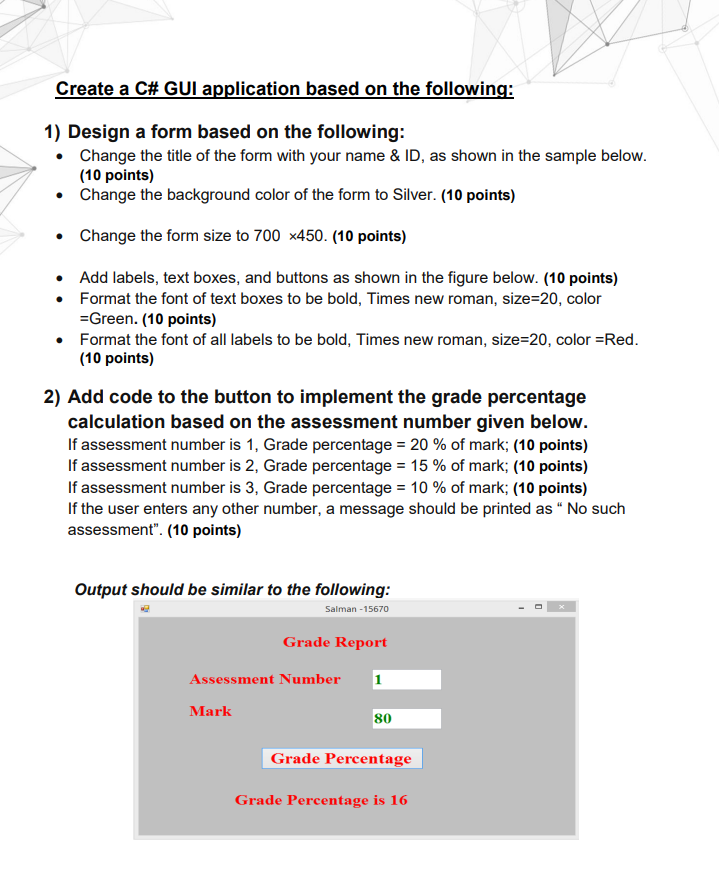
Create a C# GUI application based on the following: 1) Design a form based on the following: Change the title of the form with your name & ID, as shown in the sample below. (10 points) Change the background color of the form to Silver. (10 points) . Change the form size to 700 x450. (10 points) Add labels, text boxes, and buttons as shown in the figure below. (10 points) Format the font of text boxes to be bold, Times new roman, size=20, color =Green. (10 points) Format the font of all labels to be bold, Times new roman, size=20, color =Red. (10 points) 2) Add code to the button to implement the grade percentage calculation based on the assessment number given below. If assessment number is 1, Grade percentage = 20 % of mark; (10 points) If assessment number is 2, Grade percentage = 15% of mark; (10 points) If assessment number is 3, Grade percentage = 10 % of mark; (10 points) If the user enters any other number, a message should be printed as No such assessment". (10 points) Output should be similar to the following: Salman - 15670 - Grade Report 1 Assessment Number Mark 80 Grade Percentage Grade Percentage is 16
Step by Step Solution
There are 3 Steps involved in it

Get step-by-step solutions from verified subject matter experts
 Study Help