







Question: Hello, this is for programming in C++ . I really need help with the below assignment. I have included the default programs below the assignment.
Hello, this is for programming in C++. I really need help with the below assignment. I have included the default programs below the assignment. I am having a lot of issues with this and really need the help. Please follow the assignment below, thank you very very much.
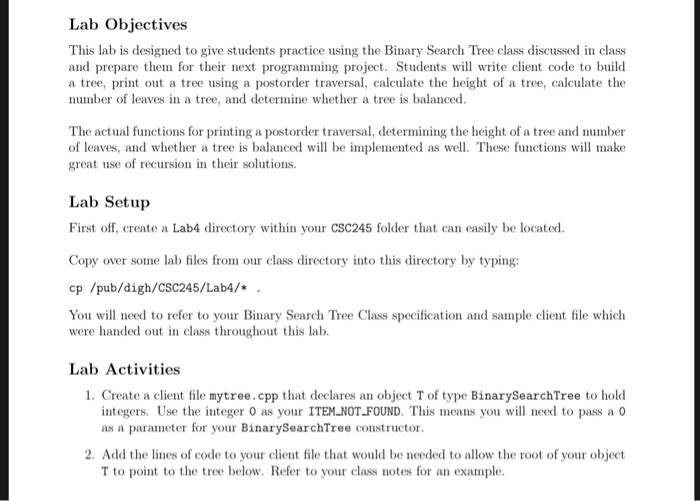
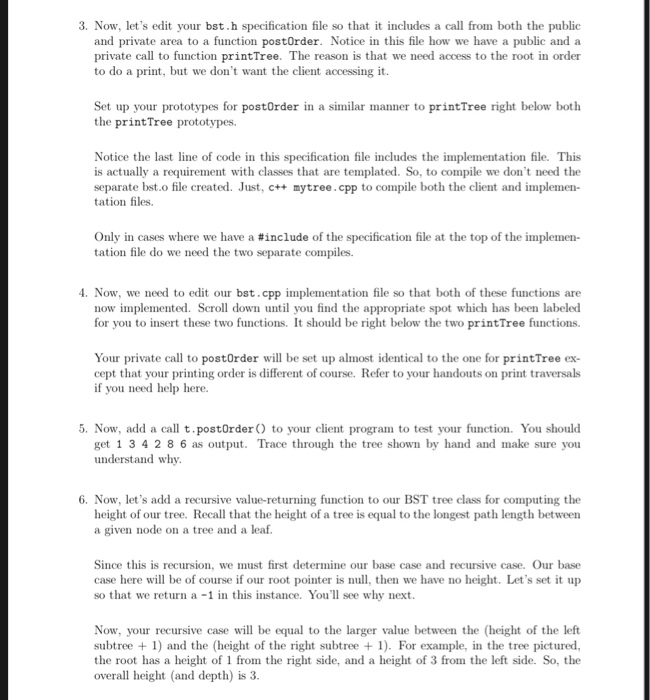
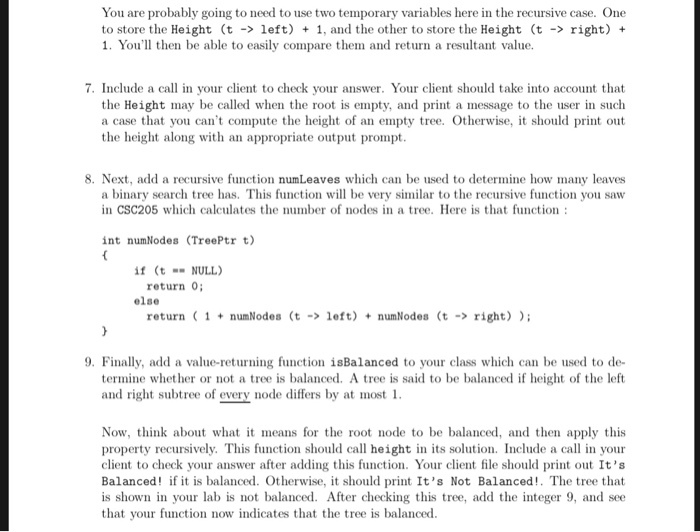
Below are the default programs for this lab in this order: bst.cpp, bst.h, dsexceptions.h
-----------------------------------------------------------------------------------------------------------------------------------------------------------------------------------------
//bst.cpp
#include
#include
using namespace std;
template
BinarySearchTree::BinarySearchTree( const Comparable & notFound ) :
ITEM_NOT_FOUND( notFound ), root( NULL )
{
}
template
BinarySearchTree::
BinarySearchTree( const BinarySearchTree & rhs ) :
root( NULL ), ITEM_NOT_FOUND( rhs.ITEM_NOT_FOUND )
{
*this = rhs;
}
template
BinarySearchTree::~BinarySearchTree( )
{
makeEmpty( );
}
template
void BinarySearchTree::insert( const Comparable & x )
{
insert( x, root );
}
template
void BinarySearchTree::remove( const Comparable & x )
{
remove( x, root );
}
template
Comparable BinarySearchTree::findMin( ) const
{
return elementAt( findMin( root ) );
}
template
Comparable BinarySearchTree::findMax( ) const
{
return elementAt( findMax( root ) );
}
template
Comparable BinarySearchTree::
find( const Comparable & x ) const
{
return elementAt( find( x, root ) );
}
template
void BinarySearchTree::makeEmpty( )
{
makeEmpty( root );
}
template
bool BinarySearchTree::isEmpty( ) const
{
return root == NULL;
}
// Call to printTree from client -- Acts as a Stub for Private Call
// Which Uses Root Ptr
template
void BinarySearchTree::printTree( ) const
{
if( isEmpty( ) )
cout
else
printTree( root );
}
// Call to printTree from private -- Accesses the Root Ptr
template
void BinarySearchTree::printTree( BinaryNode *t ) const
{
if( t != NULL )
{
printTree( t->left );
cout element
printTree( t->right );
}
}
// Call to postOrder from client -- Acts as a Stub for Private Call
// Which Uses Root Ptr
template
void BinarySearchTree::postOrder( ) const
{
}
// Call to postOrder from private -- Accesses the Root Ptr
template
void BinarySearchTree::postOrder( BinaryNode *t ) const
{
}
// Call to height from client -- Acts as a Stub for Private Call
// Which Uses Root Ptr
/*
template
int BinarySearchTree::height( ) const
{
// Insert Code Here and Remove Surrounding Comments
}
*/
// Call to height from private -- Accesses the Root Ptr
/*
template
int BinarySearchTree::height ( BinaryNode *t ) const
{
// Insert Code Here and Remove Surrounding Comments
}
*/
template
const BinarySearchTree &
BinarySearchTree::
operator=( const BinarySearchTree & rhs )
{
if( this != &rhs )
{
makeEmpty( );
root = clone( rhs.root );
}
return *this;
}
template
Comparable & BinarySearchTree::
elementAt( BinaryNode *t ) const
{
return t == NULL ? ITEM_NOT_FOUND : t->element;
}
template
void BinarySearchTree::
insert( const Comparable & x, BinaryNode * & t ) const
{
if( t == NULL )
t = new BinaryNode( x, NULL, NULL );
else if( x element )
insert( x, t->left );
else if( t->element
insert( x, t->right );
else
; // Duplicate; do nothing
}
template
void BinarySearchTree::
remove( const Comparable & x, BinaryNode * & t ) const
{
if( t == NULL )
return; // Item not found; do nothing
if( x element )
remove( x, t->left );
else if( t->element
remove( x, t->right );
else if( t->left != NULL && t->right != NULL ) // Two children
{
t->element = findMin( t->right )->element;
remove( t->element, t->right );
}
else
{
BinaryNode *oldNode = t;
t = ( t->left != NULL ) ? t->left : t->right;
delete oldNode;
}
}
template
BinaryNode *
BinarySearchTree::findMin( BinaryNode *t ) const
{
if( t == NULL )
return NULL;
if( t->left == NULL )
return t;
return findMin( t->left );
}
template
BinaryNode *
BinarySearchTree::findMax( BinaryNode *t ) const
{
if( t != NULL )
while( t->right != NULL )
t = t->right;
return t;
}
template
BinaryNode *
BinarySearchTree::
find( const Comparable & x, BinaryNode *t ) const
{
if( t == NULL )
return NULL;
else if( x element )
return find( x, t->left );
else if( t->element
return find( x, t->right );
else
return t; // Match
}
template
void BinarySearchTree::
makeEmpty( BinaryNode * & t ) const
{
if( t != NULL )
{
makeEmpty( t->left );
makeEmpty( t->right );
delete t;
}
t = NULL;
}
template
BinaryNode *
BinarySearchTree::clone( BinaryNode * t ) const
{
if( t == NULL )
return NULL;
else
return new BinaryNode( t->element, clone( t->left ), clone( t->right ) );
}
-----------------------------------------------------------------------------------------------------------------------------------------------------------------------------------------
//bst.h
#include "dsexceptions.h"
#include // For NULL
template
class BinarySearchTree;
template
class BinaryNode
{
Comparable element;
BinaryNode *left;
BinaryNode *right;
BinaryNode( const Comparable & theElement, BinaryNode *lt, BinaryNode *rt )
: element( theElement ), left( lt ), right( rt ) { }
friend class BinarySearchTree;
};
template
class BinarySearchTree
{
public:
explicit BinarySearchTree( const Comparable & notFound );
BinarySearchTree( const BinarySearchTree & rhs );
~BinarySearchTree( );
Comparable findMin( ) const;
Comparable findMax( ) const;
Comparable find( const Comparable & x ) const;
bool isEmpty( ) const;
void printTree( ) const;
// Insert Prototype For PostOrder Below
// Insert Prototype For Height Below
// Insert Prototype For NumLeaves Below
// Insert Prototype For isBalanced Below
void makeEmpty( );
void insert( const Comparable & x );
void remove( const Comparable & x );
const BinarySearchTree & operator=( const BinarySearchTree & rhs );
private:
BinaryNode *root;
Comparable ITEM_NOT_FOUND;
Comparable& elementAt( BinaryNode *t ) const;
void insert( const Comparable & x, BinaryNode * & t ) const;
void remove( const Comparable & x, BinaryNode * & t ) const;
BinaryNode * findMin( BinaryNode *t ) const;
BinaryNode * findMax( BinaryNode *t ) const;
BinaryNode * find( const Comparable & x, BinaryNode *t ) const;
void makeEmpty( BinaryNode * & t ) const;
BinaryNode * clone( BinaryNode *t ) const;
void printTree( BinaryNode *t ) const;
// Insert Private postOrder Prototype Below
// Insert Private height Prototype Below
// Insert Private numLeaves Prototype Below
// Insert Private isBalanced Prototype Below
};
#include "bst.cpp"
-----------------------------------------------------------------------------------------------------------------------------------------------------------------------------------------
//dsexceptions.h
#ifndef _DSEXCEPTIONS_H_
#define _DSEXCEPTIONS_H_
class Underflow { };
class Overflow { };
class OutOfMemory { };
class BadIterator { };
#endif
-----------------------------------------------------------------------------------------------------------------------------------------------------------------------------------------
Lab Objectives This lab is designed to give students practice using the Binary Search Tree class discussed in class and prepare them for their next programming project. Students will write client code to build a tree, print out a tree using a postorder traversal, calculate the height of a tree, calculate the number of leaves in a tree, and determine whether a tree is balanced The actual functions for printing a postorder traversal, determining the height of a tree and number of leaves, and whether a tree is balanced will be implemented as well. These functions will make great use of recursion in their solutions. Lab Setup First off, create a Lab4 directory within your CSC245 folder that can easily be located. Copy over some lab files from our class directory into this directory by typing: cp /pub/digh/CSC245/Lab4/* You will need to refer to your Binary Search Tree Class specification and sample client file which were handed out n class throughout this lab. Lab Activities 1. Create a client file mytree.cpp that declares an object T of type BinarySearchTree to hold integers. Use the integer 0 as your ITEM NOT FOUND. This means you wl need to pass a o as a parameter for your BinarySearchTree constructor. 2. Add the lines of code to your client file that would be needed to allow the root of your object T to point to the tree below. Refer to your class notes for an example. 3. Now, let's edit your bst.h specification file so tha includes a call from both the public and private area to a function postOrder. Notice in this file how we have a public and a private call to function printTree. The reason is that we need access to the root in order to do a print, but we don't want the client accessing it. Set up your prototypes for postOrder in a similar manner to printTree right below both the printTree prototypes. Notice the last line of code in this specification file includes the implementation file. This is actually a requirement with classes that are templated. So, to compile we don't need the separate bst.o file created. Just, c++ mytree.cpp to compile both the client and implemen- tation files. Only in cases where we have a #include of the specification file at the top of the implemen- tation file do we need the two separate compiles. 4. Now, we need to edit our bst.cpp implementation file so that both of these functions are now implemented. Scroll down until you find the appropriate spot which has been labeled for you to insert these two functions. It should be right below the two printTree functions. Your private call to postOrder will be set up almost identical to the one for printTree ex cept that your printing order is different of course. Refer to your handouts on print traversals if you need help here. 5. Now, add a call t.postOrder to your client program to test your function. You should get 1 3 4 2 8 6 as output. Trace through the tree shown by hand and make sure you understand why. 6. Now, let's add a recursive value-returning function to our BST tree class for computing the height of our tree. Recall that the height of a tree is equal to the longest path length betweern a given node on a tree and a leaf Since this is recursion, we must first determine our base case and recursive case. Our base case here will be of course if our root pointer is null, then we have no height. Let's set it up so that we return a-1 in this instance. You'll see why next Now, your recursive case will be equal to the larger value between the (height of the left subtree 1) and the (height of the right subtree + 1). For example, in the tree pictured, the root has a height of 1 from the right side, and a height of 3 from the left side. So, the overall height (and depth) is 3. You are probably going to need to use two temporary variables here in the recursive case. One to store the Height (t - left) 1, and the other to store the Height (t -> right)+ . You'l then be able to easily compare them and return a resultant value 7. Include a call in your client to check your answer. Your client should take into account that the Height may be called when the root is empty, and print a message to the user in such a case that you can't compute the height of an empty tree. Otherwise, it should print out the height along with an appropriate output prompt 8. Next, add a recursive function numLeaves which can be used to determine how many leaves a binary search tree has. This function will be very similar to the recursive function you saw in CSC205 which calculates the number of nodes in a tree. Here is that function int numNodes (TreePtr t) if (tNULL return 0; else return 1numNodes (t-lft)numNodes (t -> right) 9. Finally, add a value-returning function isBalanced to your class which can be used to de- termine whether or not a tree is balanced. A tree is said to be balanced if height of the left and right subtree of every node differs by at most 1 Now, think about what t means for the node to be balanced, and then apply this property recursively. This function should call height in its solution. Include a call in your client to check your answer after adding this function. Your client file should print out It's Balanced if it is balanced. Otherwise, it should print It's Not Balanced!. The tree that is shown in your lab is not balanced. After checking this tree, add the integer 9, and see that your function now indicates that the tree is balanced Lab Objectives This lab is designed to give students practice using the Binary Search Tree class discussed in class and prepare them for their next programming project. Students will write client code to build a tree, print out a tree using a postorder traversal, calculate the height of a tree, calculate the number of leaves in a tree, and determine whether a tree is balanced The actual functions for printing a postorder traversal, determining the height of a tree and number of leaves, and whether a tree is balanced will be implemented as well. These functions will make great use of recursion in their solutions. Lab Setup First off, create a Lab4 directory within your CSC245 folder that can easily be located. Copy over some lab files from our class directory into this directory by typing: cp /pub/digh/CSC245/Lab4/* You will need to refer to your Binary Search Tree Class specification and sample client file which were handed out n class throughout this lab. Lab Activities 1. Create a client file mytree.cpp that declares an object T of type BinarySearchTree to hold integers. Use the integer 0 as your ITEM NOT FOUND. This means you wl need to pass a o as a parameter for your BinarySearchTree constructor. 2. Add the lines of code to your client file that would be needed to allow the root of your object T to point to the tree below. Refer to your class notes for an example. 3. Now, let's edit your bst.h specification file so tha includes a call from both the public and private area to a function postOrder. Notice in this file how we have a public and a private call to function printTree. The reason is that we need access to the root in order to do a print, but we don't want the client accessing it. Set up your prototypes for postOrder in a similar manner to printTree right below both the printTree prototypes. Notice the last line of code in this specification file includes the implementation file. This is actually a requirement with classes that are templated. So, to compile we don't need the separate bst.o file created. Just, c++ mytree.cpp to compile both the client and implemen- tation files. Only in cases where we have a #include of the specification file at the top of the implemen- tation file do we need the two separate compiles. 4. Now, we need to edit our bst.cpp implementation file so that both of these functions are now implemented. Scroll down until you find the appropriate spot which has been labeled for you to insert these two functions. It should be right below the two printTree functions. Your private call to postOrder will be set up almost identical to the one for printTree ex cept that your printing order is different of course. Refer to your handouts on print traversals if you need help here. 5. Now, add a call t.postOrder to your client program to test your function. You should get 1 3 4 2 8 6 as output. Trace through the tree shown by hand and make sure you understand why. 6. Now, let's add a recursive value-returning function to our BST tree class for computing the height of our tree. Recall that the height of a tree is equal to the longest path length betweern a given node on a tree and a leaf Since this is recursion, we must first determine our base case and recursive case. Our base case here will be of course if our root pointer is null, then we have no height. Let's set it up so that we return a-1 in this instance. You'll see why next Now, your recursive case will be equal to the larger value between the (height of the left subtree 1) and the (height of the right subtree + 1). For example, in the tree pictured, the root has a height of 1 from the right side, and a height of 3 from the left side. So, the overall height (and depth) is 3. You are probably going to need to use two temporary variables here in the recursive case. One to store the Height (t - left) 1, and the other to store the Height (t -> right)+ . You'l then be able to easily compare them and return a resultant value 7. Include a call in your client to check your answer. Your client should take into account that the Height may be called when the root is empty, and print a message to the user in such a case that you can't compute the height of an empty tree. Otherwise, it should print out the height along with an appropriate output prompt 8. Next, add a recursive function numLeaves which can be used to determine how many leaves a binary search tree has. This function will be very similar to the recursive function you saw in CSC205 which calculates the number of nodes in a tree. Here is that function int numNodes (TreePtr t) if (tNULL return 0; else return 1numNodes (t-lft)numNodes (t -> right) 9. Finally, add a value-returning function isBalanced to your class which can be used to de- termine whether or not a tree is balanced. A tree is said to be balanced if height of the left and right subtree of every node differs by at most 1 Now, think about what t means for the node to be balanced, and then apply this property recursively. This function should call height in its solution. Include a call in your client to check your answer after adding this function. Your client file should print out It's Balanced if it is balanced. Otherwise, it should print It's Not Balanced!. The tree that is shown in your lab is not balanced. After checking this tree, add the integer 9, and see that your function now indicates that the tree is balanced
Step by Step Solution
There are 3 Steps involved in it

Get step-by-step solutions from verified subject matter experts
 Study Help