







Question: Help! 4. Memory hierarchy Computer storage forms a hierarchy. As shown in Figure 1.9 in the textbook, the types of storage high in the pyramid
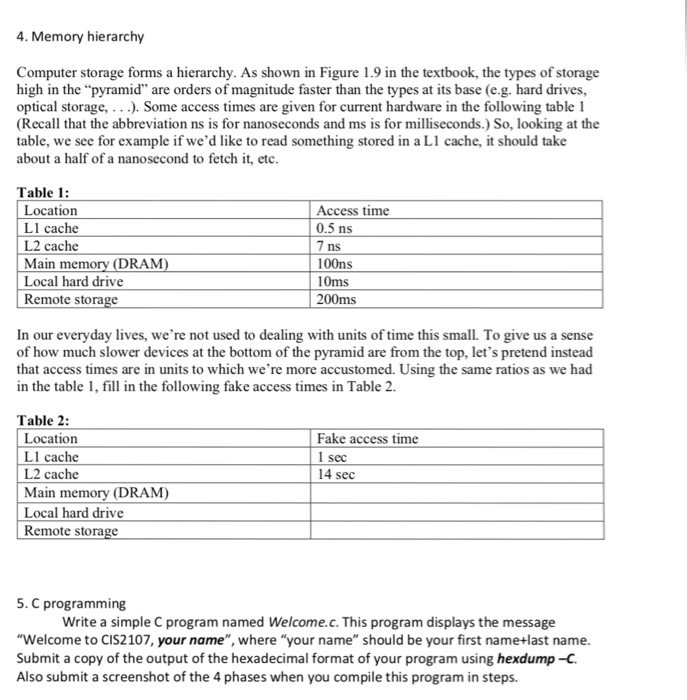
4. Memory hierarchy Computer storage forms a hierarchy. As shown in Figure 1.9 in the textbook, the types of storage high in the "pyramid" are orders of magnitude faster than the types at its base (e.g. hard drives, optical storage,..). Some access times are given for current hardware in the following table1 (Recall that the abbreviation ns is for nanoseconds and ms is for milliseconds.) So, looking at the table, we see for example if we'd like to read something stored in a L1 cache, it should take about a half of a nanosecond to fetch it, etc. Table 1 Location Ll cache L2 cache Main Local hard drive Remote stora Access time 0.5 ns ns 100ns 10ms 200ms (DRAM) In our everyday lives, we're not used to dealing with units of time this small. To give us a sense of how much slower devices at the bottom of the pyramid are from the top, let's pretend instead that access times are in units to which we're more accustomed. Using the same ratios as we had in the table 1, fill in the following fake access times in Table 2. Table 2: Fake access time Location LI cac L2 cache Main memory (DRAM) Local hard drive Remote storage sec 14 sec 5. C programming Write a simple C program named Welcome.c. This program displays the message "Welcome to CIS2107, your name", where "your name" should be your first name+last name Submit a copy of the output of the hexadecimal format of your program using hexdump-C Also submit a screenshot of the 4 phases when you compile this program in steps
Step by Step Solution
There are 3 Steps involved in it

Get step-by-step solutions from verified subject matter experts
 Study Help