Question: Help ASAP!!!!! Programming Language C++ Assignment please include comments Client Program Server Activation Server / Client Test Plan Test 1: server data file Start the
Help ASAP!!!!!
Programming Language C++
Assignment
please include comments
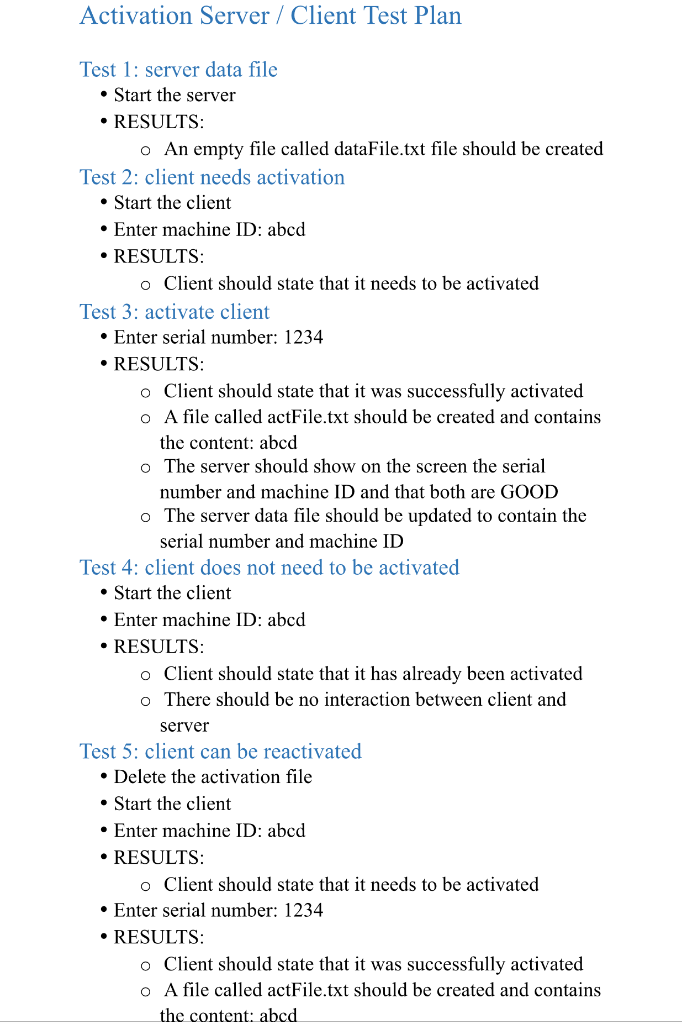
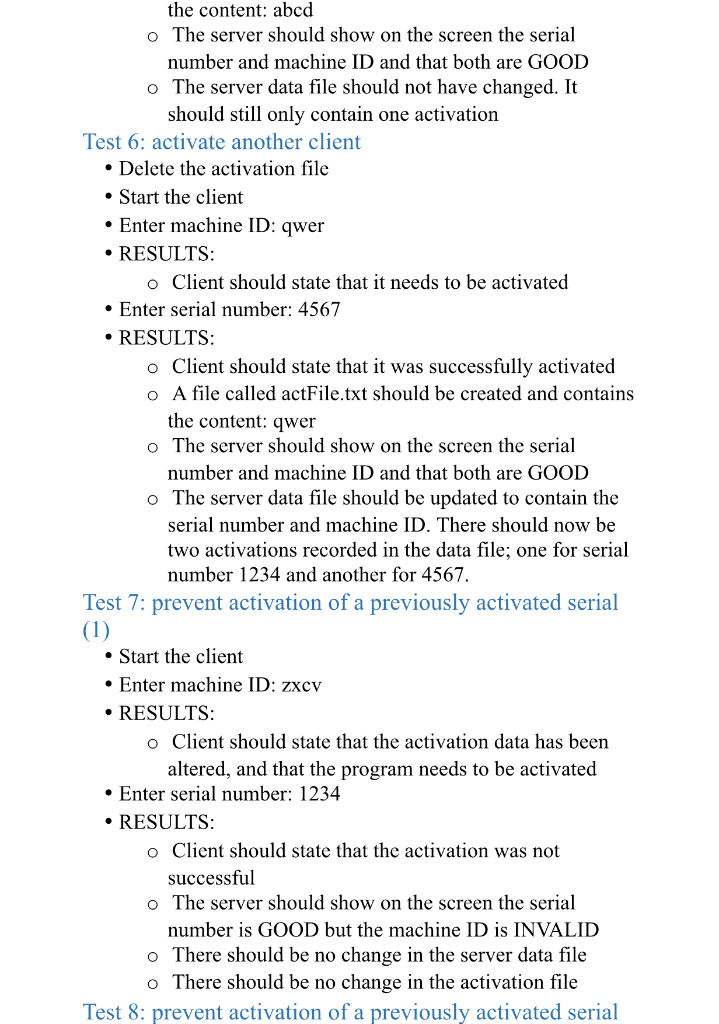
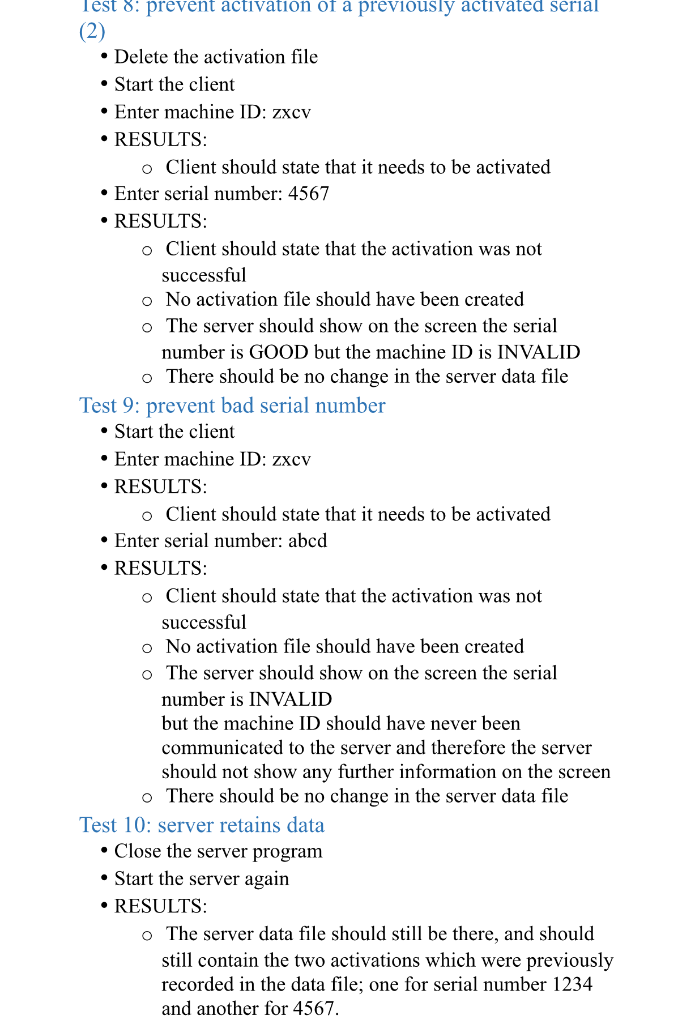
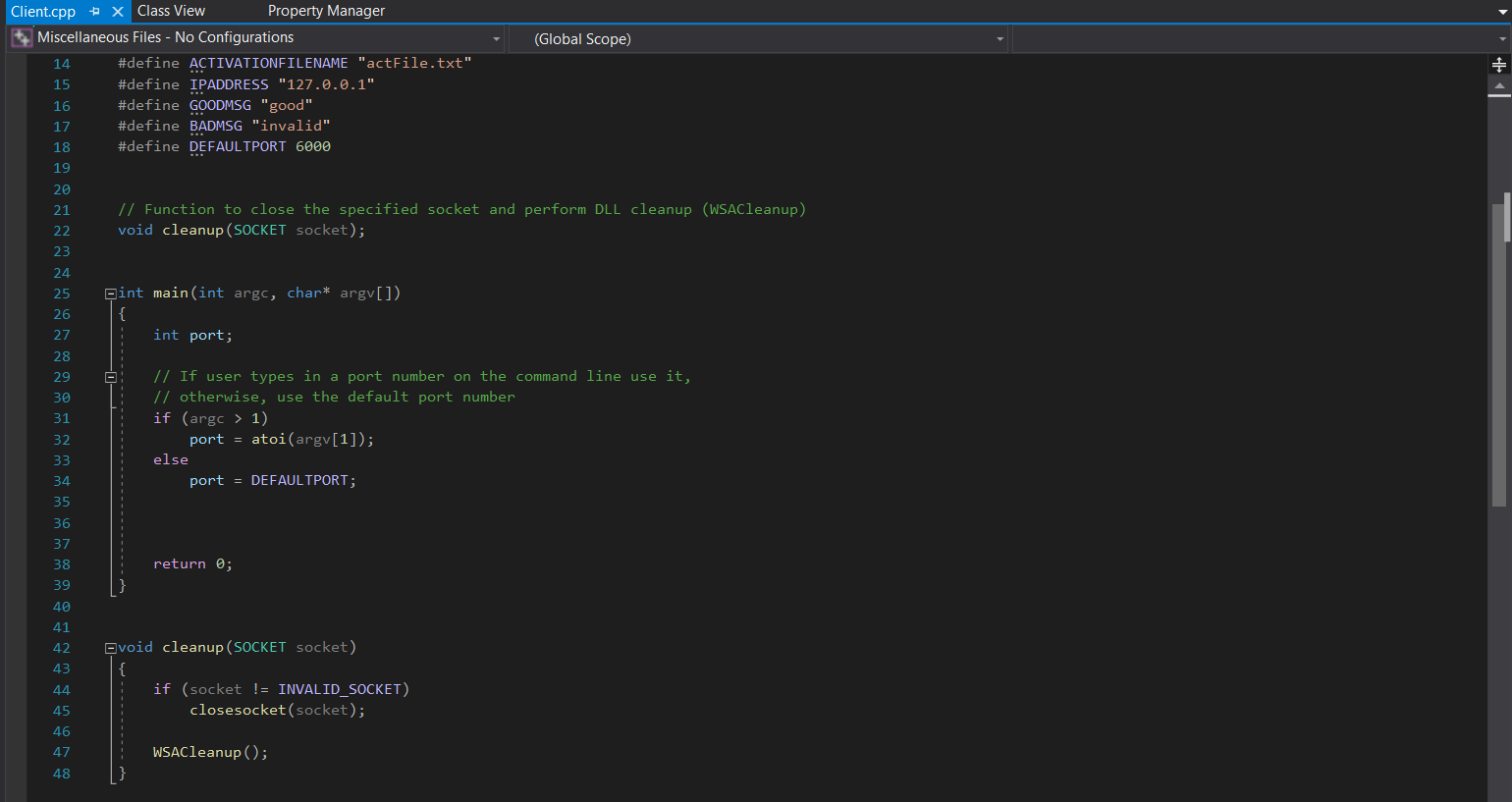
Client Program
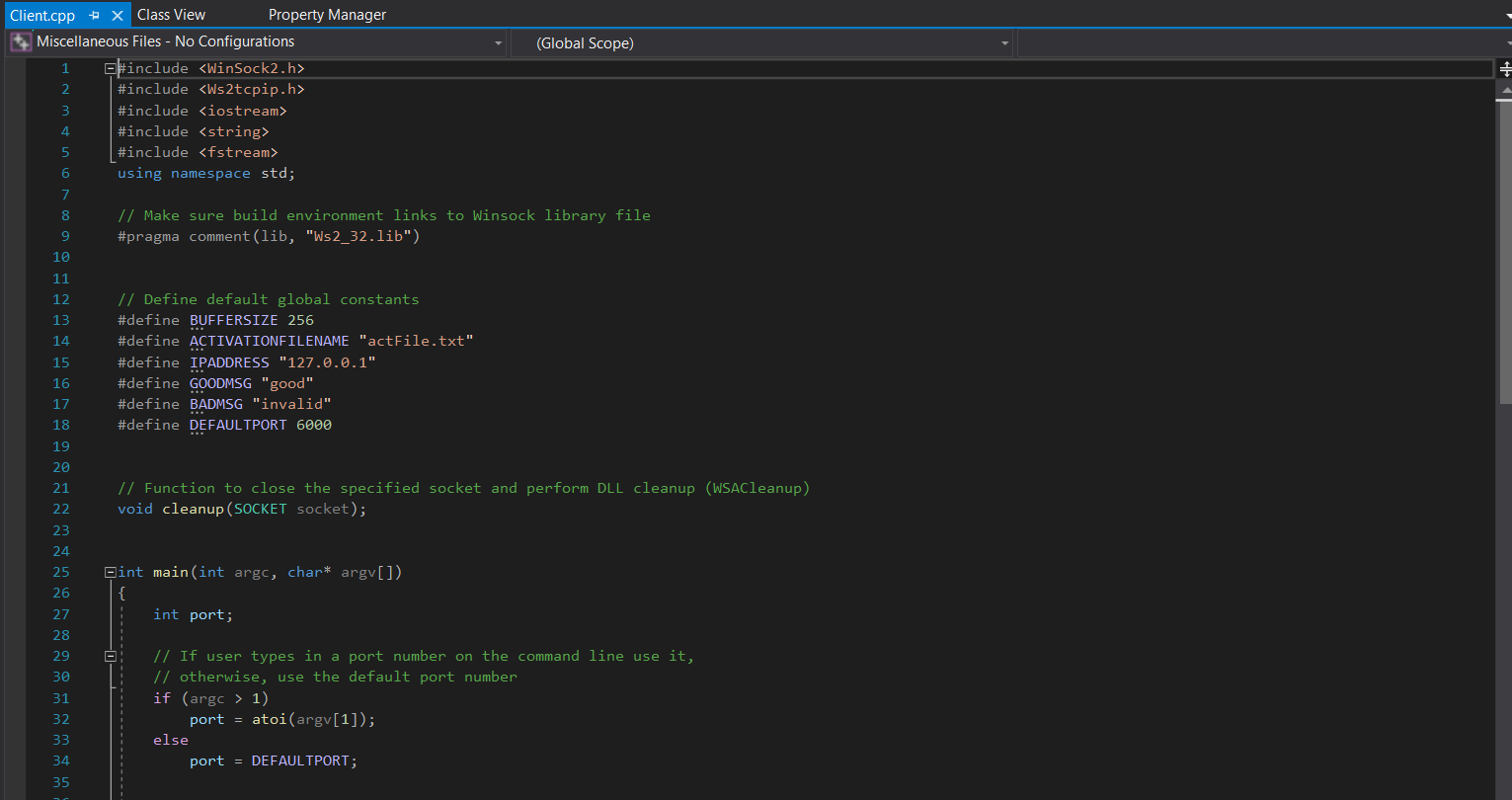
Server
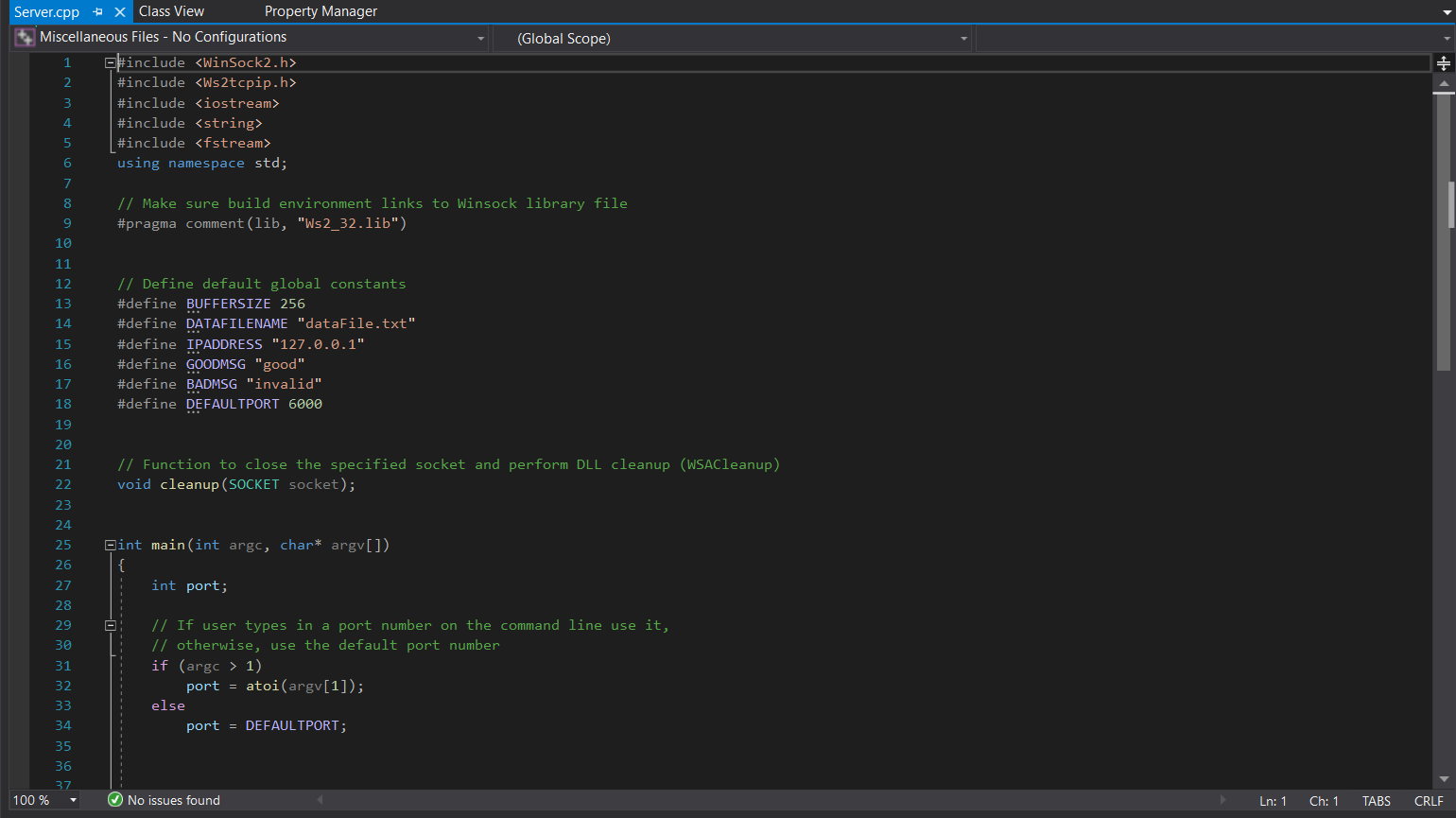
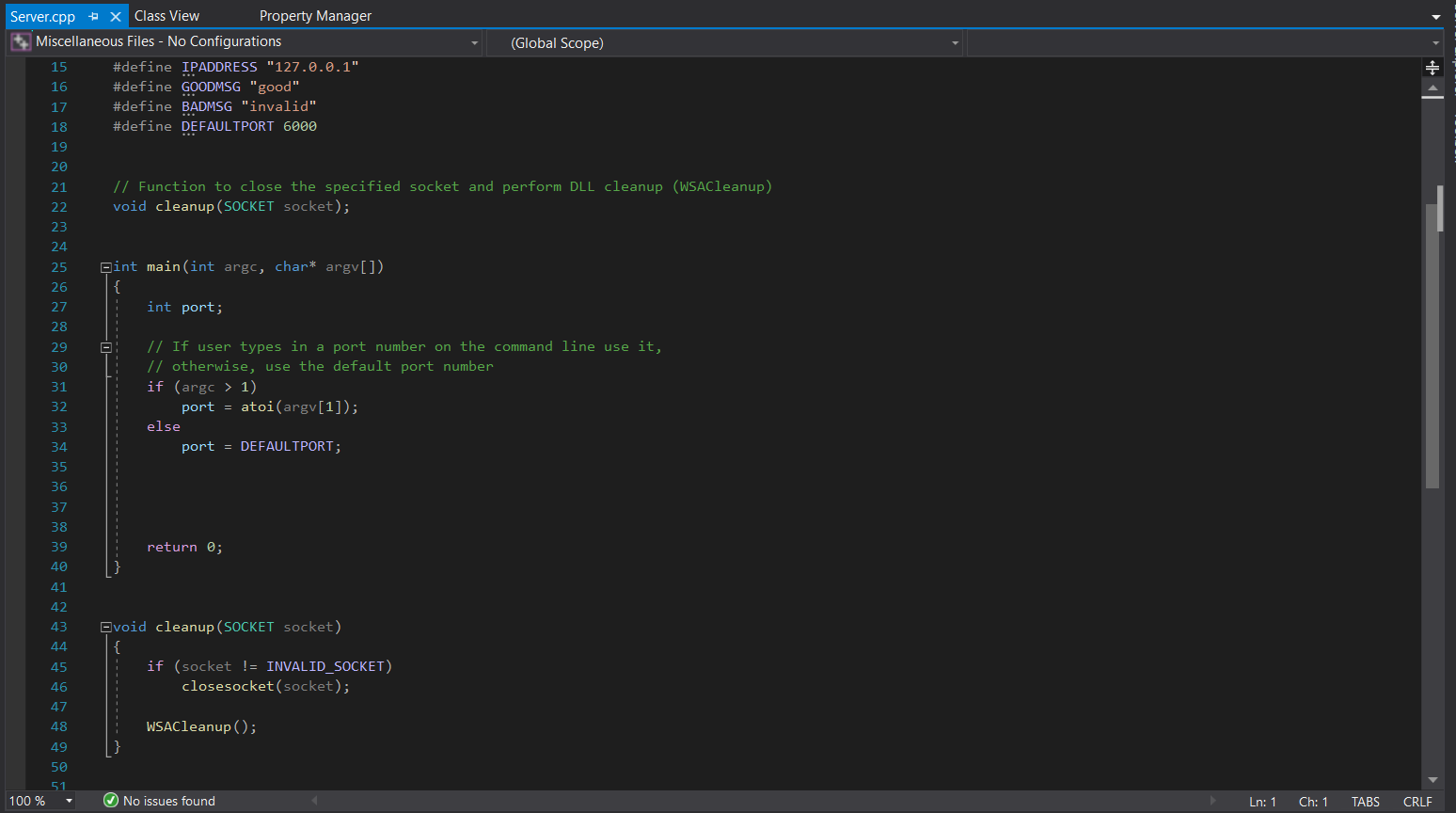
Activation Server / Client Test Plan Test 1: server data file Start the server RESULTS: o An empty file called dataFile.txt file should be created Test 2: client needs activation Start the client Enter machine ID: abcd RESULTS: o Client should state that it needs to be activated Test 3: activate client Enter serial number: 1234 RESULTS: o Client should state that it was successfully activated O A file called actFile.txt should be created and contains the content: abcd o The server should show on the screen the serial number and machine ID and that both are GOOD o The server data file should be updated to contain the serial number and machine ID Test 4: client does not need to be activated Start the client Enter machine ID: abcd RESULTS: o Client should state that it has already been activated o There should be no interaction between client and server Test 5: client can be reactivated Delete the activation file Start the client Enter machine ID: abcd RESULTS: o Client should state that it needs to be activated Enter serial number: 1234 RESULTS: o Client should state that it was successfully activated o A file called actFile.txt should be created and contains the content: abcd the content: abcd o The server should show on the screen the serial number and machine ID and that both are GOOD o The server data file should not have changed. It should still only contain one activation Test 6: activate another client Delete the activation file Start the client Enter machine ID: qwer RESULTS: o Client should state that it needs to be activated Enter serial number: 4567 RESULTS: o Client should state that it was successfully activated O A file called actFile.txt should be created and contains the content: qwer o The server should show on the screen the serial number and machine ID and that both are GOOD o The server data file should be updated to contain the serial number and machine ID. There should now be two activations recorded in the data file; one for serial number 1234 and another for 4567. Test 7: prevent activation of a previously activated serial (1) Start the client Enter machine ID: zxcv RESULTS: o Client should state that the activation data has been altered, and that the program needs to be activated Enter serial number: 1234 RESULTS: o Client should state that the activation was not successful o The server should show on the screen the serial number is GOOD but the machine ID is INVALID o There should be no change in the server data file o There should be no change in the activation file Test 8: prevent activation of a previously activated serial Test 8: prevent activation of a previously activated serial (2) Delete the activation file Start the client Enter machine ID: zxcv RESULTS: o Client should state that it needs to be activated Enter serial number: 4567 RESULTS: o Client should state that the activation was not successful o No activation file should have been created o The server should show on the screen the serial number is GOOD but the machine ID is INVALID o There should be no change in the server data file Test 9: prevent bad serial number Start the client Enter machine ID: zxcv RESULTS: o Client should state that it needs to be activated Enter serial number: abcd RESULTS: o Client should state that the activation was not successful o No activation file should have been created The server should show on the screen the serial number is INVALID but the machine ID should have never been communicated to the server and therefore the server should not show any further information on the screen There should be no change in the server data file Test 10: server retains data Close the server program Start the server again RESULTS: o The server data file should still be there, and should still contain the two activations which were previously recorded in the data file; one for serial number 1234 and another for 4567. (Global Scope) Client.cpp + x Class View Property Manager Miscellaneous Files - No Configurations #include #include #include #include #include using namespace std; // Make sure build environment links to Winsock library file #pragma comment(lib, "Ws2_32.lib"), // Define default global constants #define BUFFERSIZE 256 #define ACTIVATIONFILENAME "actFile.txt" #define IPADDRESS "127.0.0.1" #define GOODMSG "good" #define BADMSG "invalid" #define DEFAULTPORT 6000 // Function to close the specified socket and perform DLL cleanup (WSACleanup) void cleanup (SOCKET socket); Gint main(int argc, char* argv[]), int port; // If user types in a port number on the command line use it, // otherwise, use the default port number if (argc > 1) port = atoi(argv[1]); else port = DEFAULTPORT; (Global Scope) Client.cpp + x Class View Property Manager Miscellaneous Files - No Configurations 14 #define ACTIVATIONFILENAME "actFile.txt", #define IPADDRESS "127.0.0.1" #define GOODMSG "good" #define BADMSG "invalid" #define DEFAULTPORT 6000 // Function to close the specified socket and perform DLL cleanup (WSACleanup) void cleanup (SOCKET socket); Qint main(int argc, char* argv[]), int port; // If user types in a port number on the command line use it, // otherwise, use the default port number if (argc > 1) port = atoi (argv[1]); else port = DEFAULTPORT; return 0; Ovoid cleanup (SOCKET socket) if (socket != INVALID SOCKET) closesocket (socket); WSACleanup(); (Global Scope) Server.cpp + x Class View Miscellaneous Files - No Configurations 1 include #include #include #include #include using namespace std; // Make sure build environment links to Winsock library file #pragma comment (lib, "Ws2_32.lib"), // Define default global constants #define BUFFERSIZE 256 #define DATAFILENAME "datafile.txt" #define IPADDRESS "127.0.0.1" #define GOODMSG "good" #define BADMSG "invalid" #define DEFAULTPORT 6000 // Function to close the specified socket and perform DLL cleanup (WSACleanup) void cleanup (SOCKET socket); Gint main(int argc, char* argv[]), { int port; // If user types in a port number on the command line use it, // otherwise, use the default port number if (argc > 1) port = atoi (argv[1]); else port = DEFAULTPORT; 100 % No issues found Ln: 1 Ch: 1 TABS CRLF (Global Scope) Server.cpp + x Class View Property Manager Miscellaneous Files - No Configurations 15 #define IPADDRESS "127.0.0.1" #define GOODMSG "good" #define BADMSG "invalid" #define DEFAULTPORT 6000 // Function to close the specified socket and perform DLL cleanup (WSACleanup) void cleanup (SOCKET socket); Qint main(int args, char* argv[]), int port; // If user types in a port number on the command line use it, // otherwise, use the default port number if (argc > 1) port = atoi (argv[1]); else port = DEFAULTPORT; return 0; Ovoid cleanup (SOCKET socket) if (socket != INVALID_SOCKET) closesocket (socket); WSACleanup(); 100% . No issues found Ln: 1 Ch: 1 TABS CRLF Activation Server / Client Test Plan Test 1: server data file Start the server RESULTS: o An empty file called dataFile.txt file should be created Test 2: client needs activation Start the client Enter machine ID: abcd RESULTS: o Client should state that it needs to be activated Test 3: activate client Enter serial number: 1234 RESULTS: o Client should state that it was successfully activated O A file called actFile.txt should be created and contains the content: abcd o The server should show on the screen the serial number and machine ID and that both are GOOD o The server data file should be updated to contain the serial number and machine ID Test 4: client does not need to be activated Start the client Enter machine ID: abcd RESULTS: o Client should state that it has already been activated o There should be no interaction between client and server Test 5: client can be reactivated Delete the activation file Start the client Enter machine ID: abcd RESULTS: o Client should state that it needs to be activated Enter serial number: 1234 RESULTS: o Client should state that it was successfully activated o A file called actFile.txt should be created and contains the content: abcd the content: abcd o The server should show on the screen the serial number and machine ID and that both are GOOD o The server data file should not have changed. It should still only contain one activation Test 6: activate another client Delete the activation file Start the client Enter machine ID: qwer RESULTS: o Client should state that it needs to be activated Enter serial number: 4567 RESULTS: o Client should state that it was successfully activated O A file called actFile.txt should be created and contains the content: qwer o The server should show on the screen the serial number and machine ID and that both are GOOD o The server data file should be updated to contain the serial number and machine ID. There should now be two activations recorded in the data file; one for serial number 1234 and another for 4567. Test 7: prevent activation of a previously activated serial (1) Start the client Enter machine ID: zxcv RESULTS: o Client should state that the activation data has been altered, and that the program needs to be activated Enter serial number: 1234 RESULTS: o Client should state that the activation was not successful o The server should show on the screen the serial number is GOOD but the machine ID is INVALID o There should be no change in the server data file o There should be no change in the activation file Test 8: prevent activation of a previously activated serial Test 8: prevent activation of a previously activated serial (2) Delete the activation file Start the client Enter machine ID: zxcv RESULTS: o Client should state that it needs to be activated Enter serial number: 4567 RESULTS: o Client should state that the activation was not successful o No activation file should have been created o The server should show on the screen the serial number is GOOD but the machine ID is INVALID o There should be no change in the server data file Test 9: prevent bad serial number Start the client Enter machine ID: zxcv RESULTS: o Client should state that it needs to be activated Enter serial number: abcd RESULTS: o Client should state that the activation was not successful o No activation file should have been created The server should show on the screen the serial number is INVALID but the machine ID should have never been communicated to the server and therefore the server should not show any further information on the screen There should be no change in the server data file Test 10: server retains data Close the server program Start the server again RESULTS: o The server data file should still be there, and should still contain the two activations which were previously recorded in the data file; one for serial number 1234 and another for 4567. (Global Scope) Client.cpp + x Class View Property Manager Miscellaneous Files - No Configurations #include #include #include #include #include using namespace std; // Make sure build environment links to Winsock library file #pragma comment(lib, "Ws2_32.lib"), // Define default global constants #define BUFFERSIZE 256 #define ACTIVATIONFILENAME "actFile.txt" #define IPADDRESS "127.0.0.1" #define GOODMSG "good" #define BADMSG "invalid" #define DEFAULTPORT 6000 // Function to close the specified socket and perform DLL cleanup (WSACleanup) void cleanup (SOCKET socket); Gint main(int argc, char* argv[]), int port; // If user types in a port number on the command line use it, // otherwise, use the default port number if (argc > 1) port = atoi(argv[1]); else port = DEFAULTPORT; (Global Scope) Client.cpp + x Class View Property Manager Miscellaneous Files - No Configurations 14 #define ACTIVATIONFILENAME "actFile.txt", #define IPADDRESS "127.0.0.1" #define GOODMSG "good" #define BADMSG "invalid" #define DEFAULTPORT 6000 // Function to close the specified socket and perform DLL cleanup (WSACleanup) void cleanup (SOCKET socket); Qint main(int argc, char* argv[]), int port; // If user types in a port number on the command line use it, // otherwise, use the default port number if (argc > 1) port = atoi (argv[1]); else port = DEFAULTPORT; return 0; Ovoid cleanup (SOCKET socket) if (socket != INVALID SOCKET) closesocket (socket); WSACleanup(); (Global Scope) Server.cpp + x Class View Miscellaneous Files - No Configurations 1 include #include #include #include #include using namespace std; // Make sure build environment links to Winsock library file #pragma comment (lib, "Ws2_32.lib"), // Define default global constants #define BUFFERSIZE 256 #define DATAFILENAME "datafile.txt" #define IPADDRESS "127.0.0.1" #define GOODMSG "good" #define BADMSG "invalid" #define DEFAULTPORT 6000 // Function to close the specified socket and perform DLL cleanup (WSACleanup) void cleanup (SOCKET socket); Gint main(int argc, char* argv[]), { int port; // If user types in a port number on the command line use it, // otherwise, use the default port number if (argc > 1) port = atoi (argv[1]); else port = DEFAULTPORT; 100 % No issues found Ln: 1 Ch: 1 TABS CRLF (Global Scope) Server.cpp + x Class View Property Manager Miscellaneous Files - No Configurations 15 #define IPADDRESS "127.0.0.1" #define GOODMSG "good" #define BADMSG "invalid" #define DEFAULTPORT 6000 // Function to close the specified socket and perform DLL cleanup (WSACleanup) void cleanup (SOCKET socket); Qint main(int args, char* argv[]), int port; // If user types in a port number on the command line use it, // otherwise, use the default port number if (argc > 1) port = atoi (argv[1]); else port = DEFAULTPORT; return 0; Ovoid cleanup (SOCKET socket) if (socket != INVALID_SOCKET) closesocket (socket); WSACleanup(); 100% . No issues found Ln: 1 Ch: 1 TABS CRLF









 Study Help