







Question: Help Enable Editing Excel 2016 Project stay in Protected View - Instructions Chapter 1-1 Heart Rate ect Description: s problem, you wil investigate the heart
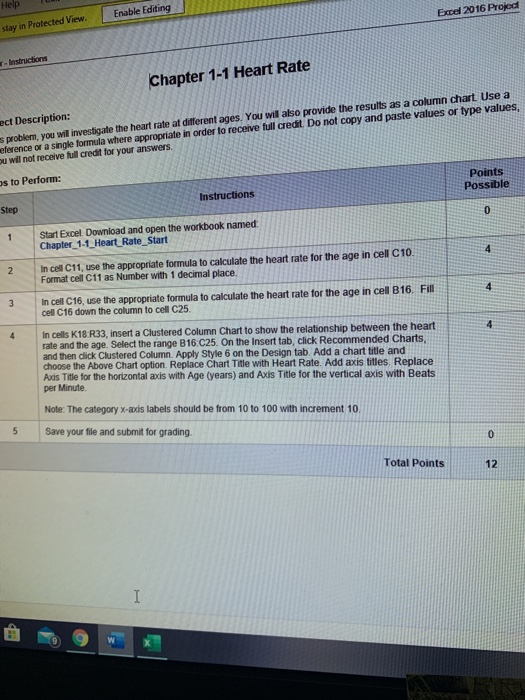
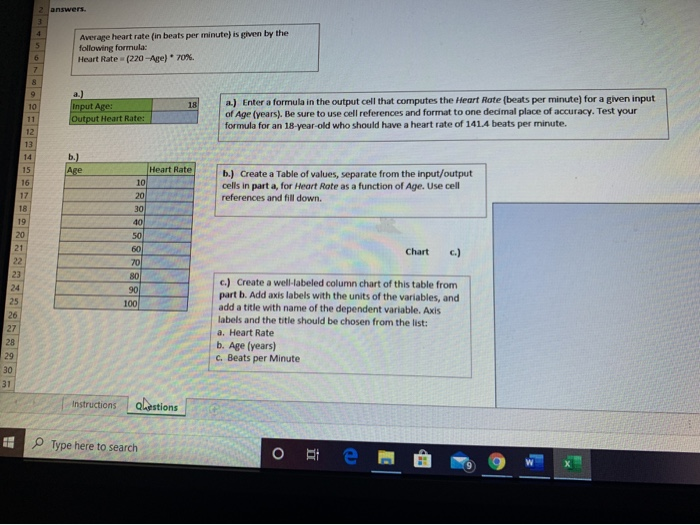
Help Enable Editing Excel 2016 Project stay in Protected View - Instructions Chapter 1-1 Heart Rate ect Description: s problem, you wil investigate the heart rate at different ages. You will also provide the results as a column chart. Use a Reference or a single formula where appropriate in order to receive full credit Do not copy and paste values or type values, ou will not receive full credit for your answers os to Perform: Points Possible Instructions Step 0 1 Start Excel Download and open the workbook named: Chapter_1-1_Heart Rate Start 4 2 In cell C11, use the appropriate formula to calculate the heart rate for the age in cell C10 Format cell C11 as Number with 1 decimal place, 4 3 In cell C16, use the appropriate formula to calculate the heart rate for the age in cell B16. Fill cell C16 down the column to cell C25. 4 4 In cells K18. R33, insert a Clustered Column Chart to show the relationship between the heart rate and the age. Select the range B16C25. On the Insert tab, click Recommended Charts, and then click Clustered Column. Apply Style 6 on the Design tab. Add a chart title and choose the Above Chart option. Replace Chart Title with Heart Rate. Add axis titles. Replace Axxis Title for the horizontal axis with Age (years) and Axis Title for the vertical axis with Beats per Minute Note: The category x-axis labels should be from 10 to 100 with increment 10 Save your file and submit for grading. 5 0 Total Points 12 I 2 answers. 3 4 5 Average heart rate (in beats per minute) is given by the following formula: Heart Rate (220-Are) 70%. 6 7 8 10 a.) Input Age: Output Heart Rate: 18 a.) Enter a formula in the output cell that computes the Heart Rate (beats per minute) for a given input of Age (years). Be sure to use cell references and format to one decimal place of accuracy. Test your formula for an 18-year-old who should have a heart rate of 141.4 beats per minute. 11 12 13 14 b.) Age 15 16 Heart Rate 10 20 30 b.) Create a Table of values, separate from the input/output cells in part a, for Heart Rate as a function of Age. Use cell references and fill down. 17 18 19 40 50 60 Chart 70 80 90 100 20 21 22 23 24 25 26 27 28 29 30 31 c.) Create a well-labeled column chart of this table from part b. Add axis labels with the units of the variables, and add a title with name of the dependent variable. Axis labels and the title should be chosen from the list: a. Heart Rate b. Age (years) C. Beats per Minute Instructions Qaestions Type here to search
Step by Step Solution
There are 3 Steps involved in it

Get step-by-step solutions from verified subject matter experts
 Study Help