Question: help me do this XML coding for me. Complete the following 1. In your XML ditor, open the sitestxt.xml and sitestxt.xsd files from the xml04
help me do this XML coding for me.
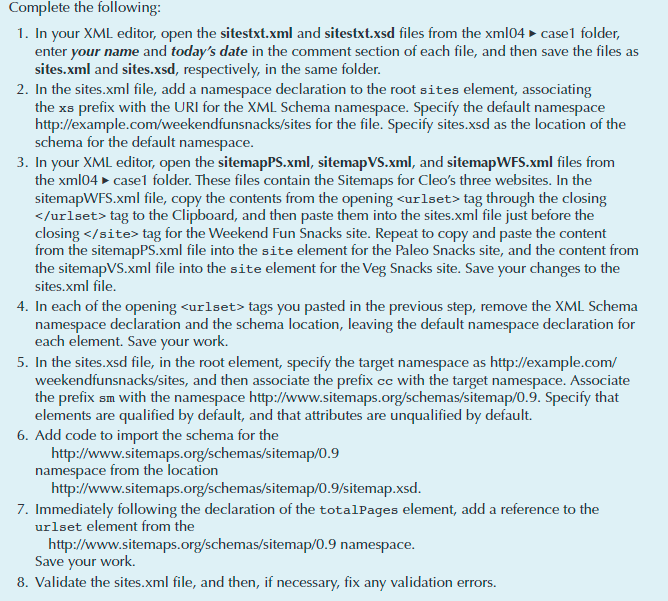
Complete the following 1. In your XML ditor, open the sitestxt.xml and sitestxt.xsd files from the xml04 casel folder enter your name and today's date in the comment section of each file, and then save the files as sites.xml and sites.xsd, respectively, in the same folder In the sites.xml file, add a namespace declaration to the root site element, associating the xs prefix with the URI for the XML Schema namespace. Specify the default namespace http://example.com/weekendfunsnacks/sites for the file. Specify sites.xsd as the location of the schema for the default namespace 3. In you r XML editor, open the sitemapPS.xml, sitemapVS.xml, and sitemapWFS.xml files from the xml04 case1 folder. These files contain the Sitemaps for Cleo's three websites. In the sitemapWFS.xml file, copy the contents from the opening tag through the closing tag to the Clipboard, and then paste them into the sites.xml file just before the closing tag for the Weekend Fun Snacks site. Repeat to copy and paste the content from the sitemapPS.xml file into the site element for the Paleo Snacks site, and the content fromm the sitemapVS.xml file into the site element for the Veg Snacks site. Save your changes to the sites.xml file 4. In each of the opening curlset> tags you pasted in the previous step, remove the XML Schema mespace declaration for ce declaration and the schema location, leaving the default na namespa each element. Save your work. 5. In the sites.xsd file, in the root element, specify the target namespace as http://example.com/ weekendfunsnacks/sites, and then associate the prefix cc with the target namespace. Associate the prefix sm with the namespace http://www.sitemaps.org/schemas/sitemap/0.9. Specify that elements are qualified by default, and that attributes are unqualified by default. 6. Add code to import the schema for the http://www.sitemaps.org/schemas/sitemap/0.9 namespace from the locatio http://www.sitemaps.org/schemas/sitemap/0.9/sitemap.xsd 7. Immediately following the declaration of the totalPages element, add a reference to the urlset element from the http://www.sitemaps.org/schemas/sitemap/0.9 namespace Save your work. 8. Validate the sites.xml file, and then, if necessary, fix any validation errors. Complete the following 1. In your XML ditor, open the sitestxt.xml and sitestxt.xsd files from the xml04 casel folder enter your name and today's date in the comment section of each file, and then save the files as sites.xml and sites.xsd, respectively, in the same folder In the sites.xml file, add a namespace declaration to the root site element, associating the xs prefix with the URI for the XML Schema namespace. Specify the default namespace http://example.com/weekendfunsnacks/sites for the file. Specify sites.xsd as the location of the schema for the default namespace 3. In you r XML editor, open the sitemapPS.xml, sitemapVS.xml, and sitemapWFS.xml files from the xml04 case1 folder. These files contain the Sitemaps for Cleo's three websites. In the sitemapWFS.xml file, copy the contents from the opening tag through the closing tag to the Clipboard, and then paste them into the sites.xml file just before the closing tag for the Weekend Fun Snacks site. Repeat to copy and paste the content from the sitemapPS.xml file into the site element for the Paleo Snacks site, and the content fromm the sitemapVS.xml file into the site element for the Veg Snacks site. Save your changes to the sites.xml file 4. In each of the opening curlset> tags you pasted in the previous step, remove the XML Schema mespace declaration for ce declaration and the schema location, leaving the default na namespa each element. Save your work. 5. In the sites.xsd file, in the root element, specify the target namespace as http://example.com/ weekendfunsnacks/sites, and then associate the prefix cc with the target namespace. Associate the prefix sm with the namespace http://www.sitemaps.org/schemas/sitemap/0.9. Specify that elements are qualified by default, and that attributes are unqualified by default. 6. Add code to import the schema for the http://www.sitemaps.org/schemas/sitemap/0.9 namespace from the locatio http://www.sitemaps.org/schemas/sitemap/0.9/sitemap.xsd 7. Immediately following the declaration of the totalPages element, add a reference to the urlset element from the http://www.sitemaps.org/schemas/sitemap/0.9 namespace Save your work. 8. Validate the sites.xml file, and then, if necessary, fix any validation errors









 Study Help