Question: Case Problem 1 Data Files needed for this Case Problem: photostxt.dtd, photostxt.xml 0 Note: To complete this case problem, you need an XML parser capable
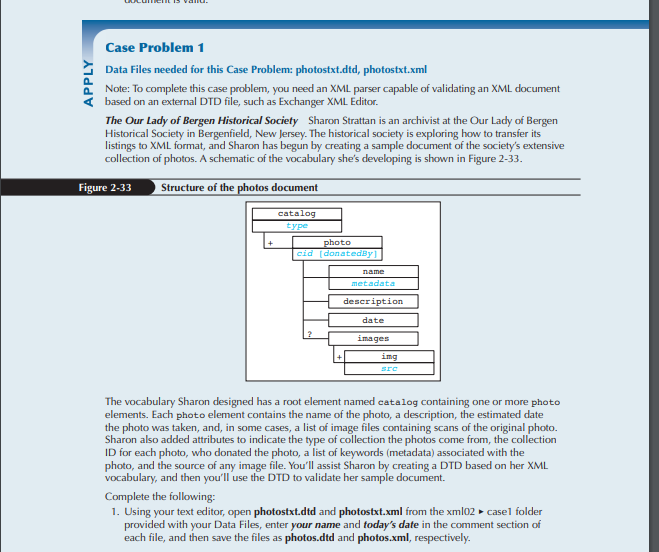

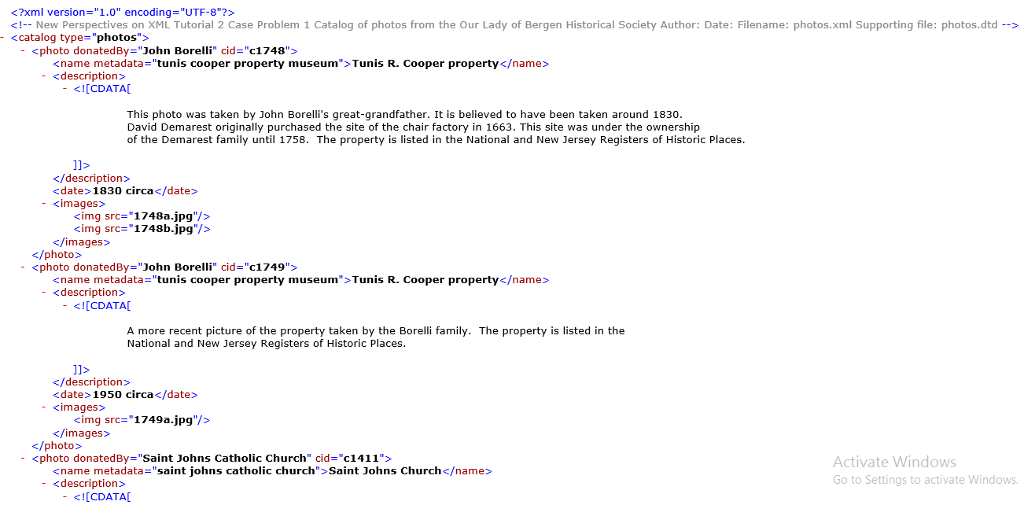
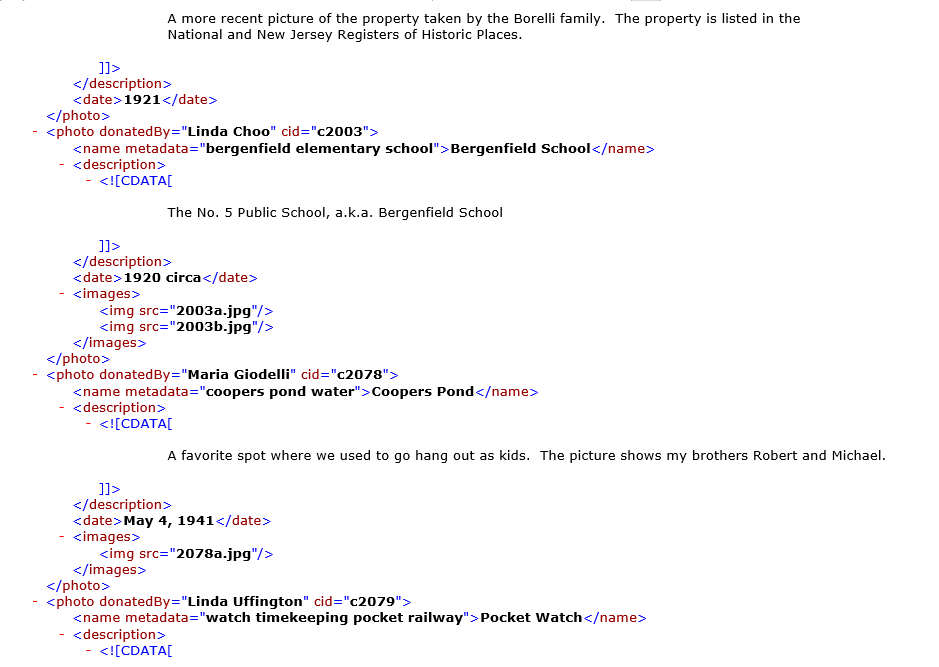
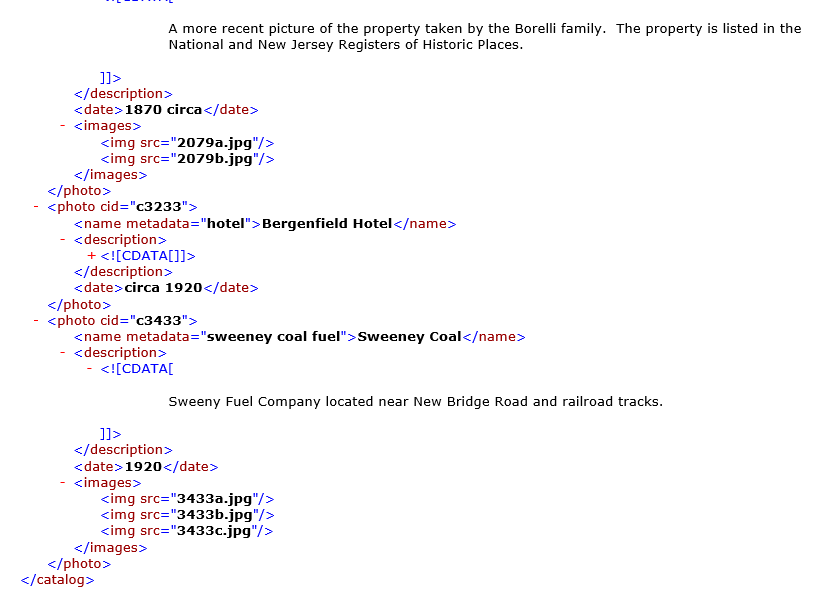
Case Problem 1 Data Files needed for this Case Problem: photostxt.dtd, photostxt.xml 0 Note: To complete this case problem, you need an XML parser capable of validating an XML document based on an external DTD file, such as Exchanger XML Editor. The Our Lady of Bergen Historical Society Sharon Strattan is an archivist at the Our Lady of Bergen Historical Society in Bergenfield, New Jersey. The historical society is exploring how to transfer its listings to XML format, and Sharon has begun by creating a sample document of the society's extensive collection of photos. A schematic of the vocabulary she's developing is shown in Figure 2-33 Figure 2-33 Structure of the s document catalog hoto description date ing The vocabulary Sharon designed has a root element named catalog containing one or more photo elements. Each photo element contains the name of the photo, a description, the estimated date the photo was taken, and, in some cases, a list of image files containing scans of the original photo. Sharon also added attributes to indicate the type of collection the photos come from, the collection ID for each photo, who donated the photo, a list of keywords (metadata) associated with the photo, and the source of any image file. You'll assist Sharon by creating a DTD based on her XML vocabulary, and then you'll use the DTD to validate her sample document. Complete the following 1. Using your text editor, open photostxt.dtd and photostxt.xml from the xmloz casel folder provided with your Data Files, enter your name and today's date in the comment section of each file, and then save the files as photos.dtd and photos.xml, respectively. 2. In the photos.dtd file, declare the following elements: a. The catalog element, containing one or more photo elements b. The photo e t, containing the following sequence of child el description, date, and( c. The name, description, and date elements, containing only parsed character data d. The images element, containing one or more img elements e. The img element, containing empty content 3. Declare the following attributes in the DTD: a. The type attribute, a required attribute of the catalog element, containing a valid XML name (Hint: Use the NMTOKEN data type.) b. The eid attribute, a required ID attribute of the photo element c. The donatedBy attribute, an optional attribute of the photo element, containing character data d. The metadata attribute, a required attribute of the name element, containing a list of valid XML names (Hint: Use the NMTOKENS data type.) e. The sre attribute, a required attribute of the img element, containing character data 4. Save your changes to the photos.dtd file. 5. In the photos.xml file, directly after the comment section, insert a DOCTYPE that references the 6. Save your changes to the photos.xml file. 7. Verify that the photos.xml file is well formed, and then validate it. Revalidate after correcting each error in the code, if necessary, until the document passes validation. (Hint: Because this document uses an external DTD, you must correct any validation errors related to the DTD in the photos.dtd file.) Note that you cannot use http://validator.w3.org to validate an XML file against a nonpublic external DTD file, so you must use a program such as Exchanger to validate this file. - Tunis R. Cooper property - [CDATA This photo was taken by John Borelli's great-grandfather. It is believed to have been taken around 1830 David Demarest originally purchased the site of the chair factory in 1663. This site was under the ownership of the Demarest family until 1758. The property is listed in the National and New Jersey Registers of Historic Places. - img src-.1748a.jpg'/> photo donatedBy-"John Borelli" cid="c1749"> - - [CDATA A more recent picture of the property taken by the Borelli family. The property is listed in the National and New Jersey Registers of Historic Places. 1950 circa- photo donatedBy="Saint Johns Catholic Church" cid="c1411"> Activate Windows Go to Settings to activate Windows - sname metadata-"saint johns catholic church">Saint Johns Church - - 1921 - Bergenfield School - - 1920 circa - img src="2003a.jpg"/> img src="2003b.jpg"/> - name metadata "coopers pond water'' > Coopers Pond - [CDATA A favorite spot where we used to go hang out as kids. The picture shows my brothers Robert and Michael May 4, 1941 - img src="2078a.jpg"/> - Pocket Watch - [CDATA A more recent picture of the property taken by the Borelli family. The property is listed in the Nationa and New Jersey Registers of Historic Places 1870 circa - ![Case Problem 1 Data Files needed for this Case Problem: photostxt.dtd,]() - - Bergenfield Hotel + circa 1920 - Sweeney Coal - - 1920 -
- - Bergenfield Hotel + circa 1920 - Sweeney Coal - - 1920 - ![photostxt.xml 0 Note: To complete this case problem, you need an XML]() kimg src-"3433b.jpg"/> /catalog> Case Problem 1 Data Files needed for this Case Problem: photostxt.dtd, photostxt.xml 0 Note: To complete this case problem, you need an XML parser capable of validating an XML document based on an external DTD file, such as Exchanger XML Editor. The Our Lady of Bergen Historical Society Sharon Strattan is an archivist at the Our Lady of Bergen Historical Society in Bergenfield, New Jersey. The historical society is exploring how to transfer its listings to XML format, and Sharon has begun by creating a sample document of the society's extensive collection of photos. A schematic of the vocabulary she's developing is shown in Figure 2-33 Figure 2-33 Structure of the s document catalog hoto description date ing The vocabulary Sharon designed has a root element named catalog containing one or more photo elements. Each photo element contains the name of the photo, a description, the estimated date the photo was taken, and, in some cases, a list of image files containing scans of the original photo. Sharon also added attributes to indicate the type of collection the photos come from, the collection ID for each photo, who donated the photo, a list of keywords (metadata) associated with the photo, and the source of any image file. You'll assist Sharon by creating a DTD based on her XML vocabulary, and then you'll use the DTD to validate her sample document. Complete the following 1. Using your text editor, open photostxt.dtd and photostxt.xml from the xmloz casel folder provided with your Data Files, enter your name and today's date in the comment section of each file, and then save the files as photos.dtd and photos.xml, respectively. 2. In the photos.dtd file, declare the following elements: a. The catalog element, containing one or more photo elements b. The photo e t, containing the following sequence of child el description, date, and( c. The name, description, and date elements, containing only parsed character data d. The images element, containing one or more img elements e. The img element, containing empty content 3. Declare the following attributes in the DTD: a. The type attribute, a required attribute of the catalog element, containing a valid XML name (Hint: Use the NMTOKEN data type.) b. The eid attribute, a required ID attribute of the photo element c. The donatedBy attribute, an optional attribute of the photo element, containing character data d. The metadata attribute, a required attribute of the name element, containing a list of valid XML names (Hint: Use the NMTOKENS data type.) e. The sre attribute, a required attribute of the img element, containing character data 4. Save your changes to the photos.dtd file. 5. In the photos.xml file, directly after the comment section, insert a DOCTYPE that references the 6. Save your changes to the photos.xml file. 7. Verify that the photos.xml file is well formed, and then validate it. Revalidate after correcting each error in the code, if necessary, until the document passes validation. (Hint: Because this document uses an external DTD, you must correct any validation errors related to the DTD in the photos.dtd file.) Note that you cannot use http://validator.w3.org to validate an XML file against a nonpublic external DTD file, so you must use a program such as Exchanger to validate this file. - Tunis R. Cooper property - [CDATA This photo was taken by John Borelli's great-grandfather. It is believed to have been taken around 1830 David Demarest originally purchased the site of the chair factory in 1663. This site was under the ownership of the Demarest family until 1758. The property is listed in the National and New Jersey Registers of Historic Places. - img src-.1748a.jpg'/>
kimg src-"3433b.jpg"/> /catalog> Case Problem 1 Data Files needed for this Case Problem: photostxt.dtd, photostxt.xml 0 Note: To complete this case problem, you need an XML parser capable of validating an XML document based on an external DTD file, such as Exchanger XML Editor. The Our Lady of Bergen Historical Society Sharon Strattan is an archivist at the Our Lady of Bergen Historical Society in Bergenfield, New Jersey. The historical society is exploring how to transfer its listings to XML format, and Sharon has begun by creating a sample document of the society's extensive collection of photos. A schematic of the vocabulary she's developing is shown in Figure 2-33 Figure 2-33 Structure of the s document catalog hoto description date ing The vocabulary Sharon designed has a root element named catalog containing one or more photo elements. Each photo element contains the name of the photo, a description, the estimated date the photo was taken, and, in some cases, a list of image files containing scans of the original photo. Sharon also added attributes to indicate the type of collection the photos come from, the collection ID for each photo, who donated the photo, a list of keywords (metadata) associated with the photo, and the source of any image file. You'll assist Sharon by creating a DTD based on her XML vocabulary, and then you'll use the DTD to validate her sample document. Complete the following 1. Using your text editor, open photostxt.dtd and photostxt.xml from the xmloz casel folder provided with your Data Files, enter your name and today's date in the comment section of each file, and then save the files as photos.dtd and photos.xml, respectively. 2. In the photos.dtd file, declare the following elements: a. The catalog element, containing one or more photo elements b. The photo e t, containing the following sequence of child el description, date, and( c. The name, description, and date elements, containing only parsed character data d. The images element, containing one or more img elements e. The img element, containing empty content 3. Declare the following attributes in the DTD: a. The type attribute, a required attribute of the catalog element, containing a valid XML name (Hint: Use the NMTOKEN data type.) b. The eid attribute, a required ID attribute of the photo element c. The donatedBy attribute, an optional attribute of the photo element, containing character data d. The metadata attribute, a required attribute of the name element, containing a list of valid XML names (Hint: Use the NMTOKENS data type.) e. The sre attribute, a required attribute of the img element, containing character data 4. Save your changes to the photos.dtd file. 5. In the photos.xml file, directly after the comment section, insert a DOCTYPE that references the 6. Save your changes to the photos.xml file. 7. Verify that the photos.xml file is well formed, and then validate it. Revalidate after correcting each error in the code, if necessary, until the document passes validation. (Hint: Because this document uses an external DTD, you must correct any validation errors related to the DTD in the photos.dtd file.) Note that you cannot use http://validator.w3.org to validate an XML file against a nonpublic external DTD file, so you must use a program such as Exchanger to validate this file. - Tunis R. Cooper property - [CDATA This photo was taken by John Borelli's great-grandfather. It is believed to have been taken around 1830 David Demarest originally purchased the site of the chair factory in 1663. This site was under the ownership of the Demarest family until 1758. The property is listed in the National and New Jersey Registers of Historic Places. - img src-.1748a.jpg'/> ![parser capable of validating an XML document based on an external DTD]() photo donatedBy-"John Borelli" cid="c1749"> - - [CDATA A more recent picture of the property taken by the Borelli family. The property is listed in the National and New Jersey Registers of Historic Places. 1950 circa- photo donatedBy="Saint Johns Catholic Church" cid="c1411"> Activate Windows Go to Settings to activate Windows - sname metadata-"saint johns catholic church">Saint Johns Church - - 1921 - Bergenfield School - - 1920 circa - img src="2003a.jpg"/> img src="2003b.jpg"/> - name metadata "coopers pond water'' > Coopers Pond - [CDATA A favorite spot where we used to go hang out as kids. The picture shows my brothers Robert and Michael May 4, 1941 - img src="2078a.jpg"/> - Pocket Watch - [CDATA A more recent picture of the property taken by the Borelli family. The property is listed in the Nationa and New Jersey Registers of Historic Places 1870 circa -
photo donatedBy-"John Borelli" cid="c1749"> - - [CDATA A more recent picture of the property taken by the Borelli family. The property is listed in the National and New Jersey Registers of Historic Places. 1950 circa- photo donatedBy="Saint Johns Catholic Church" cid="c1411"> Activate Windows Go to Settings to activate Windows - sname metadata-"saint johns catholic church">Saint Johns Church - - 1921 - Bergenfield School - - 1920 circa - img src="2003a.jpg"/> img src="2003b.jpg"/> - name metadata "coopers pond water'' > Coopers Pond - [CDATA A favorite spot where we used to go hang out as kids. The picture shows my brothers Robert and Michael May 4, 1941 - img src="2078a.jpg"/> - Pocket Watch - [CDATA A more recent picture of the property taken by the Borelli family. The property is listed in the Nationa and New Jersey Registers of Historic Places 1870 circa - ![file, such as Exchanger XML Editor. The Our Lady of Bergen Historical]() - - Bergenfield Hotel + circa 1920 - Sweeney Coal - - 1920 - kimg src-"3433b.jpg"/>
- - Bergenfield Hotel + circa 1920 - Sweeney Coal - - 1920 - kimg src-"3433b.jpg"/> ![Society Sharon Strattan is an archivist at the Our Lady of Bergen]() /catalog>
/catalog>









 Study Help