







Question: help me to do excel project Part 3 You are providing an example analysis tool for off-site instruction. The data is from one of the
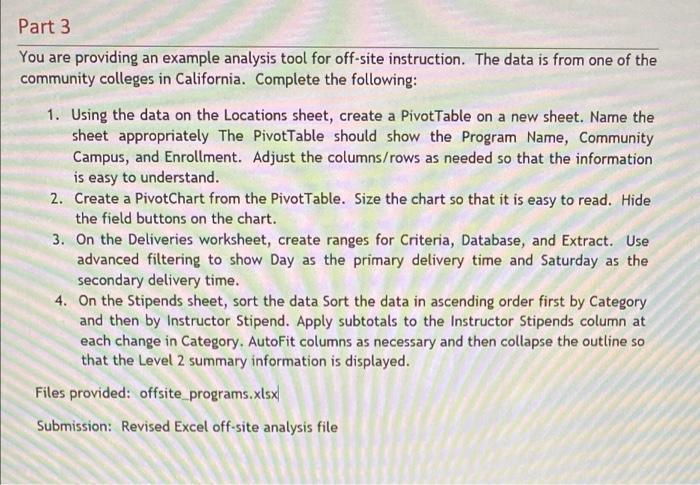
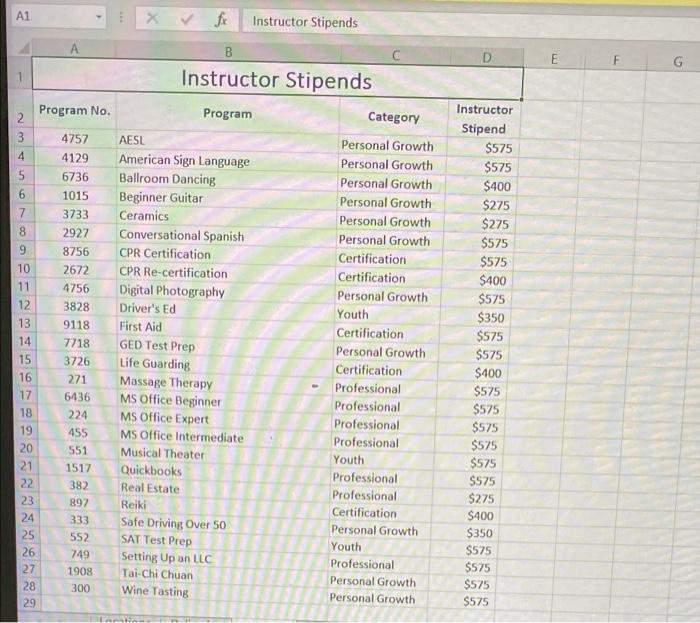
Part 3 You are providing an example analysis tool for off-site instruction. The data is from one of the community colleges in California. Complete the following: 1. Using the data on the Locations sheet, create a PivotTable on a new sheet. Name the sheet appropriately The Pivottable should show the Program Name, Community Campus, and Enrollment. Adjust the columns/rows as needed so that the information is easy to understand. 2. Create a PivotChart from the Pivottable. Size the chart so that it is easy to read. Hide the field buttons on the chart. 3. On the Deliveries worksheet, create ranges for Criteria, Database, and Extract. Use advanced filtering to show Day as the primary delivery time and Saturday as the secondary delivery time. 4. On the Stipends sheet, sort the data Sort the data in ascending order first by Category and then by Instructor Stipend. Apply subtotals to the Instructor Stipends column at each change in Category. AutoFit columns as necessary and then collapse the outline so that the Level 2 summary information is displayed. Files provided: offsite programs.xlsx Submission: Revised Excel off-site analysis file A1 fe Instructor Stipends B C D E G Instructor Stipends Program No. Program Category 2 3 4 Instructor Stipend $575 4757 $575 5 6 4129 6736 1015 3733 2927 7 8 9 10 11 12 13 14 15 16 17 18 19 8756 2672 4756 3828 9118 7718 3726 271 6436 224 455 551 1517 382 892 333 552 749 1908 300 AESL American Sign Language Ballroom Dancing Beginner Guitar Ceramics Conversational Spanish CPR Certification CPR Re-certification Digital Photography Driver's Ed First Aid GED Test Prep Life Guarding Massage Therapy MS Office Beginner MS Office Expert MS Office Intermediate Musical Theater Quickbooks Real Estate Reiki Safe Driving Over 50 SAT Test Prep Setting Up an LLC Tai-Chi Chuan Wine Tasting Personal Growth Personal Growth Personal Growth Personal Growth Personal Growth Personal Growth Certification Certification Personal Growth Youth Certification Personal Growth Certification Professional Professional Professional Professional Youth Professional Professional Certification Personal Growth Youth Professional Personal Growth Personal Growth $400 $275 $275 $575 $575 $400 $575 $350 $575 $575 $400 $575 $575 $575 $575 $575 $575 $275 $400 $350 $575 $575 $575 $575 20 21 22 23 24 25 26 27 28 29 Part 3 You are providing an example analysis tool for off-site instruction. The data is from one of the community colleges in California. Complete the following: 1. Using the data on the Locations sheet, create a PivotTable on a new sheet. Name the sheet appropriately The Pivottable should show the Program Name, Community Campus, and Enrollment. Adjust the columns/rows as needed so that the information is easy to understand. 2. Create a PivotChart from the Pivottable. Size the chart so that it is easy to read. Hide the field buttons on the chart. 3. On the Deliveries worksheet, create ranges for Criteria, Database, and Extract. Use advanced filtering to show Day as the primary delivery time and Saturday as the secondary delivery time. 4. On the Stipends sheet, sort the data Sort the data in ascending order first by Category and then by Instructor Stipend. Apply subtotals to the Instructor Stipends column at each change in Category. AutoFit columns as necessary and then collapse the outline so that the Level 2 summary information is displayed. Files provided: offsite programs.xlsx Submission: Revised Excel off-site analysis file A1 fe Instructor Stipends B C D E G Instructor Stipends Program No. Program Category 2 3 4 Instructor Stipend $575 4757 $575 5 6 4129 6736 1015 3733 2927 7 8 9 10 11 12 13 14 15 16 17 18 19 8756 2672 4756 3828 9118 7718 3726 271 6436 224 455 551 1517 382 892 333 552 749 1908 300 AESL American Sign Language Ballroom Dancing Beginner Guitar Ceramics Conversational Spanish CPR Certification CPR Re-certification Digital Photography Driver's Ed First Aid GED Test Prep Life Guarding Massage Therapy MS Office Beginner MS Office Expert MS Office Intermediate Musical Theater Quickbooks Real Estate Reiki Safe Driving Over 50 SAT Test Prep Setting Up an LLC Tai-Chi Chuan Wine Tasting Personal Growth Personal Growth Personal Growth Personal Growth Personal Growth Personal Growth Certification Certification Personal Growth Youth Certification Personal Growth Certification Professional Professional Professional Professional Youth Professional Professional Certification Personal Growth Youth Professional Personal Growth Personal Growth $400 $275 $275 $575 $575 $400 $575 $350 $575 $575 $400 $575 $575 $575 $575 $575 $575 $275 $400 $350 $575 $575 $575 $575 20 21 22 23 24 25 26 27 28 29
Step by Step Solution
There are 3 Steps involved in it

Get step-by-step solutions from verified subject matter experts
 Study Help