







Question: Help needed related Tkinter python ! Thanx example6.py import tkinter def display(): name = textVar.get() ch = choice.get() if ch == 1: message = Hello
Help needed related Tkinter python ! Thanx
example6.py
import tkinter
def display():
name = textVar.get()
ch = choice.get()
if ch == 1:
message = "Hello "+name
elif ch == 2:
message = "Goodbye "+name
else:
message = ""
messageLabel.configure(text=message)
top = tkinter.Tk()
textVar = tkinter.StringVar("")
textEntry = tkinter.Entry(top,textvariable=textVar,width=12)
textEntry.grid(row=0,column=0)
messageLabel = tkinter.Label(top,text="",width=12)
messageLabel.grid(row=1,column=0)
choice = tkinter.IntVar(0)
helloButton = tkinter.Radiobutton(top,text="Hello",
variable=choice,value=1,command=display)
helloButton.grid(row=1,column=1)
goodbyeButton = tkinter.Radiobutton(top,text="Goodbye",
variable=choice,value=2,command=display)
goodbyeButton.grid(row=1,column=2)
quitButton = tkinter.Button(top,text="Quit",command=top.destroy)
quitButton.grid(row=1,column=3)
tkinter.mainloop()
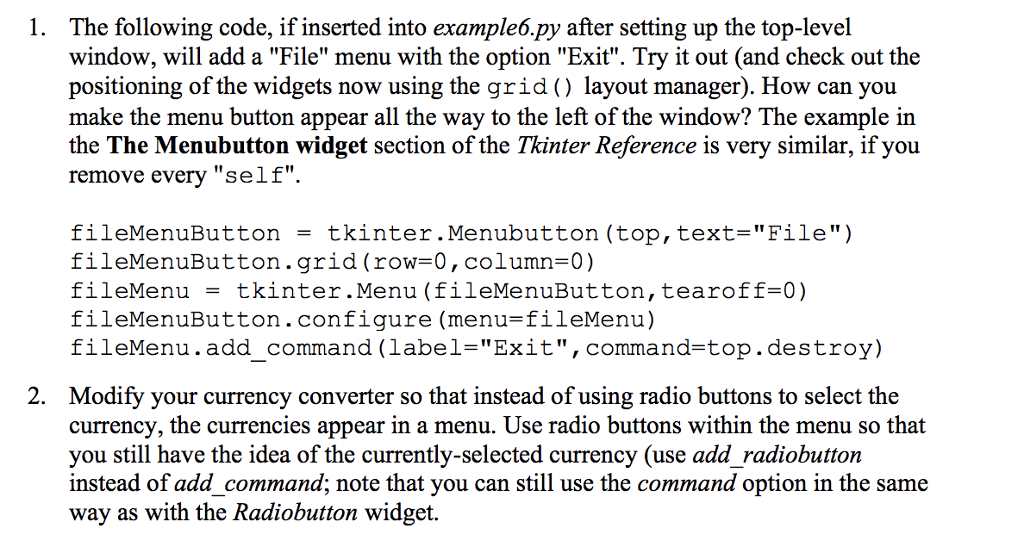
1. The following code, if inserted into example6.py after setting up the top-level window, will add a "File" menu with the option "Exit". Try it out (and check out the positioning of the widgets now using the grid) layout manager). How can you make the menu button appear all the way to the left of the window? The example in the The Menubutton widget section of the Tkinter Reference is very similar, if you remove every "self". fileMenuButton = tkinter. Menubutton (top, text="File") fileMenuButton.grid (row-0, column-0) fileMenu = tkinter.Menu (fileMenuButton, tearoff=0) fileMenuButton . configure (menu=fileMenu) fileMenu.add command (label-"Exit", command-top.destroy) 2. Modify your currency converter so that instead of using radio buttons to select the currency, the currencies appear in a menu. Use radio buttons within the menu so that you still have the idea of the currently-selected currency (use add radiobutton instead of add command; note that you can still use the command option in the same way as with the Radiobutton widget. 1. The following code, if inserted into example6.py after setting up the top-level window, will add a "File" menu with the option "Exit". Try it out (and check out the positioning of the widgets now using the grid) layout manager). How can you make the menu button appear all the way to the left of the window? The example in the The Menubutton widget section of the Tkinter Reference is very similar, if you remove every "self". fileMenuButton = tkinter. Menubutton (top, text="File") fileMenuButton.grid (row-0, column-0) fileMenu = tkinter.Menu (fileMenuButton, tearoff=0) fileMenuButton . configure (menu=fileMenu) fileMenu.add command (label-"Exit", command-top.destroy) 2. Modify your currency converter so that instead of using radio buttons to select the currency, the currencies appear in a menu. Use radio buttons within the menu so that you still have the idea of the currently-selected currency (use add radiobutton instead of add command; note that you can still use the command option in the same way as with the Radiobutton widget
Step by Step Solution
There are 3 Steps involved in it

Get step-by-step solutions from verified subject matter experts
 Study Help