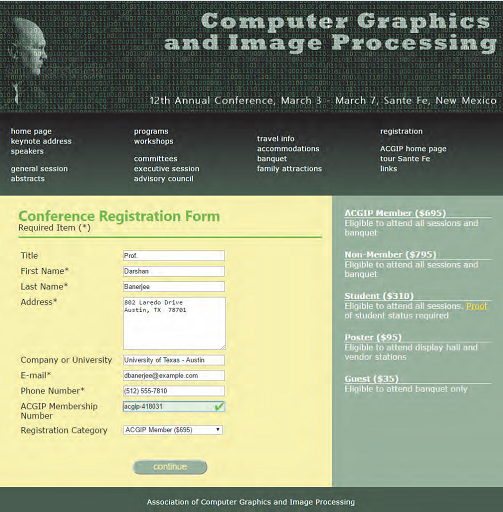
Conference Registration Form Required Item (*)
ACGIP Member ($695) Eligible to attend all sessions and banquet Non-Member ($795) Eligible to attend all sessions and banquet Student ($310) Eligible to attend all sessions. Proof of student status required Poster ($95) Eligible to attend display hall and vendor stations Guest ($35) Eligible to attend banquet only
Association of Computer Graphics and Image Processing
CSS file:
cg_validate.css
/* Validation Styles */ input:focus, select:focus, textarea:focus { background-color: rgb(245,245,140); }
cg_base.css
@charset "utf-8";
/* New Perspectives on HTML5 and CSS3, 7th Edition Tutorial 7 Case Problem 1 ACGIP Base Style Sheet Filename: cg_base.css
*/
/* Basic styles to be used with all devices and under all conditions */
article, aside, figcaption, figure, footer, header, main, nav, section { display: block; }
address, article, aside, blockquote, body, cite, div, dl, dt, dd, em, figcaption, figure, footer, h1, h2, h3, h4, h5, h6, header, html, img, li, main, nav, nav a, ol, p, section, span, ul, table, tr, td, th, col, colgroup { margin: 0; padding: 0; border: 0; font-size: 100%; background: transparent; -webkit-box-sizing: border-box; -moz-box-sizing: border-box; box-sizing: border-box; }
/* Set the default page element styles */
body { line-height: 1.2em; }
ul, ol { list-style: none; }
nav ul { list-style: none; list-style-image: none; }
nav a { text-decoration: none; }
cg_forms.css
/* New Perspectives on HTML and CSS, 7th Edition Tutorial 7 Case Problem 1
ACGIP Registration Form Style Sheet
Filename: cg_forms.css
*/
/* Form Layout Styles */
label { display: block; float: left; clear: left; margin: 5px; width: 200px; }
input, select, textarea { display: block; float: left; margin: 5px 0px; width: 200px; }
textarea { height: 100px; }
form p { clear: left; text-align: center; padding-top: 40px; }
input[type='submit'] { background-color: rgb(144, 170, 144); color: rgb(245,245,165); border-radius: 20px; float: none; display: inline; font-size: 1.1em; height: 30px; width: 150px;
}
@charset "utf-8";
/* New Perspectives on HTML and CSS, 7th Edition Tutorial 7 Case Problem 1
ACGIP General Style Sheet Filename: cg_styles.css
*/
/* HTML and Body styles */
html { background: rgb(51, 51, 51) url(cg_back.png); font-family: Verdana, Geneva, sans-serif; height: 100%; }
body { background-color: white; box-shadow: black 20px 0px 40px, black -20px 0px 40px; border-left: 3px solid black; border-right: 3px solid black; display: -webkit-flex; display: flex; -webkit-flex-flow: row wrap; flex-flow: row wrap; margin: 0px auto; min-width: 320px; max-width: 1020px; width: 100%; }
/* Header styles */
header { width: 100%; }
header img#logoimg { display: block; width: 100%; }
/* Navigation Styles */
nav { width: 100%; }
nav ul { background: linear-gradient(to bottom, black, rgb(44, 70, 44)); -moz-column-width: 200px; -webkit-column-width: 200px; column-width: 200px;
-moz-column-gap: 25px; -webkit-column-gap: 25px; column-gap: 25px; padding: 25px; }
nav ul li.newgroup { margin-top: 15px; }
nav ul li a { color: white; text-decoration: none; font-size: 0.9em; }
nav a:hover { color: rgb(191, 231, 191); text-decoration: underline; }
/* Section Styles */
section { background: rgb(245,245,165); -webkit-flex: 2 1 421px; flex: 2 1 421px; padding: 10px 20px 20px 40px; }
section h1 { font-family: Segoe, "Segoe UI", "DejaVu Sans", "Trebuchet MS", Verdana, sans-serif; font-size: 1.8em; margin: 20px 0px 5px; color: rgb(83, 183, 51); }
section > p { margin-bottom: 20px; padding-bottom: 9px; border-bottom: 3px solid rgb(83, 183, 51); }
/* Aside Styles */
aside { background: rgb(144, 170, 144); color: white; -webkit-flex: 1 2 220px; flex: 1 2 220px ; padding: 25px; }
dt { font-size: 1em; border-bottom: 1px solid white; font-weight: bold; }
dd { margin-bottom: 25px; }
dl a { color: gold; }
/* Footer styles */
footer { color: white; background: rgb(44, 70, 44); height: 70px; padding-top: 20px; text-align: center; font-size: 0.9em; width: 100%; }
/* =============================== Mobile Styles: 0px to 640px =============================== */ @media only screen and (max-width: 640px) {
section h1 { font-size: 1.5em; } section p { font-size: 0.9em; } nav { -webkit-order: 99; order: 99; } footer { -webkit-order: 100; order: 100; } }
/* ============================================= Tablet and Desktop Styles: greater than 640px ============================================= */ @media only screen and (min-width: 641px) {
}
Computer Graphics and Image Processing 12th Annual Conference, March 3o March ,Sante Fe, New Mexico program workshops home page keynote address speakers registration ACGIP home page links travel info banquet family attractions general session abstracts advisory council Conference Registration Form Required Item) ACGIP Member ($695) Eligible to attend all sessions and banquet Title First Name* Last Name Address* Darshan Banerie 892 Laredo Drive Non-Member ($795) Eligible to attend all sessions and banquet Student ($310) Eligible to attend all sessions. Proof of student status required ,TX 73701 Poster ($95) Eligible to attend display hall and vendor stations Company or University yoTeas-Austn E-mail Phone Number ACGIP Membership o410031 cbaneree3exampla.com Guest ($3S) Eligible to attend banquet only 512) 555-7810 Number Registration Category ACGP Mamber (5695) Association of Computer Graphics and Image Processing 








 Study Help