







Question: HTML 596 HTML 5 and CSS | Tutorial 7 Designing a Web Form Figure 7-65 Registration form for the ACGIP Conference homepa abstract Title
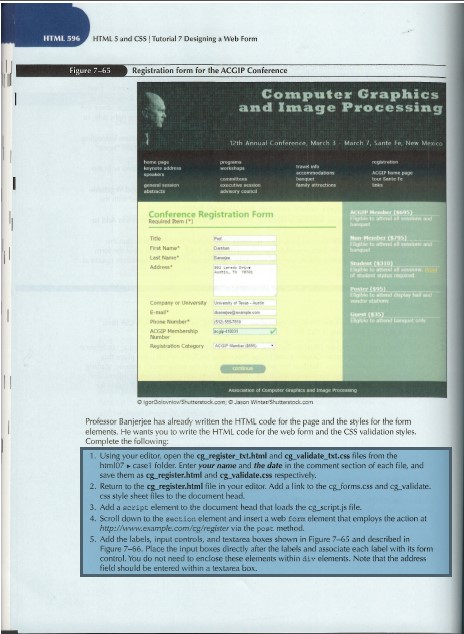
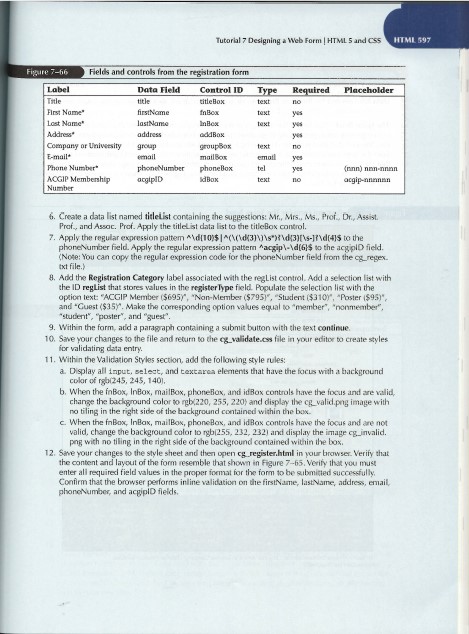
HTML 596 HTML 5 and CSS | Tutorial 7 Designing a Web Form Figure 7-65 Registration form for the ACGIP Conference homepa abstract Title First Name Last Addre Company of University Conference Registration Form Required [] Computer Graphics and Image Processing progra workshop Number ACGIP Membership Namber Registration Category Ac 12th Annual Conference, March 3 March 7, Sante Fe, New Mexico La mag.com tra banque Actice of Computers and image igorelovniow/Shutterstock.com: Jason WinteShuttock.com ACCEP tour S links ACCP Hber (695) gta al sessen and Stud (310) red Poster (195) Elable and captay hall and Gost (15) Et to attendongant only Professor Banjerjee has already written the HTML code for the page and the styles for the form elements. He wants you to write the HTML code for the web form and the CSS validation styles. Complete the following: 1. Using your editor, open the cg register_txt.html and cg_validate_txt.css files from the html07 casel folder. Enter your name and the date in the comment section of each file, and save them as cg_register.html and cg_validate.css respectively. 2. Return to the cg register.html file in your editor. Add a link to the cg forms.css and cg_validate. css style sheet files to the document head. 3. Add a script element to the document head that loads the cg_script.js file. 4. Scroll down to the section element and insert a web form element that employs the action at http://www.example.com/cg/register via the post method. 5. Add the labels, input controls, and textarea boxes shown in Figure 7-65 and described in Figure 7-66. Place the input boxes directly after the labels and associate each label with its form control. You do not need to enclose these elements within div elements. Note that the address field should be entered within a textarea box. Figure 7-66 Label Title First Name Last Name Address Company or University E-mail* Fields and controls from the registration form Control ID titleBox InBox InBox Phone Number ACGIP Membership Number Data Field title firstName lastName address Tutorial 7 Designing a Web Form | HTML 5 and CSS addBox groupBox mailbox phoneNumber phoneBox acgipID group email Type text text text text email tel text Required no yes yes yes no yes yes no Placeholder (nnn) nnn-nnnn acgip-nnnnnn 6. Create a data list named titleList containing the suggestions: Mr., Mrs., Ms., Prof., Dr., Assist. Prof., and Assoc. Prof. Apply the titleList data list to the titleBox control. 7. Apply the regular expression pattern ^\d{10}$ ]^(\(\d{3}\}\s*)\d(3)[\s-\d(41$ to the phoneNumber field. Apply the regular expression pattern ^acgip\-\d(6)$ to the acgipiD field. (Note: You can copy the regular expression code for the phoneNumber field from the cg_regex. txt file.) 8. Add the Registration Category label associated with the regList control. Add a selection list with the ID reglist that stores values in the register Type field. Populate the selection list with the option text: "ACGIP Member ($695), "Non-Member ($795)", "Student ($310)", "Poster ($95)", and "Guest ($35)". Make the corresponding option values equal to "member", "nonmember", "student", "poster", and "guest". 9. Within the form, add a paragraph containing a submit button with the text continue. 10. Save your changes to the file and return to the cg validate.css file in your editor to create styles for validating data entry. 11. Within the Validation Styles section, add the following style rules: a. Display all input, select, and textarea elements that have the focus with a background color of rgb(245, 245, 140). HTML 597 b. When the inBox, InBox, mailBox, phoneBox, and idBox controls have the focus and are valid, change the background color to rgb(220, 255, 220) and display the cg_valid.png image with no tiling in the right side of the background contained within the box. c. When the fnBox, InBax, mailBox, phoneBox, and idBox controls have the focus and are not valid, change the background color to rgb(255, 232, 232) and display the image cg_invalid. png with no tiling in the right side of the background contained within the box. 12. Save your changes to the style sheet and then open cg register.html in your browser. Verify that the content and layout of the form resemble that shown in Figure 7-65. Verify that you must enter all required field values in the proper format for the form to be submitted successfully. Confirm that the browser performs inline validation on the firstName, lastName, address, email, phoneNumber, and acgipiD fields.
Step by Step Solution
3.33 Rating (153 Votes )
There are 3 Steps involved in it
Note The modifications are highl... View full answer

Get step-by-step solutions from verified subject matter experts
 Study Help