







Question: help? #python Please provide example of output and Content of CSV file. refer to: https://www.chegg.com/homework-help/questions-and-answers/help-python-use-songsjson-file-example-refer-https-wwwcheggcom-homework-help-questions-ans-q109344968?aut Songs.json The below code represents the required code. { song1:
help? #python
Please provide example of output and Content of CSV file.
refer to: https://www.chegg.com/homework-help/questions-and-answers/help-python-use-songsjson-file-example-refer-https-wwwcheggcom-homework-help-questions-ans-q109344968?aut
Songs.json
The below code represents the required code.
{
"song1": {
"genre": "g1",
"album": "a1",
"rating": "r1",
"other": "some data1"
},
"song2": {
"genre": "g2",
"album":"a2",
"rating": "r2", "other": "some data2"
},
"song3": {
"genre": "g3",
"album": "a3",
"rating": "r3",
"other": "some data3"
},
"song4": {
"genre": "g4",
"album":"a4",
"rating": "r4",
"other": "some data4"
}
}
# Python 3 code import json import csv
# function to read json file and return file data as list def read_file(file):
# reading json file data = json.load(file)
import json
import csv
# function to read json file and return file data as list
def read_file(file):
#reading json file
data json.load(file)
#List to store file data
songs = []
# iterating each song in data
for i in data:
#creating a List with song name
songdata = [i]
# iterating each dictionary associated with song
for j in data[i]:
#adding song's genre, album, rating, other data to songdata
songdata.append(data[i][j])
#adding songdata to song
songs.append(songdata)
# returning songs
return songs
#function to display song's data
def display (songs):
# iterating each song
for song in songs:
#song[0] has song's name
#song[1] has song's genre
#song[2] has song's album
#song[3] has song's rating
#song[4] has song's other data
print("Song name: song[0])
print("Song genre:song[1])
print("Song album: song[2])
print("Song rating: song[3])
print("Song other data: ", song[4])
print(" ")
#function to create playlist
def create playlist (songs):
#List to store selected songs
playlist = []
choice input("Would you like to add a song to your playlist (yeso): ")
#run this loop till choice is "yes"
while choice = "yes":
#taking user input for song name
songname= input("Enter song name: ")
#integer variable to check if entered song exists or not
flag = 0
# iterating each song
for song in songs:
#found song
if songname= song[0]:
#adding song to playlist
playlist.append(song)
flag = 1
break
#song does not exist
if flag == 0:
print("This song does not exist!")
#asking user to give its choice
choice= Input("Would you like to add a song to your playlist (yeso): ")
# return playlist
return playlist
#function to create and write csv file
def write_csv(playlist):
#header of csv file
header = ["Song Name", "Song Genre", "Song Album", "Song Rating",
"Song Other Data"]
#create "song CSV.csv file if does not exist in write mode
with open("songsCSV.csv", "w") as f:
# creating csv writer
writer = csv.writer(f)
#writing header to csv file
writer.writerow(header)
# iterating each song in the playlist
for song in playlist:
#writing each song data to csv file
writer.writerow(song)
#main function
def main():
# run this loop till valid file name has not entered
while True:
# taking user input for file name
filename Input("Enter file name: ")
#try block
try:
# open file
file = open(filename)
break
# except block
except:
# error message
print("Can not open the file.")
#calling read_file()
songs read_file(file)
#calling display()
display(songs)
# Calling create_playlist()
playlist create_playlist (songs)
#calling write_csv()
write_csv(playlist)
#calling main()
main()
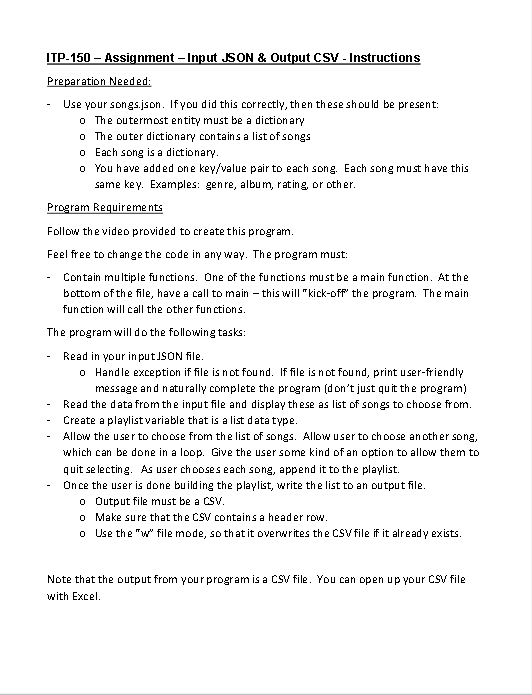
ITP-150 - Assignment - Input JSON \& Output CSV - Instructions Preparation Needed: - Use your songs.json. Ifyou did this correctly, then these should be present: o The outermost entity must be a dictionary o The outer dictionary contains a list of songs o Each song is a dictionary. o You have added one key/value pair to each song. Each song must have this same key. Examples: genre, album, rating, or other. Program Requirements Follow the video provided to create this program. Feel free to change the code in any way. The program must: - Contain multiple functions. One of the functions must be a main function. At the bottom of the file, have a call to main - this will "kick-off" the program. The main function will call the other functions. The program will do the following tasks: - Read in your input Json file. 0 Handle exception if file is not found. If file is not found, print user-friendly message and naturally complete the program (don't just quit the program) - Read the data from the input file and display these as list of song to choose from. - Create a playlistvariable that is a list data type. - Allow the user to choose from the list of songs. Allow user to choose another song, which can be done in a loop. Give the user some kind of an option to allow them to quit selecting. As user chooses each song, append it to the playlist. - Once the user is done building the playlist, write the list to an output file. o Output file must be a csv. - Make sure that the CSV contains a header row. 0 Use the "w" file mode, so that it ovenurites the CSV file if it already exists. Note that the output from your program is a CSV file. You can open up your CSV file with Excel
Step by Step Solution
There are 3 Steps involved in it

Get step-by-step solutions from verified subject matter experts
 Study Help