







Question: Help with C#, I need to be able to save/load items from a file into my listview. The code below is what i currently have.
Help with C#, I need to be able to save/load items from a file into my listview. The code below is what i currently have. When they press Save i would like it to save in a textfile. Then they could load it by pressing the load button which would read the textfile and place it into the listview. I tried doing this by tokenizing but I kept getting errors.
using System; using System.Collections.Generic; using System.ComponentModel; using System.Data; using System.Drawing; using System.IO; using System.Linq; using System.Text; using System.Threading.Tasks; using System.Windows.Forms;
namespace cars { public partial class Form2 : Form { public Form2() { InitializeComponent();
listView1.View = View.Details; listView1.FullRowSelect = true;
listView1.Columns.Add("Make", 60); listView1.Columns.Add("Model", 60); listView1.Columns.Add("Color", 50); listView1.Columns.Add("Miles", 50); listView1.Columns.Add("Condition", 90); listView1.Columns.Add("Interior", 60); listView1.Columns.Add("Highway MPG", 90); listView1.Columns.Add("City MPG", 90); listView1.Columns.Add("Price", 50); }
private void add(string make, string model, string color, string miles, string condition, string interior, string highway, string city, string price) { string[] row = { make, model, color, miles, condition, interior, highway, city, price }; ListViewItem item = new ListViewItem(row); listView1.Items.Add(item); }
private void update() { listView1.SelectedItems[0].SubItems[0].Text = textBoxMake.Text; listView1.SelectedItems[0].SubItems[0].Text = textBoxModel.Text; listView1.SelectedItems[0].SubItems[0].Text = textBoxColor.Text; listView1.SelectedItems[0].SubItems[0].Text = textBoxMiles.Text; listView1.SelectedItems[0].SubItems[0].Text = textBoxCondition.Text; listView1.SelectedItems[0].SubItems[0].Text = textBoxInterior.Text; listView1.SelectedItems[0].SubItems[0].Text = textBoxHighway.Text; listView1.SelectedItems[0].SubItems[0].Text = textBoxCity.Text; listView1.SelectedItems[0].SubItems[0].Text = textBoxPrice.Text;
//After you update an item it clears the text textBoxMake.Text = ""; textBoxModel.Text = ""; textBoxColor.Text = ""; textBoxMiles.Text = ""; textBoxCondition.Text = ""; textBoxInterior.Text = ""; textBoxHighway.Text = ""; textBoxCity.Text = ""; textBoxPrice.Text = ""; }
private void delete() { if (MessageBox.Show("Are you sure you want to delete this item?", "Delete", MessageBoxButtons.OKCancel,MessageBoxIcon.Warning)==DialogResult.OK) { listView1.Items.RemoveAt(listView1.SelectedIndices[0]);
//After you delete it clears text textBoxMake.Text = ""; textBoxModel.Text = ""; textBoxColor.Text = ""; textBoxMiles.Text = ""; textBoxCondition.Text = ""; textBoxInterior.Text = ""; textBoxHighway.Text = ""; textBoxCity.Text = ""; textBoxPrice.Text = ""; } }
private void buttonAdd_Click(object sender, EventArgs e) { add(textBoxMake.Text, textBoxModel.Text, textBoxColor.Text, textBoxMiles.Text, textBoxCondition.Text, textBoxInterior.Text, textBoxHighway.Text, textBoxCity.Text, textBoxPrice.Text);
//After you add an item to list it clears text textBoxMake.Text = ""; textBoxModel.Text = ""; textBoxColor.Text = ""; textBoxMiles.Text = ""; textBoxCondition.Text = ""; textBoxInterior.Text = ""; textBoxHighway.Text = ""; textBoxCity.Text = ""; textBoxPrice.Text = ""; }
private void buttonUpdate_Click(object sender, EventArgs e) { update(); }
private void buttonDelete_Click(object sender, EventArgs e) { delete(); }
private void listView1_MouseClick(object sender, MouseEventArgs e) { textBoxMake.Text = listView1.SelectedItems[0].SubItems[0].Text; textBoxModel.Text = listView1.SelectedItems[0].SubItems[1].Text; textBoxColor.Text = listView1.SelectedItems[0].SubItems[2].Text; textBoxMiles.Text = listView1.SelectedItems[0].SubItems[3].Text; textBoxCondition.Text = listView1.SelectedItems[0].SubItems[4].Text; textBoxInterior.Text =listView1.SelectedItems[0].SubItems[5].Text; textBoxHighway.Text = listView1.SelectedItems[0].SubItems[6].Text; textBoxCity.Text = listView1.SelectedItems[0].SubItems[7].Text; textBoxPrice.Text = listView1.SelectedItems[0].SubItems[8].Text; }
private void buttonSearch_Click(object sender, EventArgs e) {
}
private void buttonSave_Click(object sender, EventArgs e) {
} } }
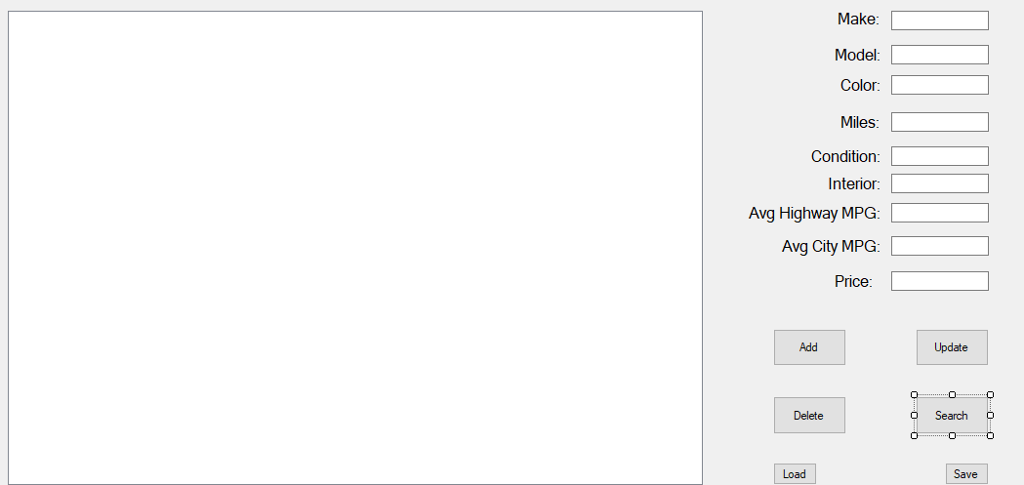
Make Model: Color Miles: Condition: Interior: Avg Highway MPG: Avg City MPG: L Price: Add Update Search Delete Load Save Make Model: Color Miles: Condition: Interior: Avg Highway MPG: Avg City MPG: L Price: Add Update Search Delete Load Save
Step by Step Solution
There are 3 Steps involved in it

Get step-by-step solutions from verified subject matter experts
 Study Help