







Question: Help with HTML and CSS I have gotten this far, and I am lost. Has to have *CSS* First please add grey to the left
Help with HTML and CSS
I have gotten this far, and I am lost. Has to have *CSS*
First please add grey to the left where the panel is, to create a grey box down to bottom of the page, but slighty covering the globe(see through). Also keep the float and shadow afect. lastly add space between the nav bar and the body.
Then please but the "title" - "date of birth" closer together
If one would post after code is posted, on how and where I messed up, that would be well appricated!!
***see picture below** that is the finished product! THANKS!!
HTML
CSS
.background { height: 100%; left: 0; position: absolute; top: 110px; z-index: -1; }
#background1 { background: url("globe.png") no-repeat 0 0; width: 80%; }
#background2 { background: url("gray_bar.jpg") no-repeat 0 0; width: 8%; opacity: .5; }
h2 {font-size: 32px; } .button { background-color: #87CEFA; border: none; border-radius: 25px; color: blue; padding: 6px 14px; text-align: center; text-decoration: none; font-size: 14px; cursor: pointer; width: 90px; position: absolute;
} .Button1 .button { top: 15%;
} .Button2 .button { top: 20%; } .Button3 .button { top: 25%; } .Button4 .button { top: 30%; }
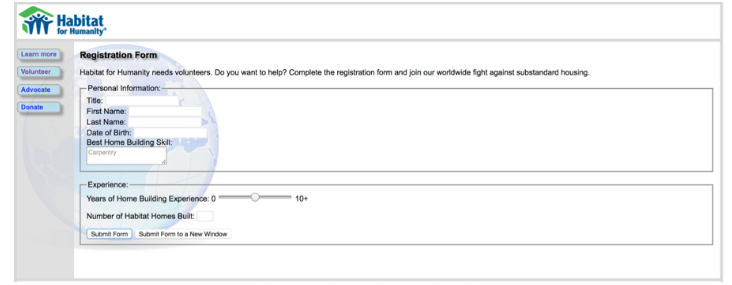
Habitat for Humanity Leam more Registration Form olunteerHabitat for Humanity needs volunteers. Do you want to help? Complete the registration form and join our worldwide Sght against substandard housing Advocate Personal Infrm ation: Titde First Name: Last Name Date of Birth Best Home Building Skl: Experience Years of Hom e Building Experience: 0- Number of Habitat Homes Built Somi Form Suomit Fom to a New 0 -10. a New Window
Step by Step Solution
There are 3 Steps involved in it

Get step-by-step solutions from verified subject matter experts
 Study Help