







Question: Help with this Arduino problem // constants won 't change. Used here to set a pin number: const int ledPinLED BUILTIN;// the number of the
Help with this Arduino problem
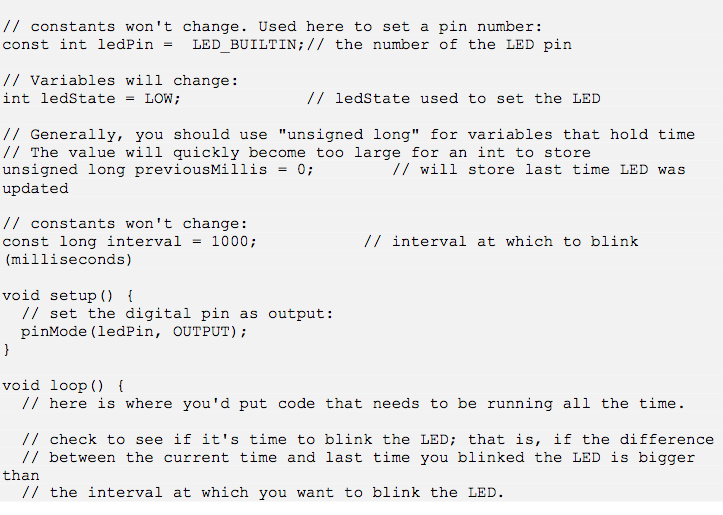
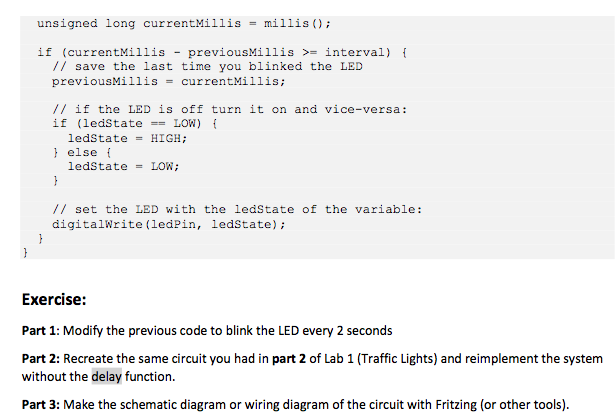
// constants won 't change. Used here to set a pin number: const int ledPinLED BUILTIN;// the number of the LED pin // Variables will change: int ledState -LOW; // ledState used to set the LED // Generally, you should use "unsigned long" for variables that hold time // The value will quickly become too large for an int to store unsigned long previousMillis-0; updated // will store last time LED was // constants won't change: const long interval-1000; (milliseconds) // interval at which to blink void setup) // set the digital pin as output: pinMode (ledPin, OUTPUT) void loop) ( // here is where you'd put code that needs to be running all the time // check to see if it's time to blink the LED; that is, if the difference // between the current time and last time you blinked the LED is biggei // the interval at which you want to blink the LED // constants won 't change. Used here to set a pin number: const int ledPinLED BUILTIN;// the number of the LED pin // Variables will change: int ledState -LOW; // ledState used to set the LED // Generally, you should use "unsigned long" for variables that hold time // The value will quickly become too large for an int to store unsigned long previousMillis-0; updated // will store last time LED was // constants won't change: const long interval-1000; (milliseconds) // interval at which to blink void setup) // set the digital pin as output: pinMode (ledPin, OUTPUT) void loop) ( // here is where you'd put code that needs to be running all the time // check to see if it's time to blink the LED; that is, if the difference // between the current time and last time you blinked the LED is biggei // the interval at which you want to blink the LED
Step by Step Solution
There are 3 Steps involved in it

Get step-by-step solutions from verified subject matter experts
 Study Help