







Question: help work on this step by step on excel. Tables Assessment April owns a rental house. She rents the house to college students and includes
help work on this step by step on excel.
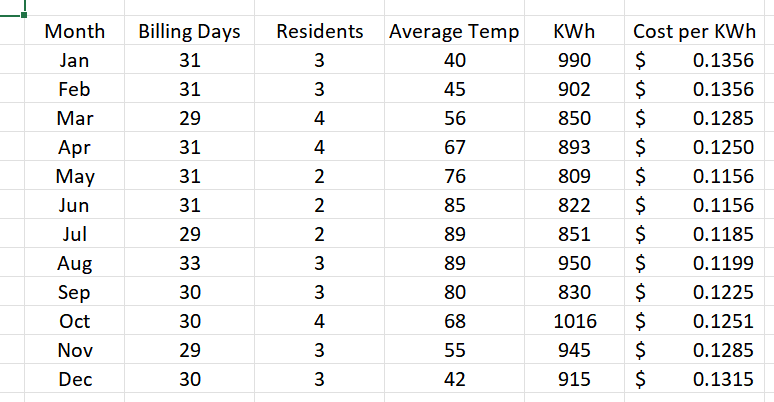
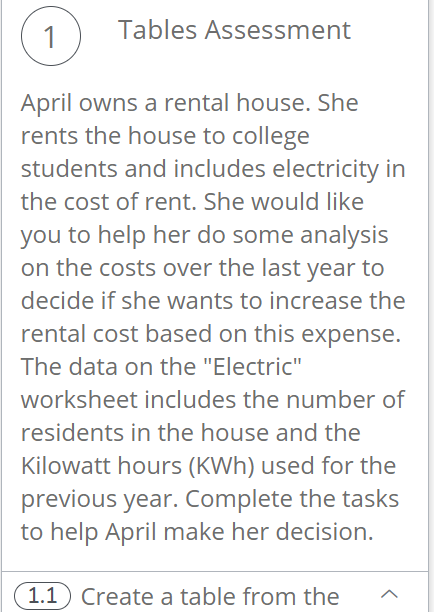
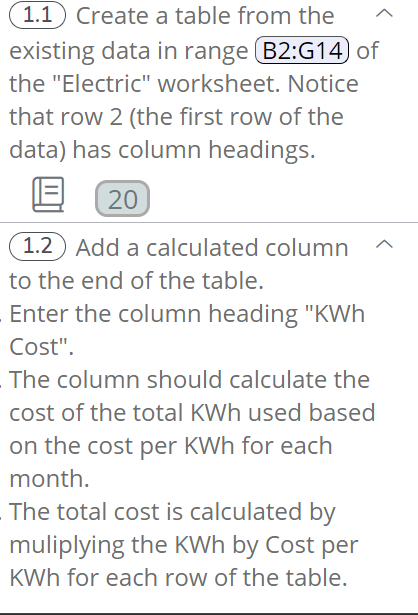
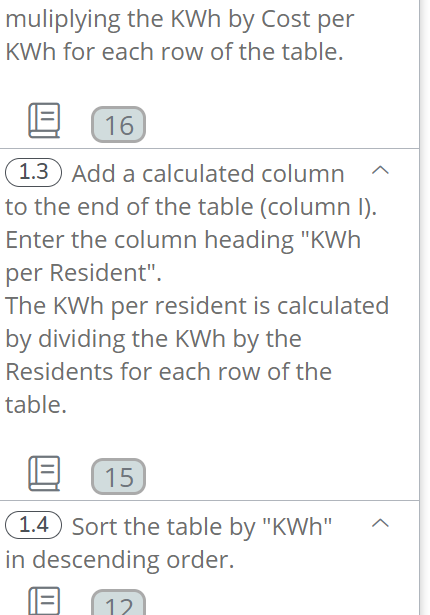
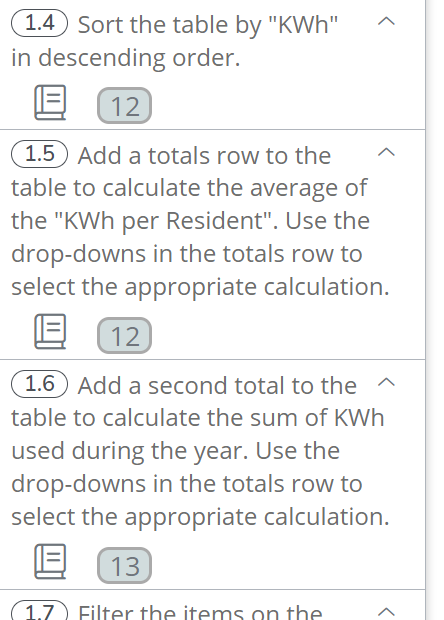
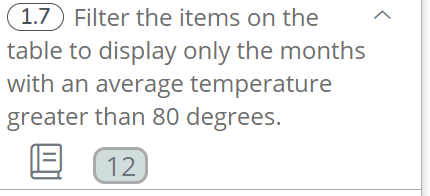
Tables Assessment April owns a rental house. She rents the house to college students and includes electricity in the cost of rent. She would like you to help her do some analysis on the costs over the last year to decide if she wants to increase the rental cost based on this expense. The data on the "Electric" worksheet includes the number of residents in the house and the Kilowatt hours (KWh) used for the previous year. Complete the tasks to help April make her decision. (1.1) Create a table from the (1.7) Filter the items on the table to display only the months with an average temperature greater than 80 degrees. \begin{tabular}{|c|c|c|c|c|c|c|} \hline Month & Billing Days & Residents & Average Temp & KWh & \multicolumn{2}{|c|}{ Cost per KWh } \\ \hline Jan & 31 & 3 & 40 & 990 & $ & 0.1356 \\ \hline Feb & 31 & 3 & 45 & 902 & $ & 0.1356 \\ \hline Mar & 29 & 4 & 56 & 850 & $ & 0.1285 \\ \hline Apr & 31 & 4 & 67 & 893 & $ & 0.1250 \\ \hline May & 31 & 2 & 76 & 809 & $ & 0.1156 \\ \hline Jun & 31 & 2 & 85 & 822 & $ & 0.1156 \\ \hline Jul & 29 & 2 & 89 & 851 & $ & 0.1185 \\ \hline Aug & 33 & 3 & 89 & 950 & $ & 0.1199 \\ \hline Sep & 30 & 3 & 80 & 830 & $ & 0.1225 \\ \hline Oct & 30 & 4 & 68 & 1016 & $ & 0.1251 \\ \hline Nov & 29 & 3 & 55 & 945 & $ & 0.1285 \\ \hline Dec & 30 & 3 & 42 & 915 & $ & 0.1315 \\ \hline \end{tabular} (1.4) Sort the table by "KWh" in descending order. (1.5) Add a totals row to the table to calculate the average of the "KWh per Resident". Use the drop-downs in the totals row to select the appropriate calculation. (1.6) Add a second total to the table to calculate the sum of KWh used during the year. Use the drop-downs in the totals row to select the appropriate calculation. (1.1) Create a table from the existing data in range B2:G14 of the "Electric" worksheet. Notice that row 2 (the first row of the data) has column headings. (1.2 Add a calculated column to the end of the table. Enter the column heading "KWh Cost". The column should calculate the cost of the total KWh used based on the cost per KWh for each month. The total cost is calculated by muliplying the KWh by Cost per KWh for each row of the table. muliplying the KWh by Cost per KWh for each row of the table. 1.3 Add a calculated column to the end of the table (column I). Enter the column heading "KWh per Resident". The KWh per resident is calculated by dividing the KWh by the Residents for each row of the table. (1.4 Sort the table by "KWh" in descending order. Tables Assessment April owns a rental house. She rents the house to college students and includes electricity in the cost of rent. She would like you to help her do some analysis on the costs over the last year to decide if she wants to increase the rental cost based on this expense. The data on the "Electric" worksheet includes the number of residents in the house and the Kilowatt hours (KWh) used for the previous year. Complete the tasks to help April make her decision. (1.1) Create a table from the (1.7) Filter the items on the table to display only the months with an average temperature greater than 80 degrees. \begin{tabular}{|c|c|c|c|c|c|c|} \hline Month & Billing Days & Residents & Average Temp & KWh & \multicolumn{2}{|c|}{ Cost per KWh } \\ \hline Jan & 31 & 3 & 40 & 990 & $ & 0.1356 \\ \hline Feb & 31 & 3 & 45 & 902 & $ & 0.1356 \\ \hline Mar & 29 & 4 & 56 & 850 & $ & 0.1285 \\ \hline Apr & 31 & 4 & 67 & 893 & $ & 0.1250 \\ \hline May & 31 & 2 & 76 & 809 & $ & 0.1156 \\ \hline Jun & 31 & 2 & 85 & 822 & $ & 0.1156 \\ \hline Jul & 29 & 2 & 89 & 851 & $ & 0.1185 \\ \hline Aug & 33 & 3 & 89 & 950 & $ & 0.1199 \\ \hline Sep & 30 & 3 & 80 & 830 & $ & 0.1225 \\ \hline Oct & 30 & 4 & 68 & 1016 & $ & 0.1251 \\ \hline Nov & 29 & 3 & 55 & 945 & $ & 0.1285 \\ \hline Dec & 30 & 3 & 42 & 915 & $ & 0.1315 \\ \hline \end{tabular} (1.4) Sort the table by "KWh" in descending order. (1.5) Add a totals row to the table to calculate the average of the "KWh per Resident". Use the drop-downs in the totals row to select the appropriate calculation. (1.6) Add a second total to the table to calculate the sum of KWh used during the year. Use the drop-downs in the totals row to select the appropriate calculation. (1.1) Create a table from the existing data in range B2:G14 of the "Electric" worksheet. Notice that row 2 (the first row of the data) has column headings. (1.2 Add a calculated column to the end of the table. Enter the column heading "KWh Cost". The column should calculate the cost of the total KWh used based on the cost per KWh for each month. The total cost is calculated by muliplying the KWh by Cost per KWh for each row of the table. muliplying the KWh by Cost per KWh for each row of the table. 1.3 Add a calculated column to the end of the table (column I). Enter the column heading "KWh per Resident". The KWh per resident is calculated by dividing the KWh by the Residents for each row of the table. (1.4 Sort the table by "KWh" in descending order
Step by Step Solution
There are 3 Steps involved in it

Get step-by-step solutions from verified subject matter experts
 Study Help