







Question: Here are calculator program. import java.awt.BorderLayout; import java.awt.Container; import java.awt.GridBagConstraints; import java.awt.GridBagLayout; import java.awt.Insets; import java.awt.event.ActionEvent; import java.awt.event.ActionListener; import javax.swing.JButton; import javax.swing.JFrame; import javax.swing.JPanel; import
 Here are calculator program.
import java.awt.BorderLayout;
import java.awt.Container;
import java.awt.GridBagConstraints;
import java.awt.GridBagLayout;
import java.awt.Insets;
import java.awt.event.ActionEvent;
import java.awt.event.ActionListener;
import javax.swing.JButton;
import javax.swing.JFrame;
import javax.swing.JPanel;
import javax.swing.JTextField;
public class Calculator extends JFrame implements ActionListener {
// defining required UI components
JPanel numPanel, outputPanel;
JTextField ioText;
JButton[] numbers;
JButton dot, add, sub, div, mult, equal, clear;
Container pane;
/**
* constructor to initialize the GUI
*/
public Calculator() {
setSize(300, 300);
setDefaultCloseOperation(EXIT_ON_CLOSE);
setLocationRelativeTo(null);
// initializing all components
pane = getContentPane();
pane.setLayout(new BorderLayout());
outputPanel = new JPanel();
ioText = new JTextField(13);
ioText.setEditable(false);
outputPanel.add(ioText);
// initializing grid of numbers
initNumbersPanel();
// adding numbers and text panel to the frame using BorderLayout
pane.add(outputPanel, BorderLayout.PAGE_START);
pane.add(numPanel, BorderLayout.CENTER);
pack();
setVisible(true);
}
/**
* Method to initialize the panel that contains numbers and operators
*/
public void initNumbersPanel() {
numPanel = new JPanel();
numPanel.setLayout(new GridBagLayout());
GridBagConstraints gbc = new GridBagConstraints();
gbc.fill = GridBagConstraints.HORIZONTAL;
gbc.insets = new Insets(5, 5, 5, 5);
numbers = new JButton[10];
gbc.gridy = 0;
gbc.gridx = 0;
for (int i = 1; i
/**
* Creating the button
*/
numbers[i] = new JButton("" + i);
/**
* Adding the action listener
*/
numbers[i].addActionListener(this);
/**
* Adding button to the panel
*/
numPanel.add(numbers[i], gbc);
gbc.gridx++;
if (gbc.gridx == 3) {
/**
* skipping to the next row, first column
*/
gbc.gridy++;
gbc.gridx = 0;
}
}
/**
* Adding the 0 button
*/
numbers[0] = new JButton("0");
numbers[0].addActionListener(this);
numPanel.add(numbers[0], gbc);
/**
* Adding plus button
*/
gbc.gridx++;
/**
* Adding the dot button
*/
dot = new JButton(".");
dot.addActionListener(this);
numPanel.add(dot, gbc);
gbc.gridx++;
// gbc.gridwidth=2;
gbc.gridwidth = 1;
add = new JButton("+");
add.addActionListener(this);
numPanel.add(add, gbc);
/**
* Adding minus button
*/
gbc.gridy++;
gbc.gridx = 0;
sub = new JButton("-");
sub.addActionListener(this);
numPanel.add(sub, gbc);
/**
* Adding mult button
*/
gbc.gridx++;
mult = new JButton("*");
mult.addActionListener(this);
numPanel.add(mult, gbc);
/**
* Adding div button
*/
gbc.gridx++;
div = new JButton("/");
div.addActionListener(this);
numPanel.add(div, gbc);
/**
* Adding equals button
*/
gbc.gridy++;
gbc.gridx = 0;
gbc.gridwidth = 2;
equal = new JButton("=");
equal.addActionListener(this);
numPanel.add(equal, gbc);
/**
* Adding clear button
*/
gbc.gridx += 2;
gbc.gridwidth = 1;
clear = new JButton("C");
clear.addActionListener(this);
numPanel.add(clear, gbc);
}
public static void main(String[] args) {
new Calculator();
}
/**
* method to append an operator to the textfield
*/
public void appendOperator(String op) {
String text = ioText.getText();
if (text.endsWith(" + ") || text.endsWith(" - ")
|| text.endsWith(" / ") || text.endsWith(" * ")
|| text.endsWith(".")) {
//replacing the existing operator with new one
text = text.substring(0, text.length() - 3);
}
text = text + " " + op + " ";
ioText.setText(text);
}
/**
* * Method to perform the calculation using the ExpressionSolver class I have
* * provided. It is not much complex and you can grab things so easily
* */
public void calculate() {
/**
* * Getting the expression from textfield
* */
String expression = ioText.getText();
//creating an ExpressionSolver object
ExpressionSolver solver=new ExpressionSolver(expression);
//solving
solver.solveExpression();
//displaying the result
ioText.setText(solver.getAnswer());
}
@Override
public void actionPerformed(ActionEvent e) {
if (ioText.getText().equalsIgnoreCase("Infinity")
|| ioText.getText().equalsIgnoreCase("NAN")) {
/**
* * If the textfield contains a previous value as infinity or NaN
* * (divided by 0), removing it
* */
ioText.setText("");
}
/**
* * Getting the source of click
* */
Object ob = e.getSource();
for (int i = 0; i
/**
* * If any of the numbers are clicked, appending that number
* */
if (ob.equals(numbers[i])) {
ioText.setText(ioText.getText().concat("" + i));
return;
}
}
if (ob.equals(dot)) {
/**
* * dot button clicked
* */
if (!ioText.getText().endsWith(".")) {
ioText.setText(ioText.getText().concat("."));
}
} else if (ob.equals(add)) {
appendOperator("+");
} else if (ob.equals(sub)) {
appendOperator("-");
} else if (ob.equals(mult)) {
appendOperator("*");
} else if (ob.equals(div)) {
appendOperator("/");
} else if (ob.equals(clear)) {
ioText.setText("");
} else if (ob.equals(equal)) {
/**
* * Equals button clicked, performing calculation
* */
calculate();
}
}
}
______________________________________________________
import java.util.ArrayList;
/**
* a class implemented to solve expressions
*/
public class ExpressionSolver {
// question in String format
private String question;
// array list containing each operand/operator in the expression
private ArrayList expression;
// answer in String format
private String answer;
// constructor taking an expression
public ExpressionSolver(String s) {
// setting expression
setExpression(s);
answer = "";
}
// method to set an expression
public void setExpression(String s) {
question = s;
// resetting array list
expression = new ArrayList();
// splitting input by white space to create an array of strings
String fields[] = s.split(" ");
// addinge each element to array list
for (String str : fields) {
expression.add(str);
}
answer = "";
}
// method to solve the expression. Assuming that the expression is in valid
// format
public void solveExpression() {
double operand1,operand2,result;
// looping as long there is a / operator present
while (expression.contains("/")) {
// finding index of /
int index = expression.indexOf("/");
// finding operands before and after index
operand1 = Double.parseDouble(expression.get(index - 1));
operand2 = Double.parseDouble(expression.get(index + 1));
// performing division operation
result = operand1 / operand2;
// replacing second operand
expression.set(index + 1, "" + result);
// removing operator
expression.remove(index);
// removing first operand
expression.remove(index - 1);
}
// doing the same for * operator
while (expression.contains("*")) {
int index = expression.indexOf("*");
operand1 = Double.parseDouble(expression.get(index - 1));
operand2 = Double.parseDouble(expression.get(index + 1));
result = operand1 * operand2;
expression.set(index + 1, "" + result);
expression.remove(index);
expression.remove(index - 1);
}
// doing the same for - operator
while (expression.contains("-")) {
int index = expression.indexOf("-");
operand1 = Double.parseDouble(expression.get(index - 1));
operand2 = Double.parseDouble(expression.get(index + 1));
result = operand1 - operand2;
expression.set(index + 1, "" + result);
expression.remove(index);
expression.remove(index - 1);
}
// doing the same for + operator
while (expression.contains("+")) {
int index = expression.indexOf("+");
operand1 = Double.parseDouble(expression.get(index - 1));
operand2 = Double.parseDouble(expression.get(index + 1));
result = operand1 + operand2;
expression.set(index + 1, "" + result);
expression.remove(index);
expression.remove(index - 1);
}
// if the expression is valid and had the operators +,-,* and / only,
// then the answer will be in index 0
answer = expression.get(0);
}
public String getAnswer() {
return answer;
}
public String toString() {
//returning question and answer
return question + " = " + answer;
}
}
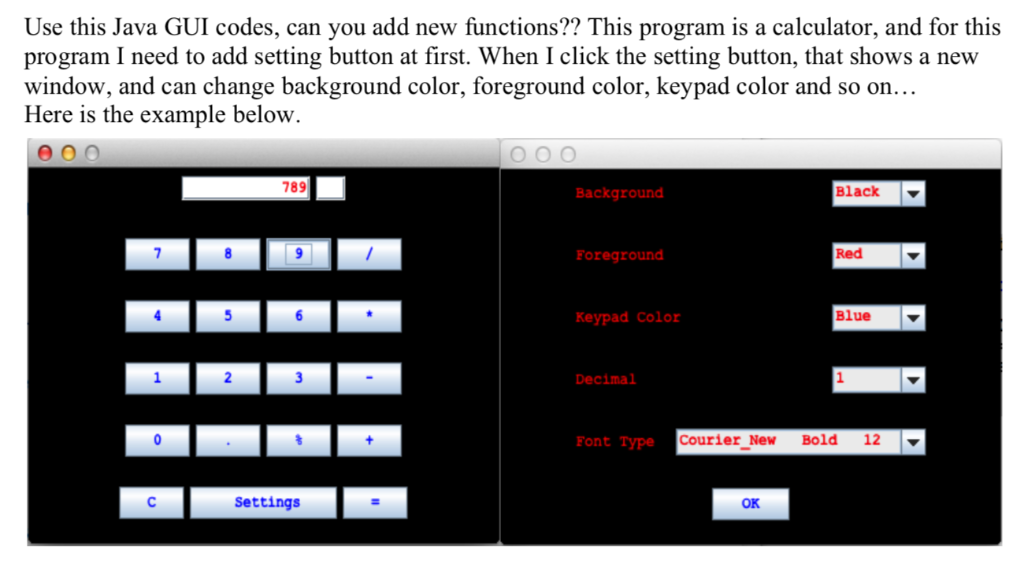
Use this Java GUI codes, can you add new functions?? This program is a calculator, and for this program I need to add setting button at first. When I click the setting button, that shows a new window, and can change background color, foreground color, keypad color and so on... Here is the example below. e00 789 Background Black Foreground Red Keypad Color Blue Decimal Font Type Courier New Bold 12 Settings OK Use this Java GUI codes, can you add new functions?? This program is a calculator, and for this program I need to add setting button at first. When I click the setting button, that shows a new window, and can change background color, foreground color, keypad color and so on... Here is the example below. e00 789 Background Black Foreground Red Keypad Color Blue Decimal Font Type Courier New Bold 12 Settings OK
Step by Step Solution
There are 3 Steps involved in it

Get step-by-step solutions from verified subject matter experts
 Study Help