







Question: I need help with my code using Eclipse IDE. The teacher wants us to make a spinning star moving to the left and at the
I need help with my code using Eclipse IDE. The teacher wants us to make a spinning star moving to the left and at the same time, it needs to keep shrinking and expanding to a certain size, just make it small and big. I'm going to post the code he gave us to make the star, it just opens a blank window, but I'm also going to post the code of the other moving objects we did during the class that should contain some code that can help with the Spinning Star. (Please leave some comments that can explain the code you used when you are making the code, so then I can see how it works.) Thank you
Blank code the one you should use to make the Spinning Star:
import java.awt.BorderLayout; import java.awt.Color; import java.awt.Dimension; import java.awt.EventQueue; import java.awt.Graphics; import java.awt.Graphics2D; import java.awt.Toolkit; import java.awt.geom.AffineTransform;
import javax.swing.JFrame; import javax.swing.JPanel; import javax.swing.Timer;
public class Star {
public Star() { JFrame jf = new JFrame("Star"); jf.setDefaultCloseOperation(JFrame.EXIT_ON_CLOSE); JPanel jp = new MyJPanel(); jf.add(jp, BorderLayout.CENTER); jf.pack(); jf.setResizable(false); jf.setLocationRelativeTo(null); jf.setVisible(true); }
public static void main(String[] args) { EventQueue.invokeLater(Star::new); }
class MyJPanel extends JPanel { private static final long serialVersionUID = 1L; private int FPS = 30; private long lastTime = 0;
public MyJPanel() { setBackground(Color.WHITE); setPreferredSize(new Dimension(1024, 768)); new Timer(1000 / FPS, ae -> repaint()).start(); lastTime = System.currentTimeMillis(); } @Override protected void paintComponent(Graphics g) { super.paintComponent(g); long now = System.currentTimeMillis(); System.out.println(now - lastTime); lastTime = now; Graphics2D g2d = (Graphics2D) g.create(); AffineTransform gat = new AffineTransform(); gat.translate(getWidth() / 2.0, getHeight() / 2.0); gat.scale(1.0, -1.0); g2d.transform(gat);
g2d.dispose(); Toolkit.getDefaultToolkit().sync(); } }
}
And the moving objects as a reference code:
import java.awt.BasicStroke; import java.awt.BorderLayout; import java.awt.Color; import java.awt.Dimension; import java.awt.EventQueue; import java.awt.Graphics; import java.awt.Graphics2D; import java.awt.Shape; import java.awt.Toolkit; import java.awt.geom.AffineTransform; import java.awt.geom.Ellipse2D; import java.awt.geom.Path2D; import java.awt.geom.Rectangle2D;
import javax.swing.JFrame; import javax.swing.JPanel; import javax.swing.Timer;
public class Draw {
public Draw() { JFrame jf = new JFrame("Draw"); jf.setDefaultCloseOperation(JFrame.EXIT_ON_CLOSE); JPanel jp = new MyJPanel(); jf.add(jp, BorderLayout.CENTER); jf.pack(); jf.setResizable(false); jf.setLocationRelativeTo(null); jf.setVisible(true); } public static void main(String[] args) { EventQueue.invokeLater(Draw::new);
} class MyJPanel extends JPanel { private static final long serialVersionUID = 1L; private int FPS = 30; private long lastTime = 0; private double rotation1 = 0.0; private double rotDelta1 = 1.0; private double rotation2 = 0.0; private double rotDelta2 = -0.5; private double translation3 = 0.0; private double transDelta3 = 2.0; public MyJPanel() { setBackground(Color.CYAN.darker()); setPreferredSize(new Dimension(1024, 768)); new Timer(1000 / FPS, ae -> repaint()).start(); lastTime = System.currentTimeMillis(); } @Override protected void paintComponent(Graphics g) { super.paintComponent(g); long now = System.currentTimeMillis(); System.out.println(now - lastTime); lastTime = now; Graphics2D g2d =(Graphics2D) g.create(); AffineTransform gat = new AffineTransform(); gat.translate(getWidth() / 2.0, getHeight() / 2.0); gat.scale(1.0, -1.0); g2d.transform(gat); g2d.setStroke(new BasicStroke(5.0f)); Rectangle2D r2d = new Rectangle2D.Double( -200.0, -200.0, 400.0, 400.0 ); AffineTransform at = new AffineTransform(); at.rotate(Math.toRadians(rotation1)); rotation1 += rotDelta1; Shape s = at.createTransformedShape(r2d); g2d.setPaint(new Color(128, 128, 0)); g2d.fill(s); g2d.setPaint(Color.BLACK); g2d.draw(s); Ellipse2D e2d = new Ellipse2D.Double( -100.0, -150.0, 200.0, 300.0 ); at = new AffineTransform(); at.rotate(Math.toRadians(rotation2)); rotation2 += rotDelta2; s = at.createTransformedShape(e2d); g2d.draw(s); Path2D p2d = new Path2D.Double(); p2d.moveTo(0.0, 50.0); p2d.lineTo(50.0, -50.); p2d.lineTo(-50.0, -50.0); p2d.closePath(); at = new AffineTransform(); at.translate(0.0, translation3); translation3 += transDelta3; if (translation3 > 250.0 || translation3
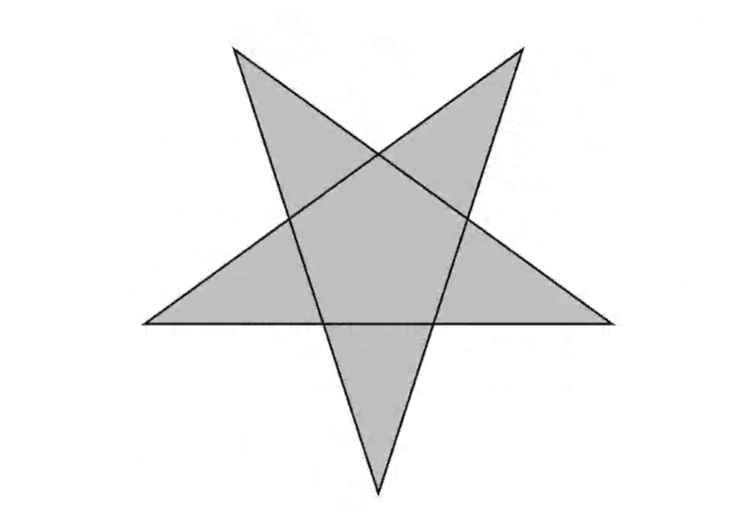
The star should look like this:
Shrinking:

Expanding:
Transcribed image text
Step by Step Solution
There are 3 Steps involved in it

Get step-by-step solutions from verified subject matter experts
 Study Help