







Question: Here are the directions I need only the SQL code not the database itself: 1. Basic CREATE TABLE Statement Requirements Use the table descriptions in
Here are the directions I need only the SQL code not the database itself:
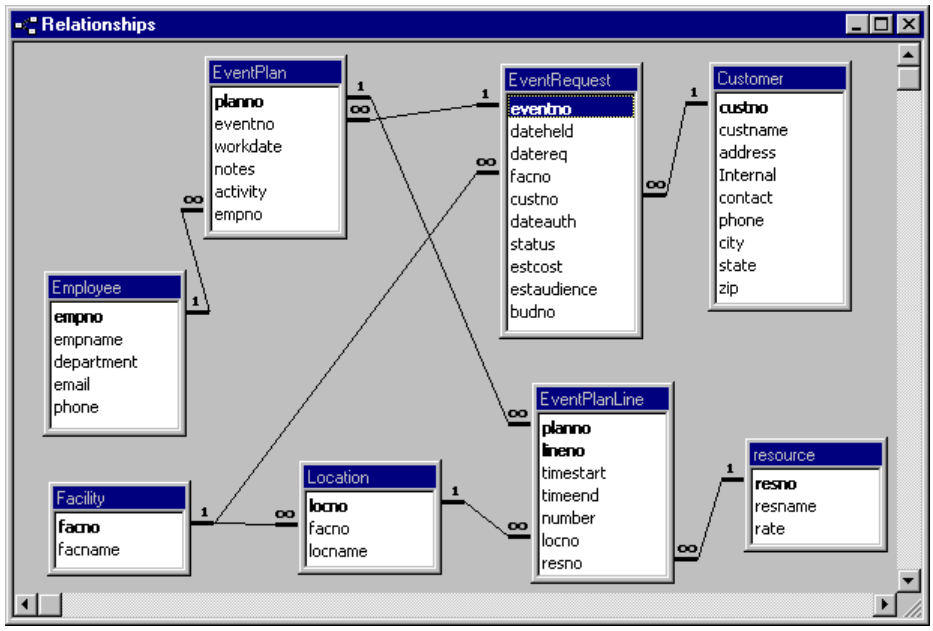
1. Basic CREATE TABLE Statement Requirements Use the table descriptions in the Intercollegiate Database background document. To ensure uniqueness, add the prefix, IAD to each table name. For example, EventRequest should be IADEventRequest. For primary key fields (CustNo, LocNo, EventNo, PlanNo, EmpNo, ResNo, and FacNo), use the VARCHAR data type with length 8. For consistency, corresponding foreign keys (such as EventRequest.CustNo) should also be the same data type and length. For the columns involving only dates use the DATE data type. The EventPlanLine.TimeStart and EventPlanLine.TimeEnd columns will store both date and time data so you should use the DATETIME data type. Use CHAR(1) for the Customer.Internal column.
2. Constraints After writing the basic CREATE TABLE statements, modify the statements with constraints and default clauses. You should specify a meaningful name for each CONSTRAINT clause and end with an appropriate suffix. For each primary key, you should specify a PRIMARY KEY constraint clause. For single column primary keys (CustNo, LocNo, EventNo, PlanNo, EmpNo, ResNo, and FacNo), only one field is in parentheses. For multiple column primary keys (combination of PlanNo and LineNo), all relevant keys are in parentheses. For each foreign key, you should specify a FOREIGN KEY constraint clause. The constraint clauses should be separate. Specify the ON DELETE CASCADE clause for the foreign key constraints supporting the relationships from EventPlan to EventPlanLine and EventRequest to EventPlan. (Database Creation) Define NOT NULL constraint clauses for all columns except eventplan.empno, EventRequest.DateAuth, EventRequest.BudNo, and EventPlan.Notes. Make sure that you define NOT NULL constraints for the PK of each table. Set the default value using the DEFAULT keyword as follows: Pending for EventRequest.Status, Y for Customer.Internal, 80217 for Customer.Zip, and todays date (use the GETDATE() function) for EventRequest.DateReq. You need to specify the DEFAULT keyword before the CONSTRAINT keyword for column definitions containing inline constraint clauses. String constants must be specified inside single quotes. You must use straight quotes not smart quotes. Use an editor such as Notepad or Notepad++ to ensure no spurious characters are included. Define a named CHECK constraint to restrict the eventrequest.status column to have a value of Pending, Denied, or Approved. See CHECK constraint examples on textbook page 654. You should use the IN operator in this constraint. Define named CHECK constraints to ensure that the resource.rate and eventrequest.estaudience are greater than 0. Define a named CHECK constraint involving EventRequest.DateAuth and EventRequest.DateReq. Date authorized should be larger (chronologically later) than date requested. The tricky part is that DateAuth can have null values. For example, when an event is initially requested, the authorization date is not known. To receive credit for this constraint, your rule should allow a row with a null (blank) value for DateAuth. When the DateAuth value is not null, it should be larger (chronologically later) than the DateReq value. Define a named CHECK constraint involving EventPlanLine.TimeStart and EventPlanLineTimeEnd. The start time should be smaller (chronologically before) than the end time.
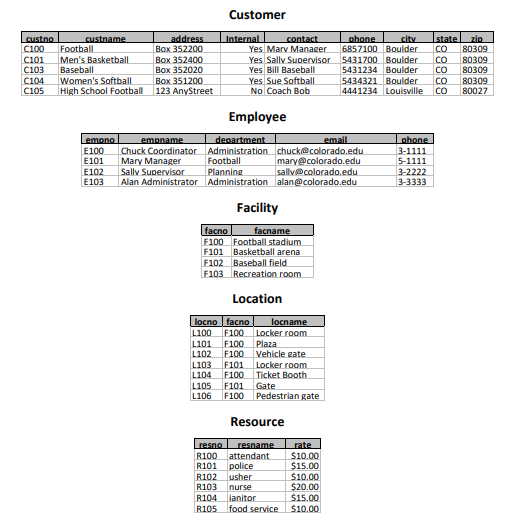
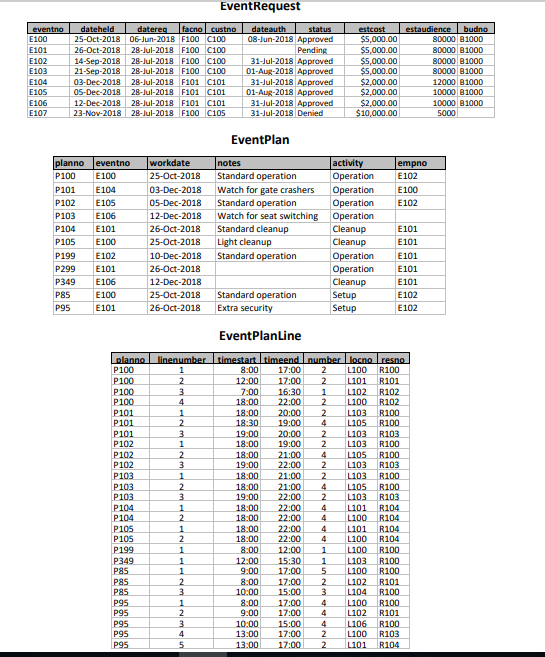
3. Loading Data I will provide a text file containing SQL INSERT statements for loading the data. You need to create the tables before inserting rows in each table. You need to insert rows in parent tablesbefore child tables that reference parent tables. The INSERT statements in the file are in a proper order for loading into the tables.
- Relationships EventPlan Customer custmo custname address Internal contact phone city state zip EventRequest eventno workdate notes dateheld oo datereq facno custno dateauth status estcost estaudience budno oo activity empno Employee empname department email phone EventPlanLine neno timestart timeend resource resno resname rate Location Facility facno facname oo number facno locname locno resno
Step by Step Solution
There are 3 Steps involved in it

Get step-by-step solutions from verified subject matter experts
 Study Help