







Question: MS SQL SERVER Virtual Lab Login: vdi.clarion.edu -> Username: s_kmfennell1 Password: Nikita2921 -> BigDataVirtual Lab -> Server Name: VBIGDATADBSRV1 Database KatrinaFennellDB should already be created.
MS SQL SERVER Virtual Lab Login: vdi.clarion.edu -> Username: s_kmfennell1 Password: Nikita2921 -> BigDataVirtual Lab -> Server Name: VBIGDATADBSRV1
Database KatrinaFennellDB should already be created.
- Write SQL queries for each of the tasks using MS SQL SERVER in the Virtual Lab.
- Follow the underscore convention when naming your database schema, entities and attributes.
- Save your work as an SQL script name your script 11056210_assignment2.sql. (Word document is acceptable as well, make sure you are submitting the same statement you used to create your tables in the virtual lab.)
- For all tasks, use the Your Database Schema that you created. KatrinaFennellDB. I will check both your virtual database in the virtual lab and your submission on D2L
Consider the relational database schema diagram below. It consists of 3 entities movies, actors, and locations.
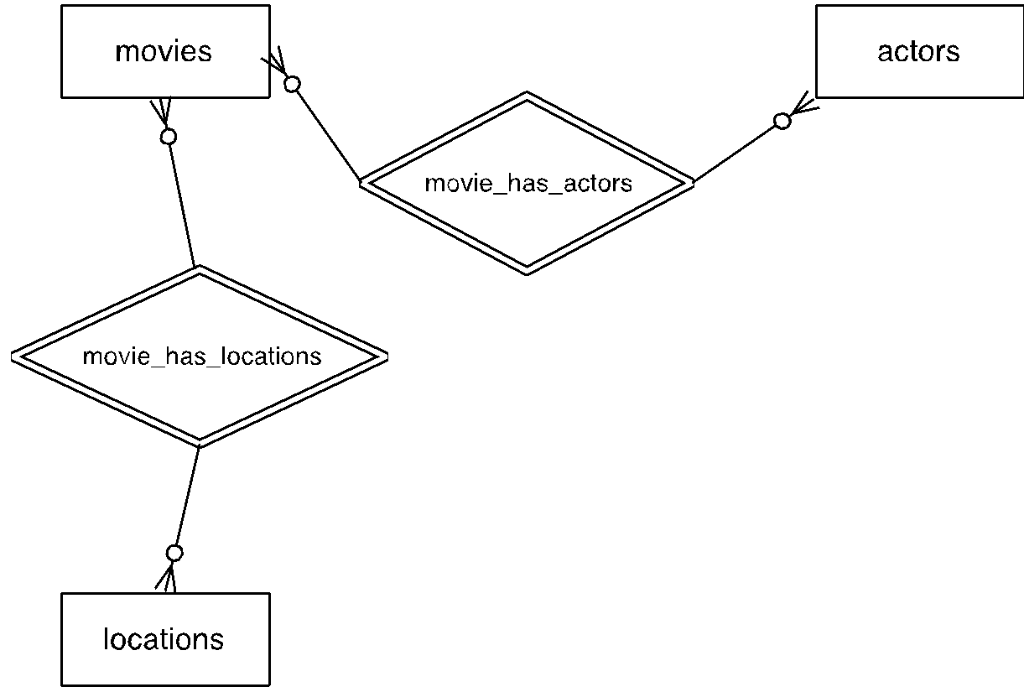
Because movies and actors have a many-to-many relationship and movies and locations have a many-to-many relationship, your schema would also have 2 junction tables movies_actors and movies_locations. Each tables logical structure is described below:
movies
| Field name | Primary Key | Data type | Is null? | Is Identity? |
| movie_id | Yes | INT | no | yes |
| title | No | VARCHAR(200) | no | no |
| release_date | No | DATETIME | no | no |
| plot_description | No | VARCHAR(4000) | no | no |
actors
| Field name | Primary Key | Data type | Is null? | Is Identity |
| actor_id | Yes | INT | no | yes |
| first_name | No | VARCHAR(100) | no | no |
| last_name | No | VARCHAR(100) | no | no |
| birth_date | No | DATETIME | no | no |
| biography | No | VARCHAR(1000) | no | no |
locations
| Field name | Primary Key | Data type | Is null? | Is Identity? |
| location_id | Yes | INT | no | yes |
| location_name | No | VARCHAR(100) | no | no |
| street_address | No | VARCHAR(150) | no | no |
| city | No | VARCHAR(100) | no | no |
| state | No | CHAR(2) | no | no |
| zip | No | VARCHAR(5) | no | no |
movies_actors
| Field name | Primary Key | Data type | Is null? | Is Identity |
| movie_id | No | INT | no | no |
| actor_id | No | INT | no | no |
movies_locations
| Field name | Primary Key | Data type | Is null? | Is Identity? |
| movie_id | No | INT | no | no |
| location_id | No | INT | no | no |
Task 1: In database [KatrinaFennellDB], create the following entity tables:
- movies
- actors
- locations
Each tables Creation Statement should correspond to the descriptions provided in this assignment. Use CREATE TABLE statement.
Task 2: In your database, create the following junction tables:
- movies_actors
- movies_locations
Use CREATE TABLE statement to create junction tables. Make sure to create appropriate foreign keys each table will have two foreign keys.
Task 3: For each entity table, insert at least 3 rows using INSERT statement:
- At least 2 movies in the movies table
- At least 2 actors in the actors table
- At least 2 locations in the locations table
You can make up your own data for the INSERT statements.
Task 4: For each junction table, create at least 2 relationships (insert at least two rows of appropriate IDs).
Task 5: Write a SELECT statement to display all actors
Task 6: Write a SELECT statement to display location name, street address and city.
movies actors movie_has_actors movie has locations locations
Step by Step Solution
There are 3 Steps involved in it

Get step-by-step solutions from verified subject matter experts
 Study Help