







Question: Here are the queries you will write in the lab session; name them as shown below. 7. Run a similar query to query 3 above,
Here are the queries you will write in the lab session; name them as shown below.
7. Run a similar query to query 3 above, but this time let's also list the Client Name (i.e., if you need to use this query for a management report you need to include client names, not just client IDs). So, please display the client ID, client name and comments entered for the client with an ID = 267368. Tip: the difference between this query and item 3 above is that you need to join the ClientComm table with the Clients table (so that you can get the client name from the Clients table).
8. Since we keep track of orders and the line items for these orders in separate tables, let's build a query that gives us a complete view of all orders and their respective line items. List all orders, client ID, line item numbers, product ID and quantities ordered in all line items in all orders. Tip: you need to join the Orders and the LineItems tables.
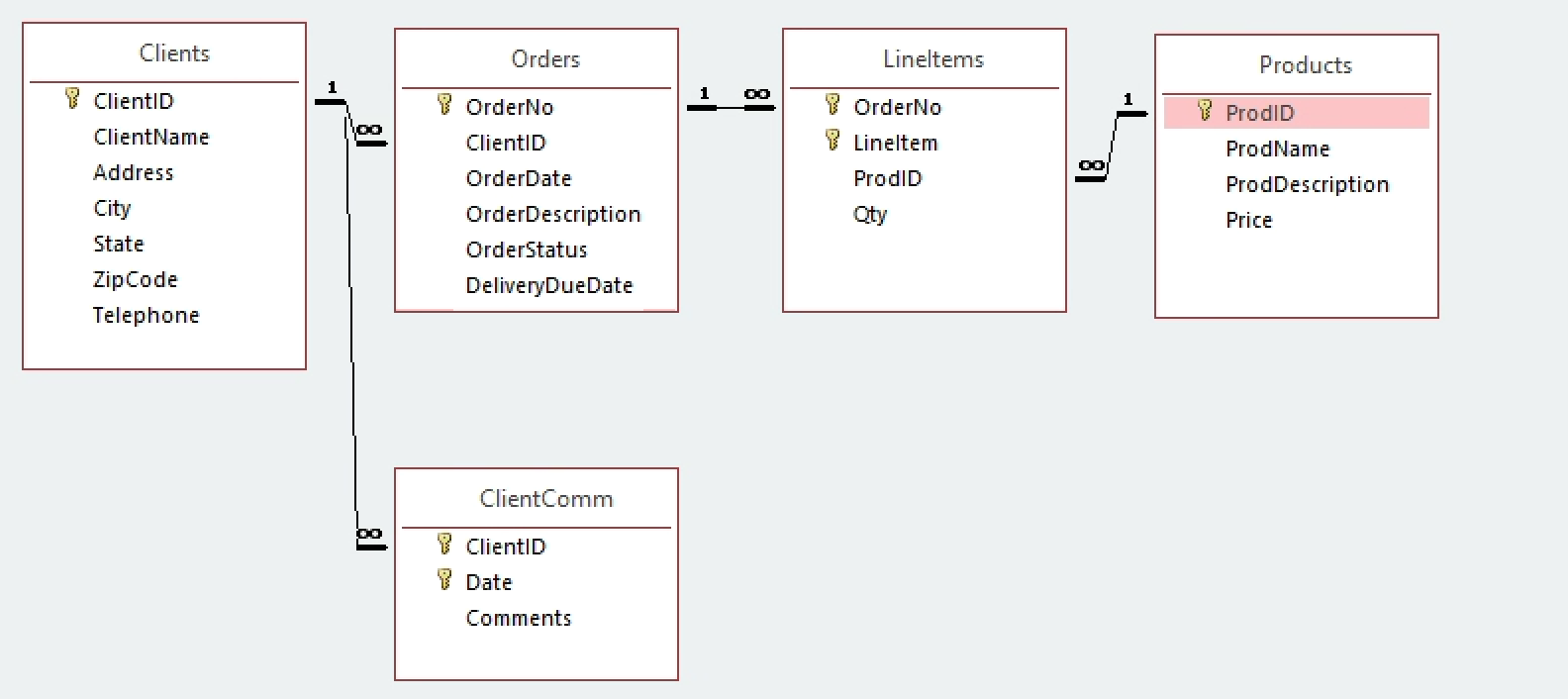
Clients Orders Lineltems Products - Y 1 ClientID ClientName IEEE OrderNo * Lineltem ProdID Y OrderNo ClientID OrderDate OrderDescription OrderStatus DeliveryDueDate ProdID ProdName ProdDescription Address Qty Price City State Zip Code Telephone ClientComm Y ClientID Y Date Comments
Step by Step Solution
There are 3 Steps involved in it

Get step-by-step solutions from verified subject matter experts
 Study Help