



Question: here is an example of how it should look like: Write a MATLAB program to simulate the Shut the Box game that can: 1. Use
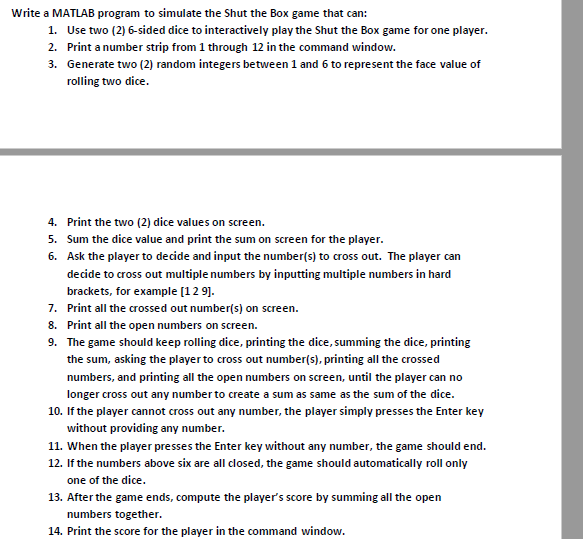
here is an example of how it should look like:
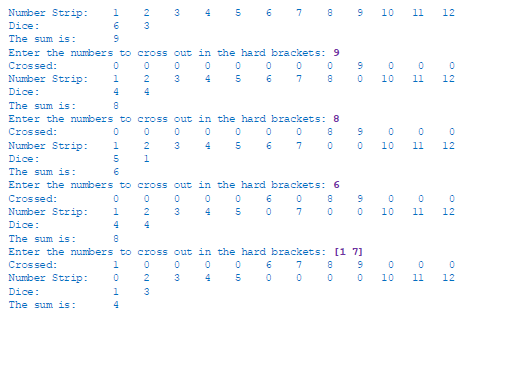
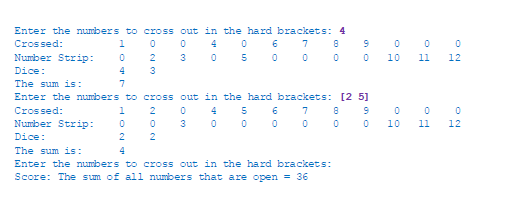
Write a MATLAB program to simulate the Shut the Box game that can: 1. Use two (2) 6-sided dice to interactively play the Shut the Box game for one player. 2. Print a number strip from 1 through 12 in the command window. 3. Generate two (2) random integers between 1 and 6 to represent the face value of rolling two dice. 4. Print the two (2) dice values on screen. 5. Sum the dice value and print the sum on screen for the player. 6. Ask the player to decide and input the number(s) to cross out. The player can decide to cross out multiple numbers by inputting multiple numbers in hard brackets, for example [129]. 7. Print all the crossed out number(s) on screen. 8. Print all the open numbers on screen. 9. The game should keep rolling dice, printing the dice, summing the dice, printing the sum, asking the player to cross out number(s), printing all the crossed numbers, and printing all the open numbers on screen, until the player can no longer cross out any number to create a sum as same as the sum of the dice. 10. If the player cannot cross out any number, the player simply presses the Enter key without providing any number. 11. When the player presses the Enter key without any number, the game should end. 12. If the numbers above six are all closed, the game should automatically roll only one of the dice. 13. After the game ends, compute the player's score by summing all the open numbers together. 14. Print the score for the player in the command window.
Step by Step Solution
There are 3 Steps involved in it
Please find the required MATLAB code below Note that to read Enter key from user input I have used getkey available on MATLAB file exchange The copy of the file has also been provided below MAIN SCRIP... View full answer

Get step-by-step solutions from verified subject matter experts