







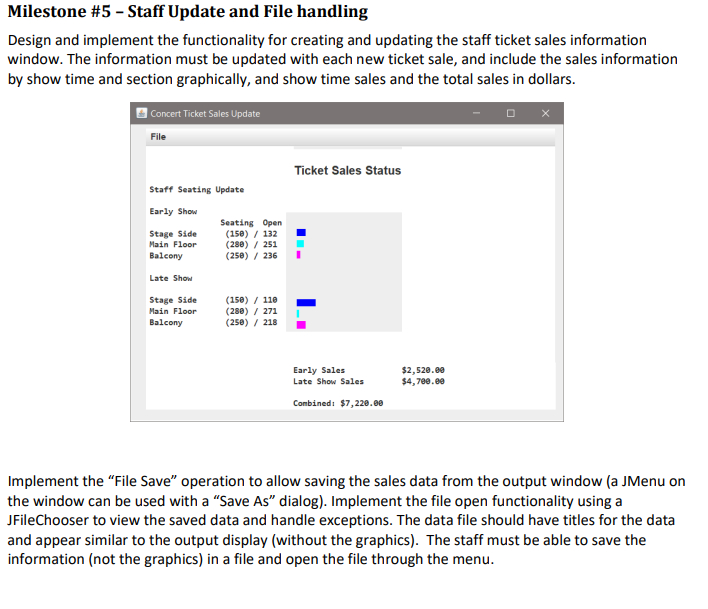
Question: Here is my code down below and what i need is the picture package concerticket; import javax.swing. * ; import java.awt. * ; import java.text.SimpleDateFormat;
Here is my code down below and what i need is the picture
package concerticket;
import javax.swing.;
import java.awt.;
import java.text.SimpleDateFormat;
import java.util.ArrayList;
import java.util.Date;
import java.util.List;
public class TicketSystem
public static void mainString args
SwingUtilities.invokeLaternew Runnable
public void run
JFrame frame new JFrameWelcome to Ashley Theater";
frame.setSize;
frame.setDefaultCloseOperationJFrameEXITONCLOSE;
Header label
JLabel headerLabel new JLabelKormassa Theater";
headerLabel.setFontnew FontArial Font.BOLD, ; Set font size and style
headerLabel.setHorizontalAlignmentSwingConstantsCENTER; Center align the text
Add a JLabel with an ImageIcon to display the image
ImageIcon imageIcon new ImageIcontheaterjpg;
JLabel imageLabel new JLabelimageIcon;
JButton createAccountButton new JButtonCreate Account";
JButton loginButton new JButtonLogin;
JButton cancelButton new JButtonCancel;
createAccountButton.addActionListenere
CreateAccountWindow createAccountWindow new CreateAccountWindow;
createAccountWindow.setVisibletrue;
;
loginButtonaddActionListenere
LoginWindow loginWindow new LoginWindow;
loginWindowaddLoginListenernew LoginListener
@Override
public void onLoginString username
loginWindowdispose; Close the login window
MainInterface mainInterface new MainInterfaceusername;
mainInterface.setVisibletrue; Show the main interface window
;
loginWindowsetVisibletrue;
;
cancelButton.addActionListenere
System.exit;
;
Panel for the buttons at the bottom
JPanel buttonPanel new JPanelnew FlowLayoutFlowLayoutCENTER;
buttonPanel.addcreateAccountButton;
buttonPanel.addloginButton;
buttonPanel.addcancelButton;
Add the headerLabel, imageLabel, and buttonPanel to the frame
frame.setLayoutnew BorderLayout;
frame.addheaderLabel BorderLayout.NORTH;
frame.addimageLabel BorderLayout.CENTER;
frame.addbuttonPanel BorderLayout.SOUTH;
frame.setVisibletrue;
;
static class MainInterface extends JFrame
public MainInterfaceString username
setTitleWelcome username ;
setSize;
setLocationRelativeTonull; Center the window on the screen
setDefaultCloseOperationJFrameEXITONCLOSE;
JLabel welcomeLabel new JLabelWelcome username ;
welcomeLabel.setFontnew FontArial Font.BOLD, ; Set font size and style
welcomeLabel.setHorizontalAlignmentSwingConstantsCENTER; Center align the text
JButton logoutButton new JButtonLogout;
logoutButtonaddActionListenere
dispose;
LoginWindow loginWindow new LoginWindow;
loginWindowsetVisibletrue;
;
JPanel panel new JPanelnew BorderLayout;
panel.addwelcomeLabel BorderLayout.NORTH;
panel.addlogoutButton BorderLayout.SOUTH;
getContentPaneaddpanel;
Display theater sections and allow selection
displayTheaterSections;
private void displayTheaterSections
List sections new ArrayList;
sections.addnew TheaterSectionStage Side", ;
sections.addnew TheaterSectionMain Floor", ;
sections.addnew TheaterSectionBalcony;
JPanel mainPanel new JPanelnew BorderLayout;
Create a panel for the image
ImageIcon theaterSectionImage new ImageIcontheatersection.png;
JLabel imageLabel new JLabeltheaterSectionImage;
JPanel imagePanel new JPanel;
imagePanel.addimageLabel;
Create a panel for the options
JPanel optionsPanel new JPanelnew GridLayout;
Step by Step Solution
There are 3 Steps involved in it
1 Expert Approved Answer
Step: 1 Unlock

Question Has Been Solved by an Expert!
Get step-by-step solutions from verified subject matter experts
Step: 2 Unlock
Step: 3 Unlock
 Study Help