







Question: JAVA Programming help I am almost finished with this code but need help with 2 things 1. adding the functionality of the Select bar, which
JAVA Programming help
I am almost finished with this code but need help with 2 things
1. adding the functionality of the "Select bar", which when you enter a name and click select you can pick from a happy birthday card or a congratulations card, when you press these the program will take the name and transform it as shown as the picture below.
2. adding the functionality of the "Font Bar", which will change the font of the card to whichever font is pressed. HERE ARE PICTURES OF HOW THE PROGRAM SHOULD WORK
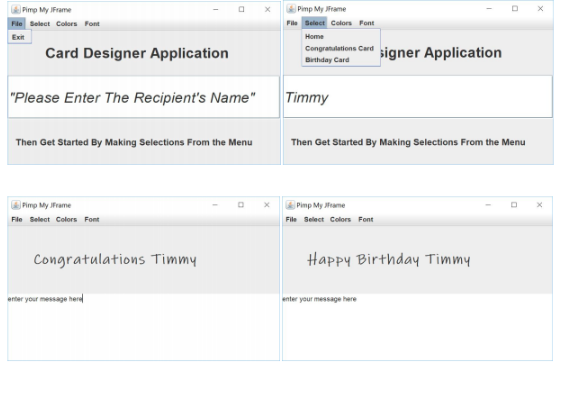
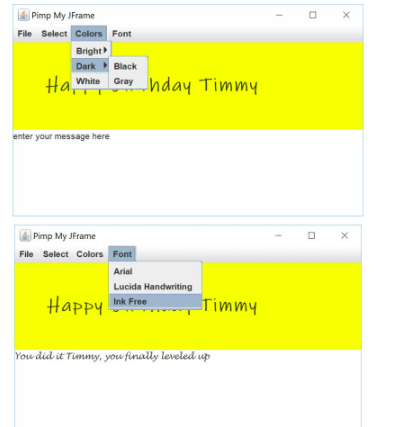
HERE IS MY CODE BELOW
package demo;
import javax.swing.*;
import java.awt.*;
import java.awt.event.*;
import java.awt.Color;
public class JKeyDemo extends JFrame implements
ActionListener {
private String name;
private JMenuBar mainBar = new JMenuBar();
private JMenu menu1 = new JMenu("File");
private JMenu menu2 = new JMenu("Select");
private JMenu menu3 = new JMenu("Colors");
private JMenu menu4 = new JMenu("Font");
private JMenuItem exit = new JMenuItem("Exit");
private JMenu bright = new JMenu("Bright");
private JMenu dark = new JMenu("Dark");
private JMenuItem black = new JMenuItem("Black");
private JMenuItem gray = new JMenuItem("Gray");
private JMenuItem white = new JMenuItem("White");
private JMenuItem pink = new JMenuItem("Pink");
private JMenuItem yellow = new JMenuItem("Yellow");
private JMenuItem arial = new JMenuItem("Arial");
private JMenuItem luc = new JMenuItem("Lucida Handwritting");
private JMenuItem ink = new JMenuItem("Ink Free");
private JMenuItem home = new JMenuItem("Home");
private JMenuItem congrats = new JMenuItem("Congratulations Card");
private JMenuItem birth = new JMenuItem("Birthday Card");
private JTextField text = new JTextField(" PLEASE ENTER THE RECEIPENTS NAME");
private JLabel label = new JLabel("Card Designer Application");
private JLabel label2 = new JLabel("Then Get Selections From Clicking On The Menu");
public JKeyDemo() {
setLayout(new FlowLayout());
setJMenuBar(mainBar);
mainBar.add(menu1);
mainBar.add(menu2);
mainBar.add(menu3);
mainBar.add(menu4);
menu1.add(exit);
menu2.add(home);
menu2.add(congrats);
menu2.add(birth);
menu3.add(bright);
menu3.add(dark);
menu3.add(white);
dark.add(black);
dark.add(gray);
menu4.add(arial);
menu4.add(luc);
menu4.add(ink);
bright.add(pink);
bright.add(yellow);
exit.addActionListener(this);
white.addActionListener(this);
pink.addActionListener(this);
yellow.addActionListener(this);
black.addActionListener(this);
gray.addActionListener(this);
arial.addActionListener(this);
luc.addActionListener(this);
ink.addActionListener(this);
add(label);
add(text);
add(label2);
label.setFont(new Font("Arial", Font.BOLD, 26)); }
@Override
public void actionPerformed(ActionEvent e) {
Object source = e.getSource();
Container con = getContentPane();
if(source == exit) System.exit(0);
else if(source == white)
con.setBackground(Color.WHITE);
else if(source == pink)
con.setBackground(Color.PINK);
else if(source == black)
con.setBackground(Color.BLACK);
else if(source == gray)
con.setBackground(Color.GRAY);
else con.setBackground(Color.YELLOW);
if(source == arial)
label.setFont(new Font("Arial", Font.BOLD, 26));
else if (source == luc)
label.setFont(new Font("Lucida Handwritting", Font.BOLD, 26));
else if (source == ink)
label.setFont(new Font("Ink Free", Font.BOLD, 26));
}
public static void main(String[] args) {
JKeyDemo mFrame = new JKeyDemo();
final int WIDTH = 250;
final int HEIGHT = 200;
mFrame.setSize(WIDTH, HEIGHT);
mFrame.setVisible(true);
}
}
Step by Step Solution
There are 3 Steps involved in it

Get step-by-step solutions from verified subject matter experts
 Study Help