







Question: Here is MY CURRENT C CODE THAT NEEDS TO BE EDITED . Reminder this is NOT IN C++ IF YOU CANNOT DO THIS LIKE REQUESTED
Here is MY CURRENT C CODE THAT NEEDS TO BE EDITED .
Reminder this is NOT IN C++
IF YOU CANNOT DO THIS LIKE REQUESTED PLEASE DO NOT ANSWER.
IF YOU JUST REPOST MY CODE I WILL REPORT YOU AS SPAM.
Please modify MY CODE and ANSWER THE QUESTION AFTER THE CODE POSTED BELOW:
#include #include #include #include
char square[10] = {'0','1','2','3','4','5','6','7','8','9'}; int checkwin(); void board(); void clearboard(); void playsingleplayer(); void playtwoplayer(); int main() { int flag=0,ch; char mark; while(flag==0) { printf(" 1.Single Player"); printf(" 2.Two player"); printf(" 3.Exit"); printf(" Enter your choice:"); scanf("%d",&ch); switch(ch) { case 1: clearboard(); playsingleplayer(); break; case 2: clearboard(); playtwoplayer(); break; case 3:flag=1; break; } } system("pause"); return 0; } int checkwin() { if (square[1] == square[2] && square[2] == square[3]) return 1; else if (square[4] == square[5] && square[5] == square[6]) return 1; else if (square[7] == square[8] && square[8] == square[9]) return 1; else if (square[1] == square[4] && square[4] == square[7]) return 1; else if (square[2] == square[5] && square[5] == square[8]) return 1; else if (square[3] == square[6] && square[6] == square[9]) return 1; else if (square[1] == square[5] && square[5] == square[9]) return 1; else if (square[3] == square[5] && square[5] == square[7]) return 1; else if (square[1] != '1' && square[2] != '2' && square[3] != '3' && square[4] != '4' && square[5] != '5' && square[6] != '6' && square[7] != '7' && square[8] != '8' && square[9] != '9') return 0; else return -1; } void board() {
{ system("clear"); printf( " \tTic Tac Toe "); printf("Player 1 (X) - Player 2 (O)"); printf(" "); printf(" | | | " ); printf(" "); printf(" %c | %c | %c |", square[1], square[2], square[3] ); printf(" "); printf("___|___|___| "); printf(" "); printf(" | | |"); printf(" "); printf(" %c | %c | %c |", square[4], square[5], square[6] ); printf(" "); printf("___|___|___| "); printf(" | | |"); printf(" "); printf(" %c | %c | %c | ", square[7], square[8], square[9] ); printf(" | | | "); printf(" "); printf(" "); } } void clearboard() { square[1]='1'; square[2]='2'; square[3]='3'; square[4]='4'; square[5]='5'; square[6]='6'; square[7]='7'; square[8]='8'; square[9]='9';
} void playsingleplayer() { int player,i,choice; char mark,playername[2][10], player1name[50]; player = 1; srand(time(NULL)); printf("Player 1 enter your name:"); scanf("%s",player1name); do { board(); player=(player%2)?1:2; if(player==1) { printf(" %s, make a move by entering a number: ",player1name); scanf("%d",&choice); } else { strcpy(playername[1],"Computer"); printf(" Player %s, enter a number: ",playername[1] ); choice=rand() % 9; } mark=(player == 1) ? 'X' : 'O'; if (choice == 1 && square[1] == '1') square[1] = mark; else if (choice == 2 && square[2] == '2') square[2] = mark; else if (choice == 3 && square[3] == '3') square[3] = mark; else if (choice == 4 && square[4] == '4') square[4] = mark; else if (choice == 5 && square[5] == '5') square[5] = mark; else if (choice == 6 && square[6] == '6') square[6] = mark; else if (choice == 7 && square[7] == '7') square[7] = mark; else if (choice == 8 && square[8] == '8') square[8] = mark; else if (choice == 9 && square[9] == '9') square[9] = mark; else { printf(" Invalid move "); player--; } i=checkwin(); player++; }while(i==-1); board(); if(i==1) { --player; if(player==1) printf(" ==>\a%s wins!",player1name); else printf(" ==>\a%s wins!",playername[1]); } else printf(" ==>\aGame draw"); }
void playtwoplayer() { int player=1,i,choice; char mark; do { board(); player=(player%2)?1:2; printf(" Player %d, enter a number: ",player ); scanf("%d",&choice); mark=(player == 1) ? 'X' : 'O'; if (choice == 1 && square[1] == '1') square[1] = mark; else if (choice == 2 && square[2] == '2') square[2] = mark; else if (choice == 3 && square[3] == '3') square[3] = mark; else if (choice == 4 && square[4] == '4') square[4] = mark; else if (choice == 5 && square[5] == '5') square[5] = mark; else if (choice == 6 && square[6] == '6') square[6] = mark; else if (choice == 7 && square[7] == '7') square[7] = mark; else if (choice == 8 && square[8] == '8') square[8] = mark; else if (choice == 9 && square[9] == '9') square[9] = mark; else { printf(" Invalid move "); player--; } i=checkwin(); player++; }while(i==-1); board(); if(i==1) printf(" ==>\aPlayer %d win",--player); else printf(" ==>\aGame draw"); }
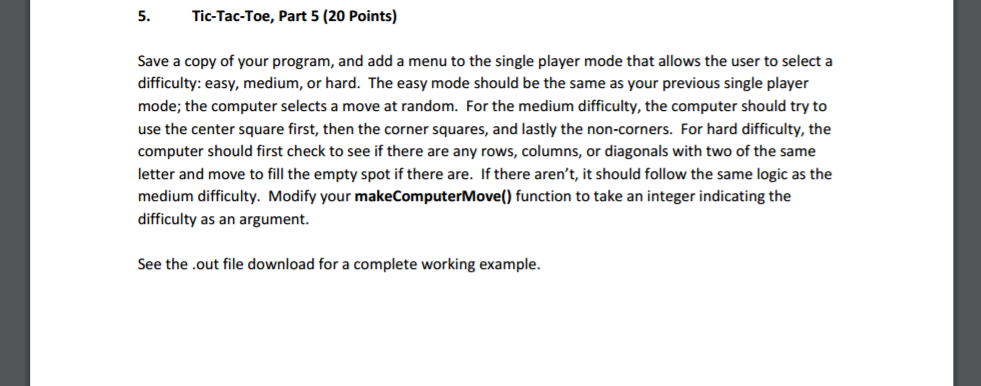
5. Tic-Tac-Toe, Part 5 (20 Points) Save a copy of your program, and add a menu to the single player mode that allows the user to select a difficulty: easy, medium, or hard. The easy mode should be the same as your previous single player mode; the computer selects a move at random. For the medium difficulty, the computer should try to use the center square first, then the corner squares, and lastly the non-corners. For hard difficulty, the computer should first check to see if there are any rows, columns, or diagonals with two of the same letter and move to fill the empty spot if there are. Ifthere aren't, it should follow the same logic as the medium difficulty. Modify your makeComputerMove() function to take an integer indicating the difficulty as an argument. See the .out file download for a complete working example. 5. Tic-Tac-Toe, Part 5 (20 Points) Save a copy of your program, and add a menu to the single player mode that allows the user to select a difficulty: easy, medium, or hard. The easy mode should be the same as your previous single player mode; the computer selects a move at random. For the medium difficulty, the computer should try to use the center square first, then the corner squares, and lastly the non-corners. For hard difficulty, the computer should first check to see if there are any rows, columns, or diagonals with two of the same letter and move to fill the empty spot if there are. Ifthere aren't, it should follow the same logic as the medium difficulty. Modify your makeComputerMove() function to take an integer indicating the difficulty as an argument. See the .out file download for a complete working example
Step by Step Solution
There are 3 Steps involved in it

Get step-by-step solutions from verified subject matter experts
 Study Help