







Question: Here is the code I made, but the test case is not working, it goes wrong when the binary string convert to decimal. please help.
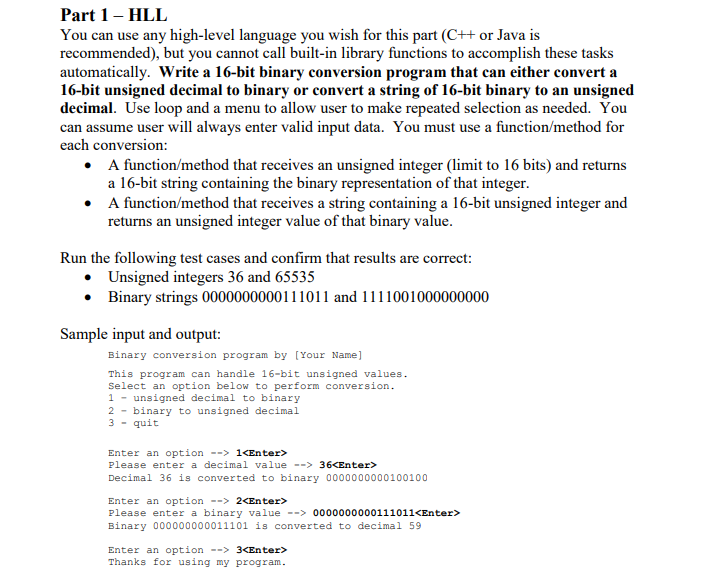
Here is the code I made, but the test case is not working, it goes wrong when the binary string convert to decimal. please help.
Note: this is c++ not c
#include "stdafx.h"
#include
#include
#include
#include
using namespace std;
// function for option 1
void decToBin(int number)
{
int array[16];
int i = 0;
for (int counter = 0; counter
{
array[counter] = 0;
}
while (number > 0)
{
array[i] = number % 2;
number = number / 2;
i++;
}
for (int counter = 15; counter >= 0; counter--)
{
cout
}
}
// function for option 2
void binToDec(int number)
{
int array[16];
double dec = 0;
int i = 0;
for (int counter = 0; counter
{
array[counter] = 0;
}
while (number != 0)
{
array[i] = number % 10;
number = number / 10;
i++;
}
for (int counter = 0; counter
{
if (array[counter] != 0)
{
dec += pow(2, counter);
}
}
cout
}
// negative number
void negat(int number)
{
long array[16];
double dec = 0.0;
int length = 16;
int j = 15;
int a = 0;
//store the number in the array check
for (int counter = 15; counter >= 0; counter--)
{
array[counter] = number % 10;
number = number / 10;
}
// flip the numbers check
for (int counter = 15; counter >= 0; counter--)
{
if (array[counter] == 0)
{
array[counter] = 1;
}
else {
array[counter] = 0;
}
}
// add 1
if (array[length] == 1)
{
while (array[length] == 1)
{
array[length] = 0;
length++;
}
array[length + 1]++;
}
else
{
array[15]++;
}
//reverse array
int temp, i;
for (i = 0; i
temp = array[16 - i - 1];
array[16 - i - 1] = array[i];
array[i] = temp;
}
/// to dec
for (int counter = 0; counter
{
if (array[counter] != 0)
{
dec += pow(2, counter);
}
}
dec = 0 - dec;
cout
}
void ShowMenu()
{
cout
cout
cout
}
/**********************************************************/
int main()
{
int number;
string ans;
int choice;
bool Quit = false;
char move = 'z';
while (!Quit) {
ShowMenu();
cout
cin >> move;
switch (move) {
case '1':
int number;
string ans;
cout
cin >> number;
decToBin(number);
break;
case '2':
int number;
string ans;
cout
cin >> number;
if (number / 1000000000000000 == 1) {
negat(number);
}
else {
binToDec(number);
}
break;
case '3': //user wants to quit
Quit = true; //execution continues after the switch
//or do this to end program
//return 0;
break;
default:
cout
break;
}
}
cout
system("pause");
return 0;
}
Part 1- HLL You can use any high-level language you wish for this part (C+t or Java is recommended), but you cannot call built-in library functions to accomplish these tasks automatically. Write a 16-bit binary conversion program that can either convert a 16-bit unsigned decimal to binary or convert a string of 16-bit binary to an unsigned decimal. Use loop and a menu to allow user to make repeated selection as needed. You can assume user will always enter valid input data. You must use a function/method for each conversion: A function/method that receives an unsigned integer (limit to 16 bits) and returns a 16-bit string containing the binary representation of that integer A function/method that receives a string containing a 16-bit unsigned integer and returns an unsigned integer value of that binary value Run the following test cases and confirm that results are correct Unsigned integers 36 and 65535 Binary strings 0000000000111011 and 1111001000000000 Sample input and output: Binary conversion program by [Your Name] This program can handle 16-bit unsigned values Select an option below to perform conversion 1unsigned decimal to binary 2binary to unsigned decimal 3 -quit Enter an option --> 1
Step by Step Solution
There are 3 Steps involved in it

Get step-by-step solutions from verified subject matter experts
 Study Help