







Question: here is the copy.c #include #include #include #include #include int main(int argc, char *argv[]) { char *source=argv[1]; char *destination=argv[2]; int input = open(source, O_RDONLY); int
here is the copy.c
#include#include #include #include #include int main(int argc, char *argv[]) { char *source=argv[1]; char *destination=argv[2]; int input = open(source, O_RDONLY); int output = open(destination, O_WRONLY | O_CREAT, 0600); char c[1]; while(1){ int r = read(input, c, 1); if(r==0) break; write(output, c, 1); } close(input); close(output); return 0; }
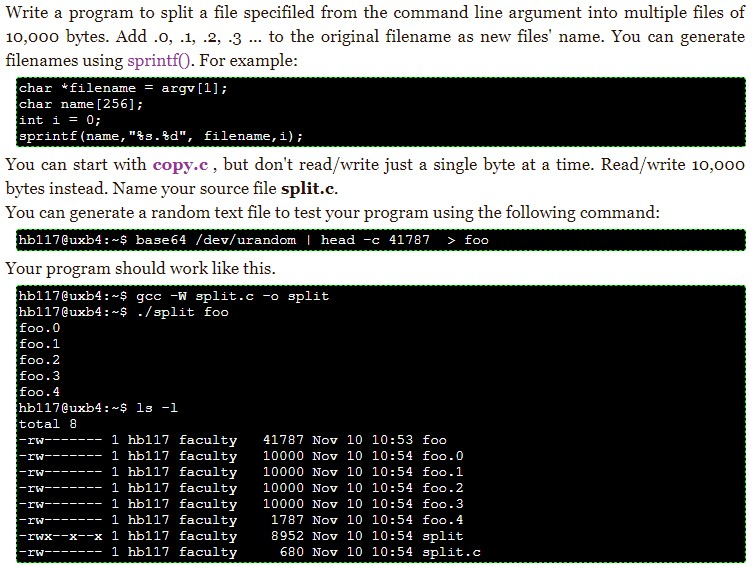
Write a program to split a file specifiled from the command line argument into multiple files of 10,000 bytes. Add .o, .1, .2, .3 to the original filename as new files' name. You can generate filenames using sprintf0. For example char *filename argv [1]; char name [256] int i 0 sprint f (name ,"%s.%d", filename , i); You can start with copy.c, but don't read/write just a single byte at a time. Read/write 10,000 bytes instead. Name your source file split.c You can generate a random text file to test your program using the following command hb117@uxb4: $ base64 /dev/urandom head -c 41787 > foo Your program should work like this hb117@uxb4:-$ gcc W split.c-osplit hb117@uxb4:-? /split foo foo.0 foo.1 foo.2 foo.3 foo.4 hb117@uxb4: S ls-1 total 8 1787 Nov 10 10:54 foo.4 8952 Nov 10 10:54 split rwx--x--x 1 hb117 faculty 680 Nov 10 10:54 split.c
Step by Step Solution
There are 3 Steps involved in it

Get step-by-step solutions from verified subject matter experts
 Study Help