







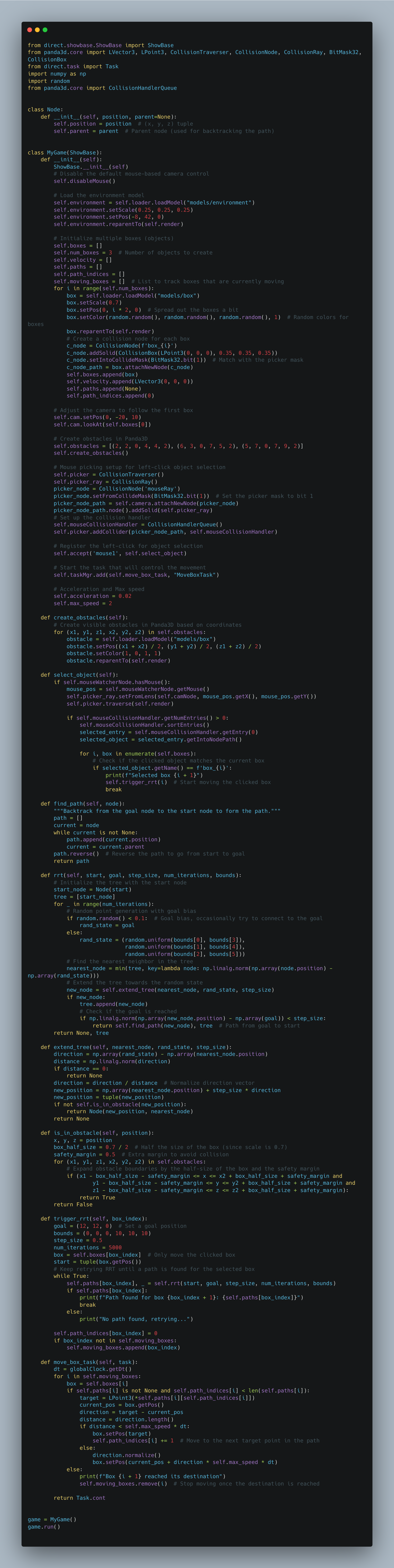
Question: Here is the panda 3 d code. The environment is in 3 D . When we run the code, an environment pops open with three
Here is the pandad code. The environment is in D When we run the code, an environment pops open with three box objects, and three obstacles. When you click on the first object using the mouse, the second object moves. When you click again, the third object moves. Now, I need the following changes to the code:
Instead of a D environment, change the code so the environment is in D There will still be box objects, and three obstacles.
When I click on the first object, only the first box will move from the start location to the end location. When I click on the second object, only the second object will move. And same for the third object. Right now, when I click on the first object, the second one movesso need to change that.
If I draw a box on the D environment using the mouse, then all the objects within that box will trigger their rrt and start moving from start to end.
When the objectobjects are moving, I should be able to click on any of the moving objects which will then stop right there. Then if I click again, it will start moving again towards the end location.
Please make sure to give the right answer. Someone answered it wrong in the previous question.
Step by Step Solution
There are 3 Steps involved in it
1 Expert Approved Answer
Step: 1 Unlock

Question Has Been Solved by an Expert!
Get step-by-step solutions from verified subject matter experts
Step: 2 Unlock
Step: 3 Unlock
 Study Help