







Question: Here is the WordPlay code for this question: /JavaCS1/src/simpleguiapplication/WordPlay.java When you finish this question, your application should work as follows: Word Play To match this
Here is the WordPlay code for this question: /JavaCS1/src/simpleguiapplication/WordPlay.java When you finish this question, your application should work as follows: Word Play To match this behavior let's add a "Double" button to the WordPlay code. We've started the modification for you: WordPlay now contains a JButton component called doubleButton. When the Double button is clicked, the displayed string should be doubled, or repeated, in the program. The implementation of the "Double" button is incomplete. In the boxes below, provide the missing statements so that the doubling feature will work properly. 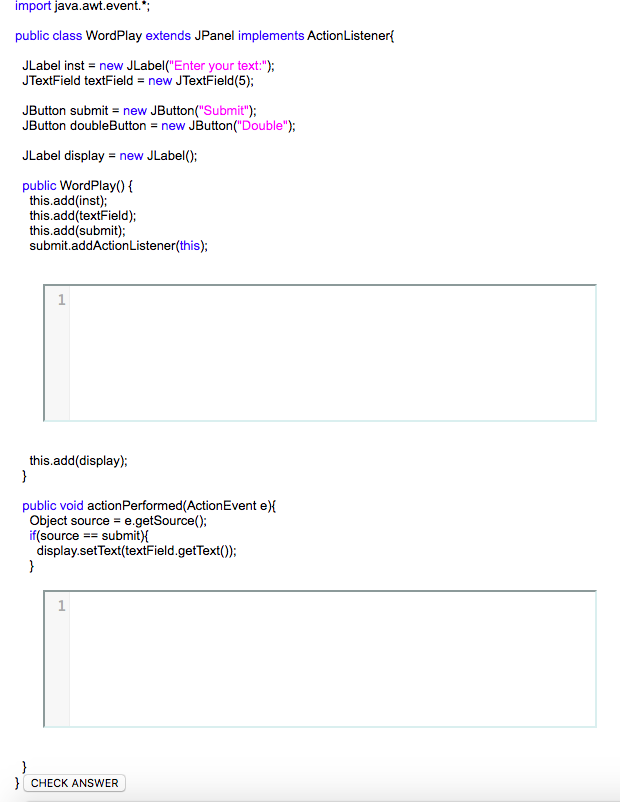
import java.awt.event.* public class WordPlay extends JPanel implements ActionListener JLabel inst new JLabel( Enter your text:"); JTextField textField - new JTextField(5); JButton submit new JButton( Submit" JButton doubleButton = new JButton("Double"); JLabel display new JLabel(); public WordPlay0 this.add(inst); this.add(textField) this.add(submit); submit.addActionListener(this); this.add(display); public void actionPerformed(ActionEvent e) Object source-e.getSource(); if(source-submit){ display.setText(textField.getText0) CHECK
Step by Step Solution
There are 3 Steps involved in it

Get step-by-step solutions from verified subject matter experts
 Study Help