







Question: Here's the Python code I have so far (along with a picture): import sys import turtle turtle.setup(400,400) wn = turtle.Screen() wn.title(Circle Program) wn.bgcolor(white) tess =
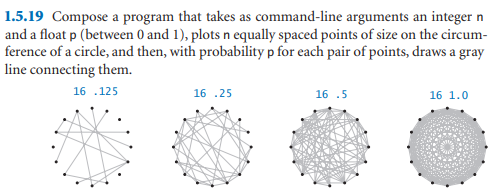
Here's the Python code I have so far (along with a picture):
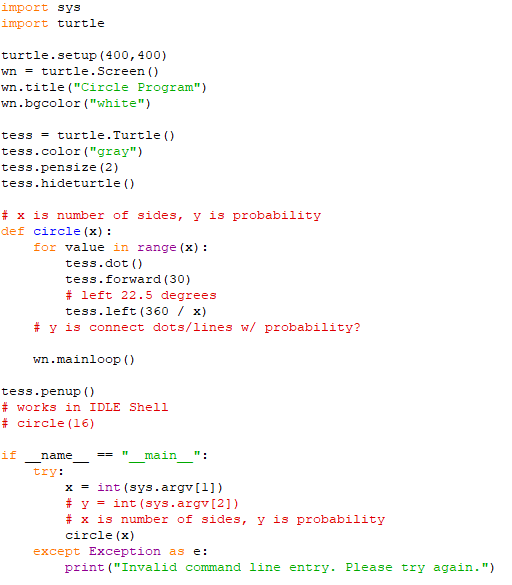
import sys import turtle
turtle.setup(400,400) wn = turtle.Screen() wn.title("Circle Program") wn.bgcolor("white")
tess = turtle.Turtle() tess.color("gray") tess.pensize(2) tess.hideturtle()
# x is number of sides, y is probability def circle(x): for value in range(x): tess.dot() tess.forward(30) # left 22.5 degrees tess.left(360 / x) # y is connect dots/lines w/ probability?
wn.mainloop()
tess.penup() # works in IDLE Shell # circle(16)
if __name__ == "__main__": try: x = int(sys.argv[1]) # y = int(sys.argv[2]) # x is number of sides, y is probability circle(x) except Exception as e: print("Invalid command line entry. Please try again.")
Here's the output:
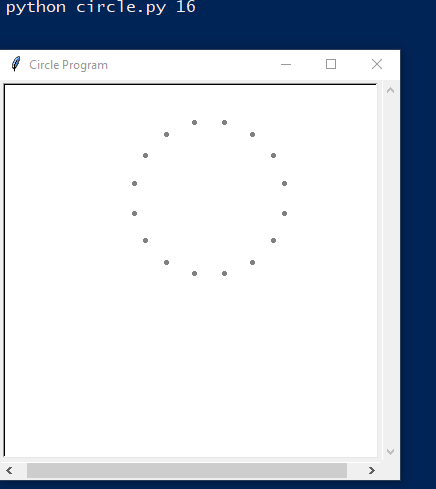
It appears I answered part of the question: plotting symmetric points of a circle with the first command-line argument. That's as far as I can solve for this assignment. I appreciate your coding assistance to produce the assignment's result!
1.5.19 Compose a program that takes as command-line arguments an integer n and a float p (between 0 and 1), plots n equally spaced points of size on the circum- ference of a circle, and then, with probability p for each pair of points, draws a gray line connecting them. 16 .125 16.25 16.5 16 1.0 import sys import turtle turtle.setup (400, 400) wn = turtle. Screen() wn.title("Circle Program") wn.bgcolor ("white") tess = turtle. Turtle() tess.color ("gray") tess.pensize (2) tess.hideturtle() de # x is number of sides, y is probability circle (x): for value in range (x): tess.dot () tess.forward (30) # left 22.5 degrees tess.left (360 / x) # y is connect dots/lines w/ probability? wn.mainloop() tess.penup() # works in IDLE Shell # circle (16) if TI name main try: x = int (sys.argv[1]) # y = int (sys.argv[2]) # x is number of sides, y is probability circle (x) except Exception as e: print("Invalid command line entry. Please try again.") python circle.py 16 Circle Program 0 x
Step by Step Solution
There are 3 Steps involved in it

Get step-by-step solutions from verified subject matter experts
 Study Help