







Question: hi i need a flowchart that will guide the MBOT (by makeblock)ROBOT to navigate through the obstacle field (drawing privided) and reach the fibal destination.
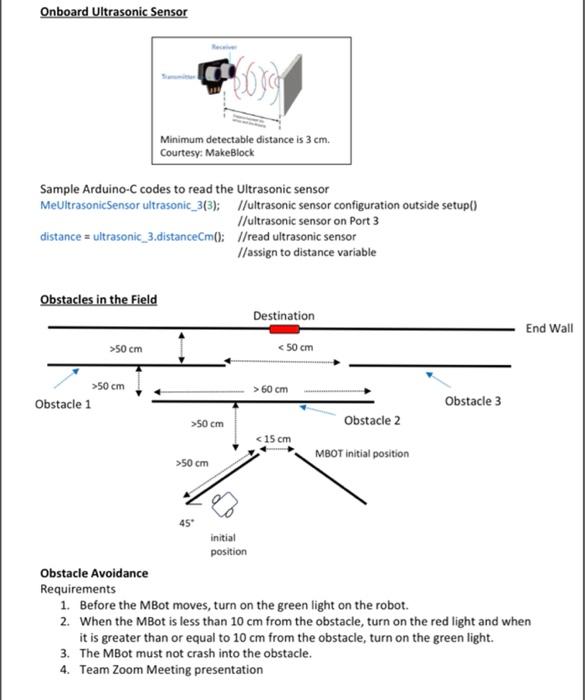
Onboard Ultrasonic Sensor Minimum detectable distance is 3 cm. Courtesy: MakeBlock Sample Arduino-C codes to read the Ultrasonic sensor MeUltrasonic Sensor ultrasonic_313); //ultrasonic sensor configuration outside setup() //ultrasonic sensor on Port 3 distance = ultrasonic_3.distanceCm(: /read ultrasonic sensor //assign to distance variable Obstacles in the Field Destination End Wall >50 cm 50 cm Obstacle 1 > 60 cm Obstacle 3 >50 cm Obstacle 2 50 cm 45 initial position Obstacle Avoidance Requirements 1. Before the MBot moves, turn on the green light on the robot. 2. When the MBot is less than 10 cm from the obstacle, turn on the red light and when it is greater than or equal to 10 cm from the obstacle, turn on the green light. 3. The MBot must not crash into the obstacle. 4. Team Zoom Meeting presentation Onboard Ultrasonic Sensor Minimum detectable distance is 3 cm. Courtesy: MakeBlock Sample Arduino-C codes to read the Ultrasonic sensor MeUltrasonic Sensor ultrasonic_313); //ultrasonic sensor configuration outside setup() //ultrasonic sensor on Port 3 distance = ultrasonic_3.distanceCm(: /read ultrasonic sensor //assign to distance variable Obstacles in the Field Destination End Wall >50 cm 50 cm Obstacle 1 > 60 cm Obstacle 3 >50 cm Obstacle 2 50 cm 45 initial position Obstacle Avoidance Requirements 1. Before the MBot moves, turn on the green light on the robot. 2. When the MBot is less than 10 cm from the obstacle, turn on the red light and when it is greater than or equal to 10 cm from the obstacle, turn on the green light. 3. The MBot must not crash into the obstacle. 4. Team Zoom Meeting presentation
Step by Step Solution
There are 3 Steps involved in it

Get step-by-step solutions from verified subject matter experts
 Study Help