







Question: Hi I'm not familiar with using Microsoft Visual C# Express 2010. Please help me with this project and provide instructions. Intro to Visual Programming -
Hi I'm not familiar with using Microsoft Visual C# Express 2010.
Please help me with this project and provide instructions.
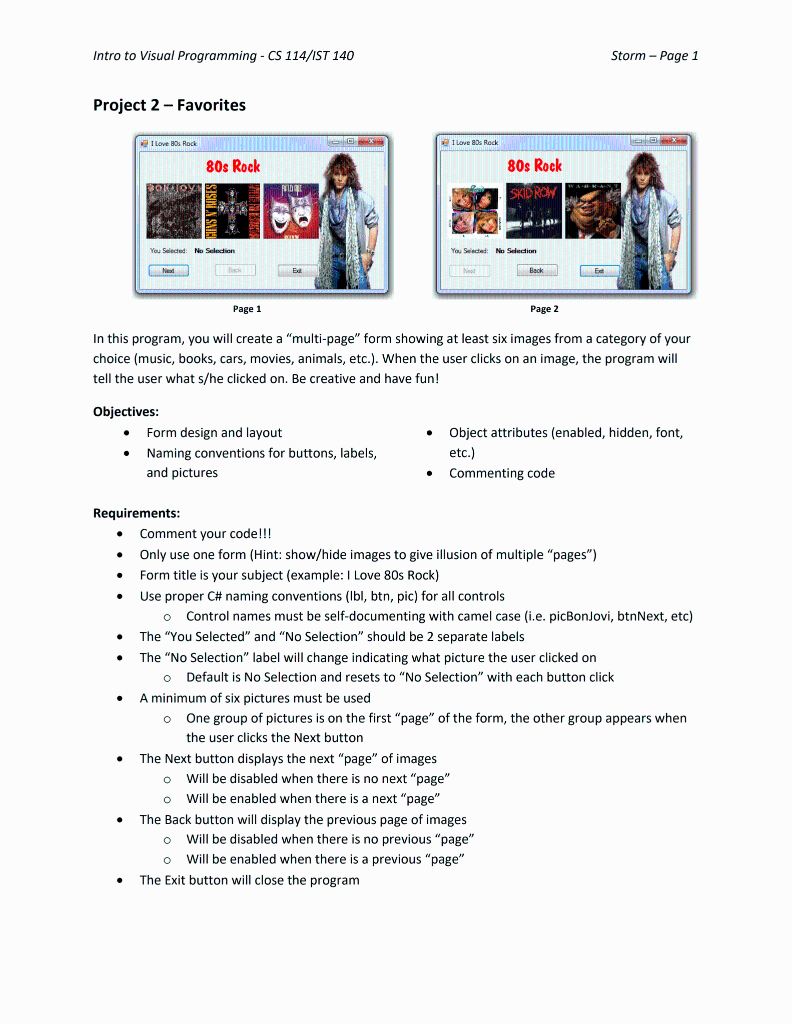
Intro to Visual Programming - CS 114/IST 140 Storm - Page 1 Project 2 - Favorites Page 1 rage 2 In this program, you will create a "multi-page" form showing at least six images from a category of your choice (music, books, cars, movies, animals, etc.). When the user clicks on an image, the program will tell the user what s/he clicked on. Be creative and have fun! Objectives: - Form design and layout - Object attributes (enabled, hidden, font, - Naming conventions for buttons, labels, etc.) and pictures - Commenting code Requirements: - Comment your code!!! - Only use one form (Hint: show/hide images to give illusion of multiple "pages") - Form title is your subject (example: I Love 80s Rock) - Use proper C\# naming conventions (Ibl, btn, pic) for all controls - Control names must be self-documenting with camel case (i.e. picBonJovi, btnNext, etc) - The "You Selected" and "No Selection" should be 2 separate labels - The "No Selection" label will change indicating what picture the user clicked on - Default is No Selection and resets to "No Selection" with each button click - A minimum of six pictures must be used - One group of pictures is on the first "page" of the form, the other group appears when the user clicks the Next button - The Next button displays the next "page" of images - Will be disabled when there is no next "page" - Will be enabled when there is a next "page" - The Back button will display the previous page of images - Will be disabled when there is no previous "page" - Will be enabled when there is a previous "page" - The Exit button will close the program
Step by Step Solution
There are 3 Steps involved in it

Get step-by-step solutions from verified subject matter experts
 Study Help