







Question: Hi, I'm trying to build an application that functions like a shopping cart system that resembles this dialogue box below. I have it all set
Hi, I'm trying to build an application that functions like a shopping cart system that resembles this dialogue box below. I have it all set up, but I keep getting errors everytime I try to run it. Can you help find the issue? Thanks.
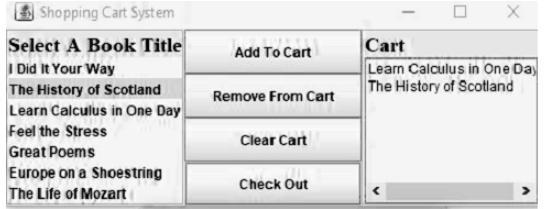
//Here is my code.
import java.awt.BorderLayout;
import java.awt.Font;
import java.awt.GridLayout;
import java.awt.List;
import java.io.File;
import java.io.FileNotFoundException;
import java.text.DecimalFormat;
import java.util.Scanner;
import javax.swing.BorderFactory;
import javax.swing.JButton;
import javax.swing.JFrame;
import javax.swing.JLabel;
import javax.swing.JList;
import javax.swing.JOptionPane;
import javax.swing.JPanel;
import java.awt.event.ActionEvent;
import java.awt.event.ActionListener;
public class ShoppingCart extends JFrame {
private static JPanel listPanel;
private static JPanel shoppingcartPanel;
private static JPanel buttonsPanel;
private static JList
private static JButton addButton;
private static JButton removeButton;
private static JButton clearButton;
private static JButton checkOutButton;
private static String[] listArray;
private static List cartItems = new List();
// value for salestax
final double salesTax = 0.06;
public ShoppingCart() throws FileNotFoundException {
//Title of the frame
setTitle("Course Scheduling System");
//set the frame exit on close button
setDefaultCloseOperation(JFrame.EXIT_ON_CLOSE);
//frame layout with 1 row and 3 columns
setLayout(new GridLayout(1, 3));
//position of the frame is set at center of the dialogue box
setLocationRelativeTo(null);
//calling buildListPanel method to create list panel
buildListPanel();
//calling buildListPanel method to create a button panel
buildButtonPanel();
//calling buildCartPanel method to create a cart panel
buildCartPanel();
//adds the panel components to frame
add(listPanel);
add(buttonsPanel);
add(shoppingcartPanel);
pack();
//frame is visible
setVisible (true);
}
private void buildButtonPanel() {
buttonsPanel = new JPanel();
//set layout as GridLayout
buttonsPanel.setLayout(new GridLayout(4, 1));
addButton = new JButton ("Add To Cart");
//add action listener to the addButton
addButton.addActionListener(new AddButtonListener());
removeButton = new JButton("Remove From Cart");
//Add action listener to the removeButton
removeButton.addActionListener(new RemoveButtonListener());
clearButton=new JButton("Clear Cart");
//add action listener to the clearButton
clearButton.addActionListener(new clearButtonListener());
checkOutButton = new JButton ("Check Out");
//add action listener to the checkout button
checkOutButton.addActionListener(new CheckoutButtonListener());
//add buttons to the buttonPanel
buttonsPanel.add(addButton);
buttonsPanel.add(removeButton);
buttonsPanel.add(clearButton);
buttonsPanel.add(checkOutButton);
}
public class AddButtonListener implements ActionListener {
public void actionPerformed(ActionEvent arg0) {
// sprinkle more items from list items
String value = (String) listItems.getSelectedValue();
cartItems.add(value);
}
}
// method implements remove button action listener
public class RemoveButtonListener implements ActionListener {
public void actionPerformed(ActionEvent e) {
// remove items from list items
String str = cartItems.getSelectedItem();
cartItems.remove(str);
}
}
// method removes all items added to the cart list
public class clearButtonListener implements ActionListener {
public void actionPerformed(ActionEvent e) {
cartItems.removeAll();
}
}
// method sprinkles more Label and List Components
private void buildCartPanel() {
shoppingcartPanel = new JPanel();
shoppingcartPanel.setLayout(new BorderLayout());
shoppingcartPanel.setBorder(BorderFactory.createEtchedBorder());
JLabel cartLbl = new JLabel("Cart");
cartLbl.setFont(new Font("Times New Roman", Font.BOLD, 18));
shoppingcartPanel.add(cartLbl, BorderLayout.NORTH);
shoppingcartPanel.add(cartItems, BorderLayout.CENTER);
}
// subtotal all book titles plus sales tax
public class CheckoutButtonListener implements ActionListener {
public void actionPerformed(ActionEvent e) {
String line;
double totalCost = 0;
double costofItem = 0;
File file = new File("BookPrices.txt");
Scanner fileReader = null;
try {
fileReader = new Scanner(file);
} catch (FileNotFoundException e1) {
e1.printStackTrace();
}
while (fileReader.hasNext()) {
line = fileReader.nextLine();
String[] cost = line.split(",");
String title = cost[0];
costofItem = Double.parseDouble(cost[1]);
for (int i = 0; i
if (title.equals(cartItems.getItem(i)))
totalCost += costofItem;
}
}
// calculate tax amount for total cost
double tax = salesTax * totalCost;
DecimalFormat myFormatter = new DecimalFormat("###.##");
// display the total cost in message box
JOptionPane.showMessageDialog(null, "Total Cost is:" + myFormatter.format(tax + totalCost));
}
}
// method creates the list panel with one list
private void buildListPanel() throws FileNotFoundException {
listPanel = new JPanel();
listPanel.setLayout(new BorderLayout());
listPanel.setBorder(BorderFactory.createEtchedBorder());
// set label text
JLabel label = new JLabel("Select A Book Title");
// set bold font
label.setFont(new Font("Times New Roman", Font.BOLD, 18));
String line;
String[] tempArray=new String[100];
int index = 0;
// read book titles from txt file
File file = new File("BookPrices.txt");
Scanner fileReader = new Scanner(file);
// read file title
while (fileReader.hasNext()) {
line = fileReader.nextLine();
String[] titles = line.split(",");
tempArray[index] = titles[0];
index++;
}
//Initialize listArray to be of length=index
//because now index represents number of lines in a file
listArray=new String[index];
//Add titles to listArray
for(int i=0;i listArray[i]=tempArray[i]; } // add titles of book listItems = new JList // set list panel north side listPanel.add(label, BorderLayout.NORTH); // set list panel north with list items listPanel.add(listItems, BorderLayout.CENTER); } // method for program execution public static void main(String[] args) throws FileNotFoundException { new ShoppingCart(); } }
Step by Step Solution
There are 3 Steps involved in it

Get step-by-step solutions from verified subject matter experts
 Study Help