







Question: Hi, so this is a Python program I'm trying to fix: The following is the instructions and also my code+errors ___________________________________________________ So these are the
Hi, so this is a Python program I'm trying to fix: The following is the instructions and also my code+errors
___________________________________________________
So these are the instructions https://docs.google.com/document/d/1XVlFLdKOjOOvLbl-KFrblF-plJZvOxvjlN_kqC44LaA/edit#
This is my code:
def read_file(): FileName = input('File :') FileHandle = open(FileName, 'r') for line in FileHandle: print(line,"")
def write_file(): FileName = input('File :') FileHandle = open(FileName, 'w') FileHandle.writelines([input()," ", input()," ", input(), " ",input()," ", input()," "]) FileHandle.close()
def print_menu(): print() print("1. Read File") print("2. Write File") print("3. Exit") i = -1 while i not in (1,2,3): i = int(input("Choose: ")) return i def main(): print("Welcome to the Weather Monitor!") i = print_menu() while i != 3: if(i == 1): read_file() elif i == 2: write_file() i = print_menu() if __name__ == '__main__': main()
______________________
However, I'm having trouble having it display the "day" part
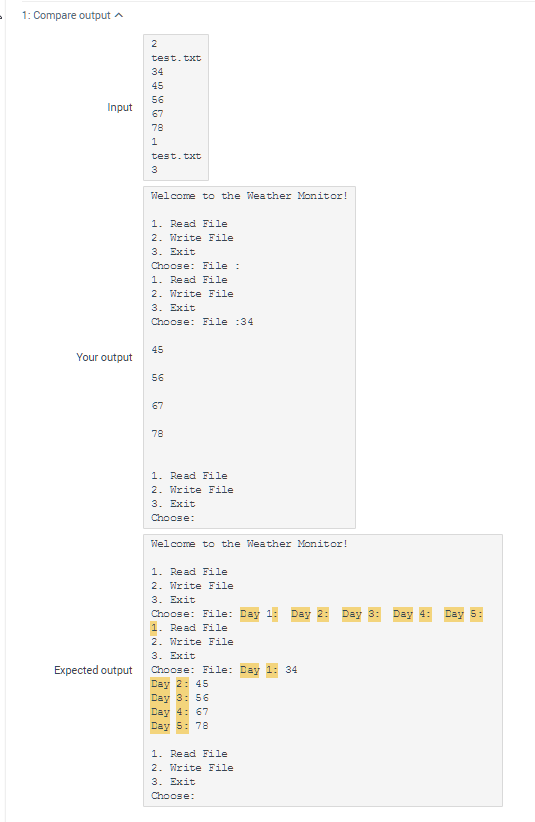
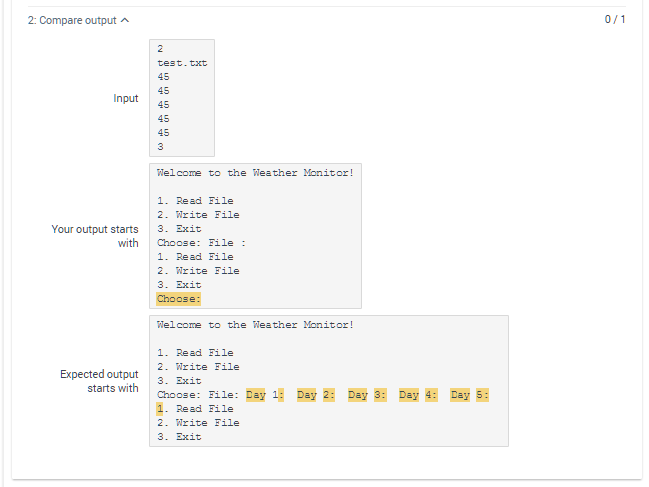
1: Compare outputA test.txt 34 45 56 67 78 Input test.txt Welcome to the Weather Monitor! Read File 2. Write File 3. Exit Choose: File Read File 2. Write File 3. Exit Choose: File 34 45 Your output 56 67 78 Read File 2. Write File 3. Exit Choose Welcome to the Weather Monitor! Read File 2. Write File 3. Exit Choose: File: Day 1: Day 2: Day 3: Day 4: Day 5: Read File 2. Write File 3. Exit Expected output Choose: File: Day 1: 34 Day 2: 45 ay 3 56 Day 4:67 Day 5:78 Read File 2. nrite File 3. Exit Choose
Step by Step Solution
There are 3 Steps involved in it

Get step-by-step solutions from verified subject matter experts
 Study Help