







Question: Instructions Project Description: I would like everyone to copy the code written in the image saved in this assignment. This assignment uses all the
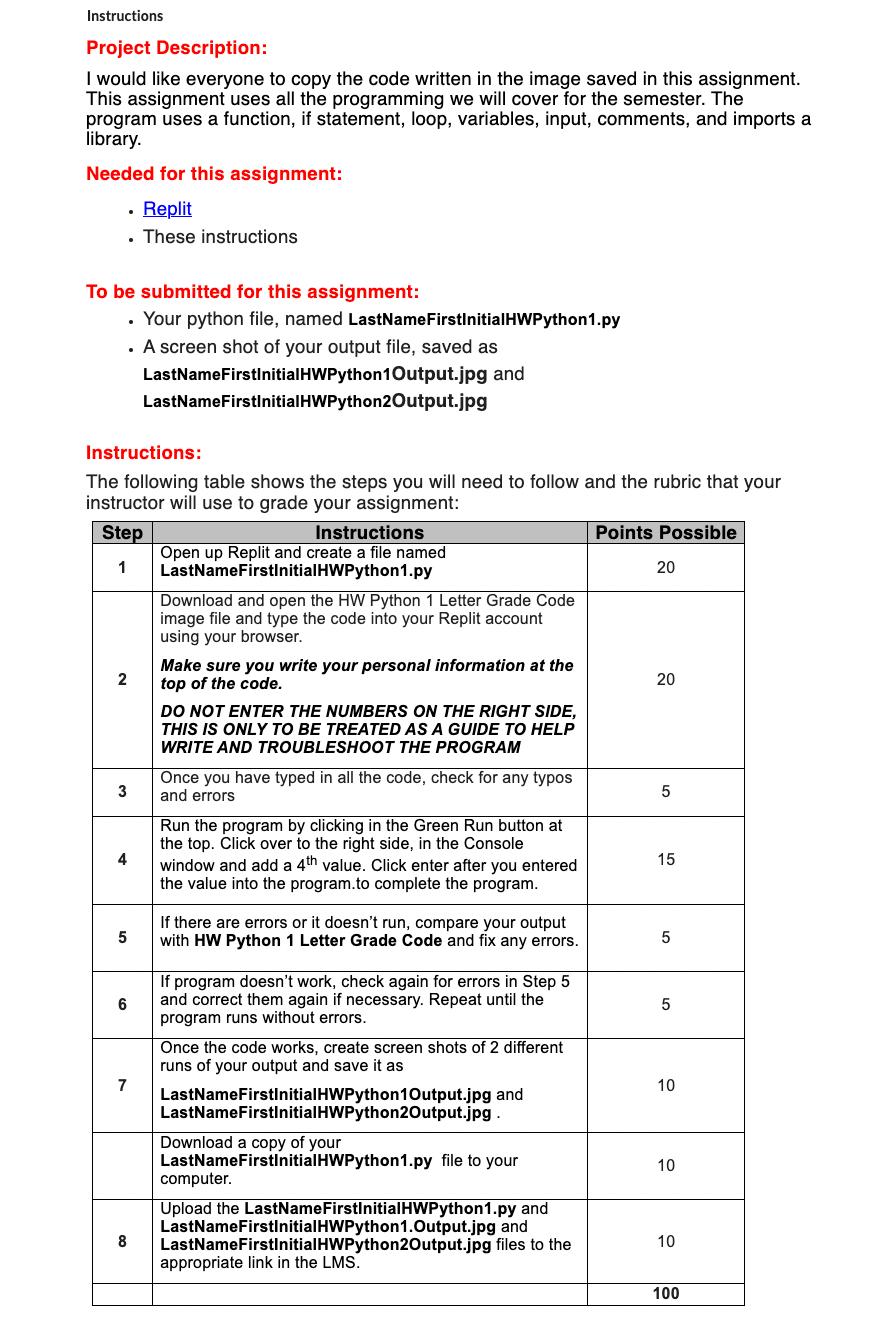
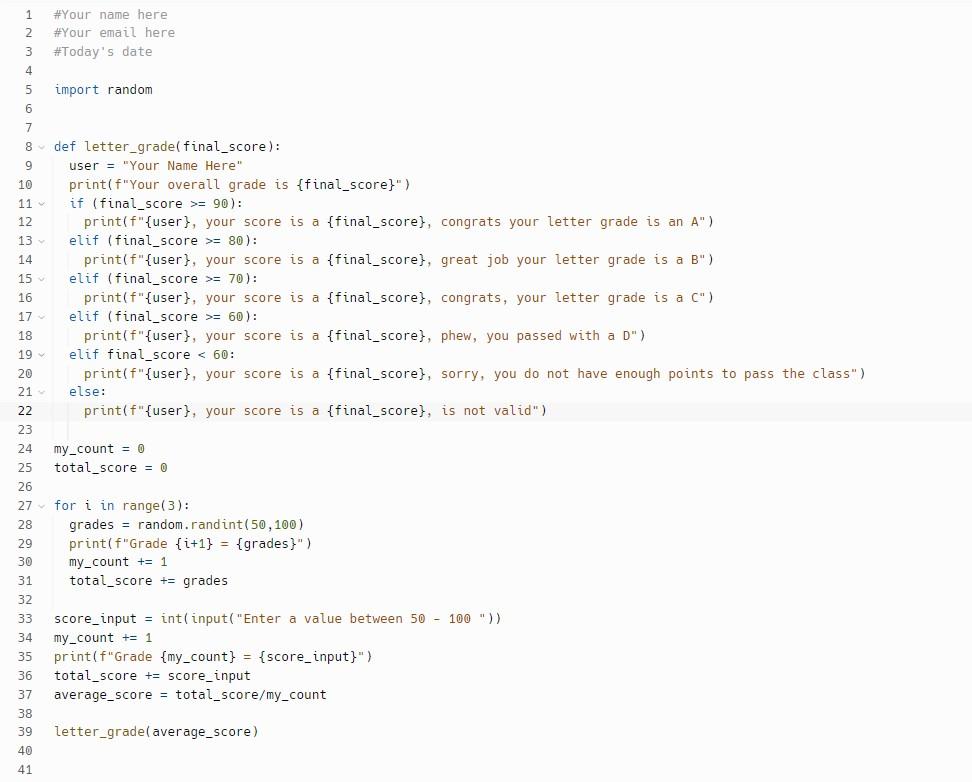
Instructions Project Description: I would like everyone to copy the code written in the image saved in this assignment. This assignment uses all the programming we will cover for the semester. The program uses a function, if statement, loop, variables, input, comments, and imports a library. Needed for this assignment: - Replit . These instructions To be submitted for this assignment: . Your python file, named LastNameFirstinitialHWPython1.py . A screen shot of your output file, saved as LastNameFirstInitialHWPython1 Output.jpg and LastNameFirstInitialHWPython2Output.jpg Instructions: The following table shows the steps you will need to follow and the rubric that your instructor will use to grade your assignment: Step 1 2 Instructions Open up Replit and create a file named LastNameFirstInitial HWPython1.py Download and open the HW Python 1 Letter Grade Code image file and type the code into your Replit account using your browser. Make sure you write your personal information at the top of the code. DO NOT ENTER THE NUMBERS ON THE RIGHT SIDE, THIS IS ONLY TO BE TREATED AS A GUIDE TO HELP WRITE AND TROUBLESHOOT THE PROGRAM Points Possible 20 20 20 3 Once you have typed in all the code, check for any typos and errors 5 4 Run the program by clicking in the Green Run button at the top. Click over to the right side, in the Console window and add a 4th value. Click enter after you entered the value into the program.to complete the program. 15 5 If there are errors or it doesn't run, compare your output with HW Python 1 Letter Grade Code and fix any errors. 5 9 If program doesn't work, check again for errors in Step 5 and correct them again if necessary. Repeat until the program runs without errors. 5 7 8 Once the code works, create screen shots of 2 different runs of your output and save it as LastNameFirstInitial HWPython1Output.jpg and LastNameFirstInitial HWPython2Output.jpg. Download a copy of your LastNameFirstInitialHWPython1.py file to your computer. Upload the LastName FirstInitialHWPython1.py and LastNameFirstInitialHWPython1.Output.jpg and LastNameFirstInitial HWPython2Output.jpg files to the appropriate link in the LMS. 10 10 10 100 1 2 #Your name here # Your email here 3 #Today's date 4 5 import random 6 7 8- def letter_grade(final_score): 9 10 11- 12 user = "Your Name Here" print (f"Your overall grade is {final_score}") if (final_score >= 90): print(f"{user}, your score is a {final_score), congrats your letter grade is an A") elif (final score >= 80): print(f"{user}, your score is a {final_score}, great job your letter grade is a B") elif (final score >= 70): print(f"{user}, your score is a {final_score), congrats, your letter grade is a C") elif (final score >= 60): print(f"{user}, your score is a {final_score), phew, you passed with a D") elif final score < 60: print(f"{user}, your score is a {final_score}, sorry, you do not have enough points to pass the class") else: print(f"{user}, your score is a {final_score}, is not valid") my_count = 0 total_score = 0 13- 14 15 16 17- 18 19- 20 21~ 22 23 24 25 26 27~ 28 29 30 31 32 33 score input int(input("Enter a value between 50 - 100 " ) ) 34 my count + 1 35 print (f"Grade {my_count] = {score_input}") 36 total score += score_input 37 average score = total_score/my_count 38 39 letter_grade(average_score) 40 for i in range(3): grades random.randint(50, 100) print(f"Grade (i+1} = {grades}") my_count += 1 total score + grades 41
Step by Step Solution
There are 3 Steps involved in it
Based on the provided instructions and the code in the image I will help you create the Python file named LastNameFirstInitialHWPython1py and run it t... View full answer

Get step-by-step solutions from verified subject matter experts
 Study Help