







Question: Hi there! I cant get this code to work and would greatly appreciate some help or if you could rewrite the code. %blood pressure measurements
Hi there!
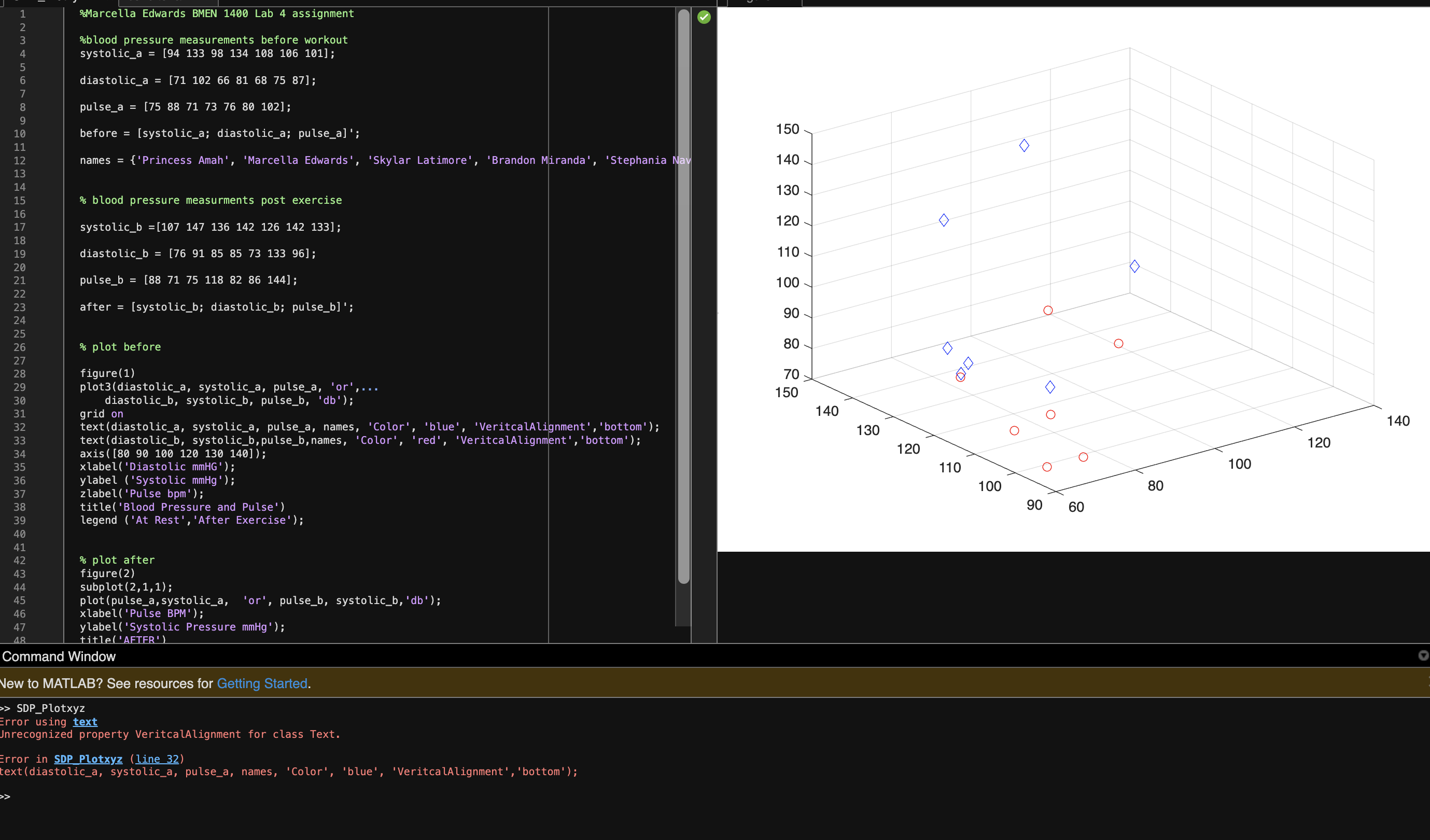
I cant get this code to work and would greatly appreciate some help or if you could rewrite the code.
%blood pressure measurements before workout
systolic_a = [94 133 98 134 108 106 101];
diastolic_a = [71 102 66 81 68 75 87];
pulse_a = [75 88 71 73 76 80 102];
before = [systolic_a; diastolic_a; pulse_a]';
names = {'Princess Amah', 'Marcella Edwards', 'Skylar Latimore', 'Brandon Miranda', 'Stephania Nava', 'Daphne Nguyen', 'helena Song'};
% blood pressure measurments post exercise
systolic_b =[107 147 136 142 126 142 133];
diastolic_b = [76 91 85 85 73 133 96];
pulse_b = [88 71 75 118 82 86 144];
after = [systolic_b; diastolic_b; pulse_b]';
% plot before
figure(1)
plot3(diastolic_a, systolic_a, pulse_a, 'or',...
diastolic_b, systolic_b, pulse_b, 'db');
grid on
text(diastolic_a, systolic_a, pulse_a, names, 'Color', 'blue', 'VeritcalAlignment','bottom');
text(diastolic_b, systolic_b,pulse_b,names, 'Color', 'red', 'VeritcalAlignment','bottom');
axis([80 90 100 120 130 140]);
xlabel('Diastolic mmHG');
ylabel ('Systolic mmHg');
zlabel('Pulse bpm');
title('Blood Pressure and Pulse')
legend ('At Rest','After Exercise');
% plot after
figure(2)
subplot(2,1,1);
plot(pulse_a,systolic_a, 'or', pulse_b, systolic_b,'db');
xlabel('Pulse BPM');
ylabel('Systolic Pressure mmHg');
title('AFTER')
COMMAND WINODW
SDP_Plotxyz
Error using text
Unrecognized property VeritcalAlignment for class Text.
Error in SDP_Plotxyz (line 32)
text(diastolic_a, systolic_a, pulse_a, names, 'Color', 'blue', 'VeritcalAlignment','bottom');
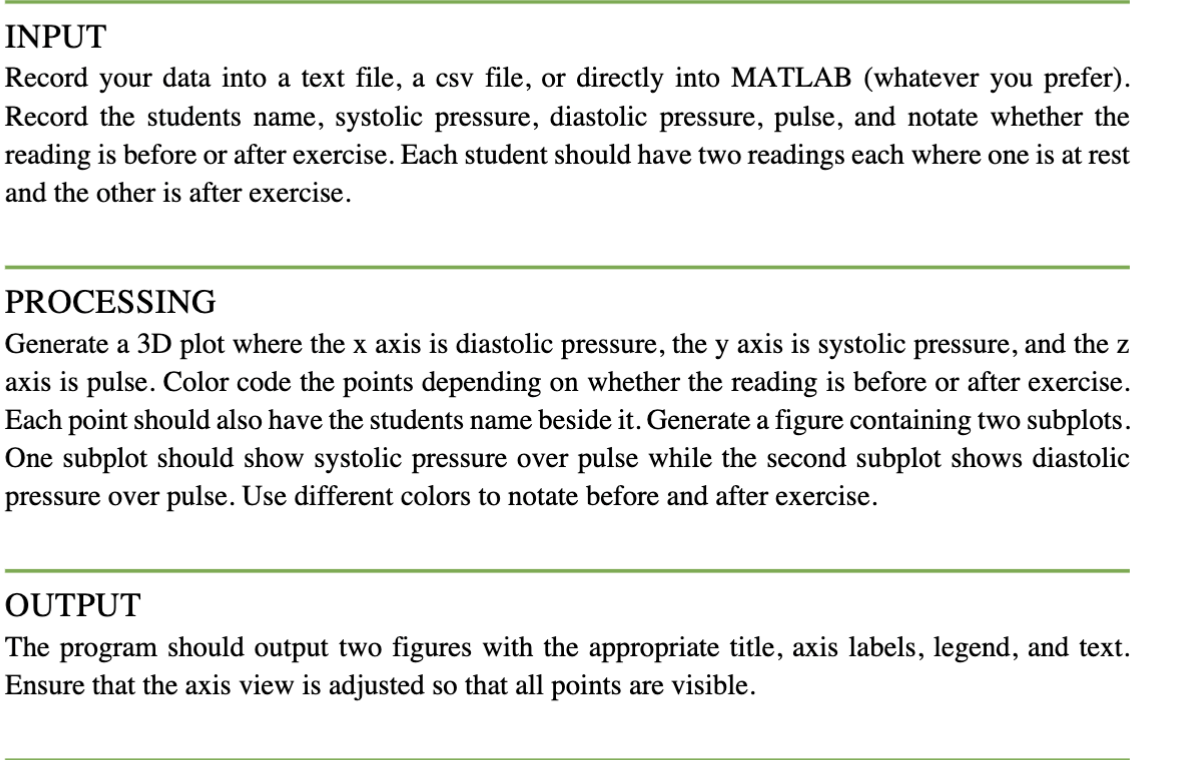
INPUT Record your data into a text file, a csv file, or directly into MATLAB (whatever you prefer). Record the students name, systolic pressure, diastolic pressure, pulse, and notate whether the reading is before or after exercise. Each student should have two readings each where one is at rest and the other is after exercise. PROCESSING Generate a 3D plot where the x axis is diastolic pressure, the y axis is systolic pressure, and the z axis is pulse. Color code the points depending on whether the reading is before or after exercise. Each point should also have the students name beside it. Generate a figure containing two subplots. One subplot should show systolic pressure over pulse while the second subplot shows diastolic pressure over pulse. Use different colors to notate before and after exercise. OUTPUT The program should output two figures with the appropriate title, axis labels, legend, and text. Ensure that the axis view is adjusted so that all points are visible. \%Marcella Edwards BMEN 1400 Lab 4 assignment \%blood pressure measurements before workout before = [systolic_a; diastolic_a; pulse_a]'; names ={ 'Princess Amah', 'Marcella Edwards', 'Skylar Latimore', 'Brandon Miranda', 'Stephania % blood pressure measurments post exercise systolic_b =[107147136142126142133]; diastolic_b =[7691858313396]; pulse_b =[8871758286144] after = [systolic_b; diastolic_b; pulse_b]'; \% plot before figure(1) plot3 (diastolic_a, systolic_a, pulse_a, 'or',... diastolic_b, systolic_b, pulse_b, 'db'); grid on text(diastolic_a, systolic_a, pulse_a, names, 'Color', 'blue', 'VeritcalAlignment', 'bottom'); text (diastolic_b, systolic_b,pulse_b, names, 'Color', 'red', 'Veritcalalignment', 'bottom'); axis ( [8090100120130140]); x label ('Diastolic mmH' '); ylabel ('Systolic mmHg'); zlabel('Pulse bpm ); title('Blood Pressure and Pulse') legend ('At Rest', 'After Exercise'); % plot after figure (2) subplot (2,1,1); plot(pulse_a, systolic_a, 'or', pulse_b, systolic_b,'db'); x label('Pulse BPM'); ylabel('Systolic Pressure mmHg '); title('AFTFR') and Window VATLAB? See resources for Getting Started. lotxyz ing text ized property VeritcalAlignment for class Text. SDP Plotxyz (line 32) istolic_a, systolic_a, pulse_a, names, 'Color', 'blue', 'Veritcalalignment', 'bottom')
Step by Step Solution
There are 3 Steps involved in it

Get step-by-step solutions from verified subject matter experts
 Study Help