



Question: HI, THIS IS MATLAB I have asked this question before and the answer I received was incorrect. I talked to professor and they said to
HI,
THIS IS MATLAB
I have asked this question before and the answer I received was incorrect. I talked to professor and they said to do the following.
It is probably that since you're using the strsplit function, it won't remove all of the n-states if it has a second word (New York, New Jersey, etc). Instead, you should try to:
1. Convert the character array into a string function.
2. Make an array that has all the n-states (such as stateswithletterN = ["New Hampshire", "New Jersey"...] and keep going down the list. There's a link on the problem on how the states should be spelled.
3. Your code on line 8 is similar to what I did to remove the n-states, but I would also suggest you use the strtrim function too to remove any leftover white spaces.
4. Convert the string back to a character array.
HERE IS MY PREVIOUS CODE
s3=strtrim(strsplit(s1))
removeWhat='N';
kLogical=startsWith(s3,removeWhat)
removedElements=s3(kLogical)
s2=strtrim(erase(s1,removedElements))
end
HERE IS THE PROBLEM.> I WILL GIVE THUMBS UP IF IT WORKS
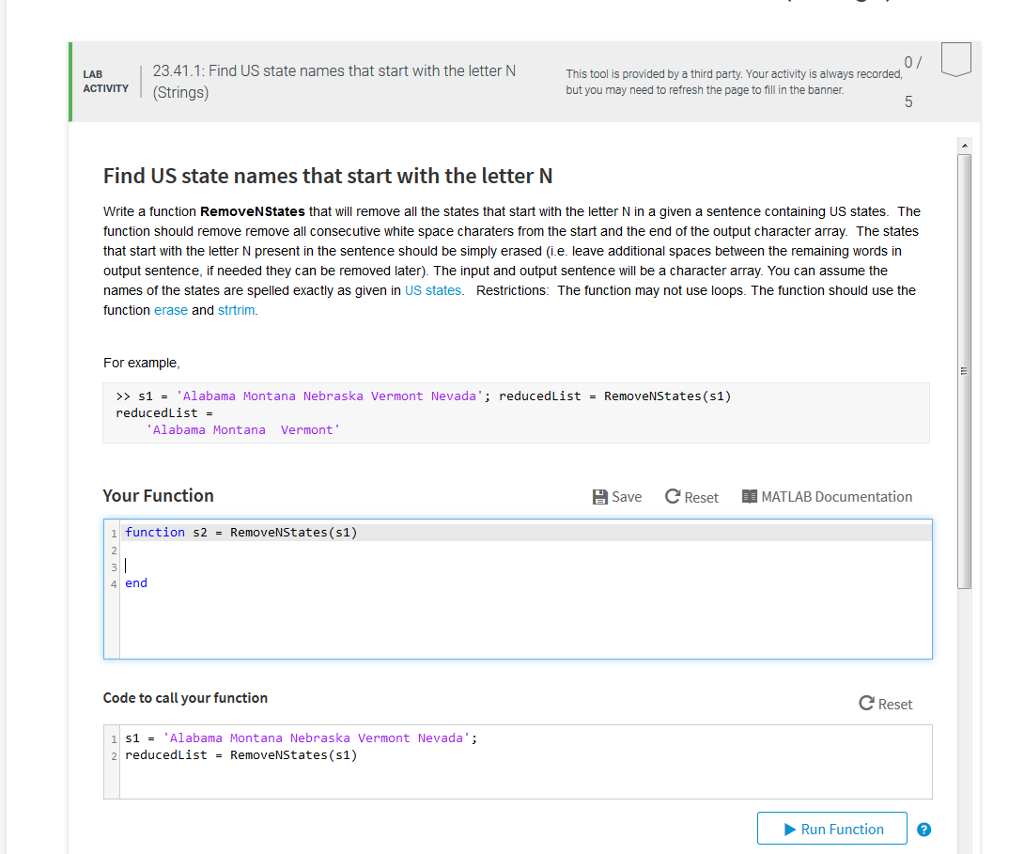
0/ 23.41.1: Find US state names that start with the letter N This tool is provided by a third party. Your activity is always recorded, but you may need to refresh the page to fill in the banner LAB ACTIVITY (Strings) Find US state names that start with the letter N Write a function RemoveNStates that will remove all the states that start with the letter N in a given a sentence containing US states. The function should remove remove all consecutive white space charaters from the start and the end of the output character array. The states that start with the letter N present in the sentence should be simply erased (i.e. leave additional spaces between the remaining words in output sentence, if needed they can be removed later) The input and output sentence will be a character array. You can assume the names of the states are spelled exactly as given in US states. Restrictions: The function may not use loops. The function should use the function erase and strtrim For example >> s1 = 'Alabama Montana Nebraska Vermont Nevada's reducedList RemoveNStates(s1) educed List = Alabama Montana Vermont Your Function Save CReset ,MATLAB Documentation 1 function s2 = RemoveNStates(51) 2 4 end Code to call your function C Reset 1S1Alabama Montana Nebraska Vermont Nevada' 2 reducedist = RemoveNStates(s1) Run Function
Step by Step Solution
There are 3 Steps involved in it

Get step-by-step solutions from verified subject matter experts