







Question: Homework 2 (20 Points) Due: 2/19 at 4pm Points: Code Function and Result Plot: 10 points Commenting and Diagram: 5 points Video or Office Hours
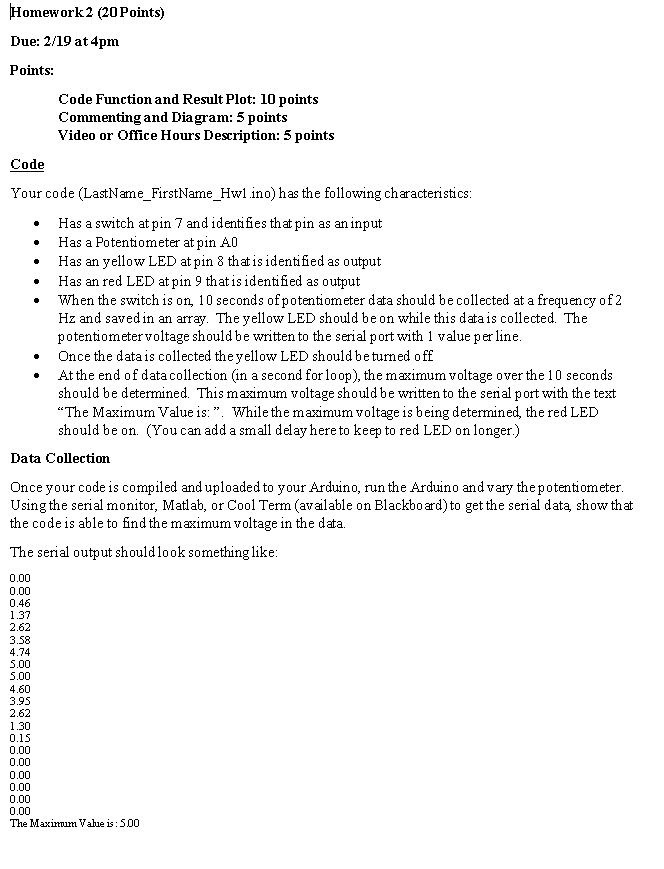
Homework 2 (20 Points) Due: 2/19 at 4pm Points: Code Function and Result Plot: 10 points Commenting and Diagram: 5 points Video or Office Hours Description: 5 points Code Your code (LastName_FirstName_Hwl.ino) has the following characteristics: Has a switch at pin 7 and identifies that pin as an input Has a Potentiometer at pin AO Has an yellow LED at pin 8 that is identified as output Has an red LED at pin 9 that is identified as output When the switch is on, 10 seconds of potentiometer data should be collected at a frequency of 2 Hz and saved in an array. The yellow LED should be on while this data is collected. The potentiometer voltage should be written to the serial port with 1 value per line. Once the data is collected the yellow LED should be turned off At the end of data collection in a second for loop), the maximum voltage over the 10 seconds should be determined. This maximum voltage should be written to the serial port with the text The Maximum Value is: ". While the maximum voltage is being determined, the red LED should be on. (You can add a small delay here to keep to red LED on longer.) Data Collection Once your code is compiled and uploaded to your Arduino, run the Arduino and vary the potentiometer. Using the serial monitor, Matlab, or Cool Term (available on Blackboard) to get the serial dat, show that the code is able to find the maximum voltage in the data. The serial output should look something like: 0.00 0.00 0.46 1.37 2.62 3.58 4.74 5.00 5.00 4.60 3.95 2.62 1.30 0.15 0.00 0.00 0.00 0.00 0.00 0.00 The Maximum Vahie is: 500 Homework 2 (20 Points) Due: 2/19 at 4pm Points: Code Function and Result Plot: 10 points Commenting and Diagram: 5 points Video or Office Hours Description: 5 points Code Your code (LastName_FirstName_Hwl.ino) has the following characteristics: Has a switch at pin 7 and identifies that pin as an input Has a Potentiometer at pin AO Has an yellow LED at pin 8 that is identified as output Has an red LED at pin 9 that is identified as output When the switch is on, 10 seconds of potentiometer data should be collected at a frequency of 2 Hz and saved in an array. The yellow LED should be on while this data is collected. The potentiometer voltage should be written to the serial port with 1 value per line. Once the data is collected the yellow LED should be turned off At the end of data collection in a second for loop), the maximum voltage over the 10 seconds should be determined. This maximum voltage should be written to the serial port with the text The Maximum Value is: ". While the maximum voltage is being determined, the red LED should be on. (You can add a small delay here to keep to red LED on longer.) Data Collection Once your code is compiled and uploaded to your Arduino, run the Arduino and vary the potentiometer. Using the serial monitor, Matlab, or Cool Term (available on Blackboard) to get the serial dat, show that the code is able to find the maximum voltage in the data. The serial output should look something like: 0.00 0.00 0.46 1.37 2.62 3.58 4.74 5.00 5.00 4.60 3.95 2.62 1.30 0.15 0.00 0.00 0.00 0.00 0.00 0.00 The Maximum Vahie is: 500
Step by Step Solution
There are 3 Steps involved in it

Get step-by-step solutions from verified subject matter experts
 Study Help