







Question: Homework 3 - Data extraction, conversion, filter, sort, and build a CSV file output Abstract As discussed in Homework 1 many ETL (extraction, transformation, and
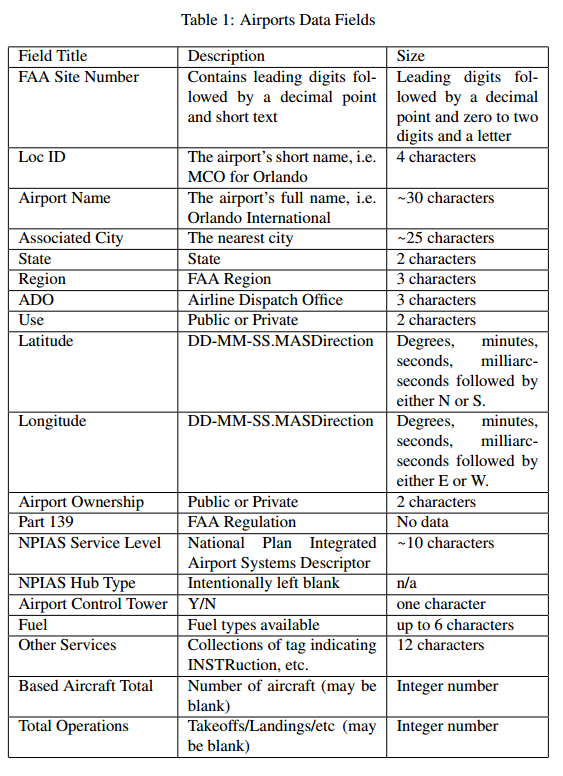
Homework 3 - Data extraction, conversion, filter, sort, and build a CSV file output Abstract As discussed in Homework 1 many ETL (extraction, transformation, and loading) problems parse data files wherein the data fields is separated by commas. This assignment is a continuation of that process - with an additional two steps. The first step is to convert the input files latitude and longitude from sexagesimal (base 60) degrees to decimal degrees. For example, the inputs are in the form: degrees, minutes and seconds, arcseconds and direction. The outputs are in the form: sign, degrees, and decimal fractions to represent the same value. Therefore this assignment requires the data extraction, degree conversion, data formatting, sorting, and output. The file inputs are defined in the Inputs, as are the outputs. This assignment has an additional two requirements. The first is to sort the airports alphabetically. The second is to sort the airports geographically and plan a route from south to north, all the while flying over land 1 Objectives The objectives of this assignment are to demonstrate proficiency in file I/O, data structures, data transformation, sorting techniques, and file output using C language resources. 1.1 Inputs There are two basic inputs, the input file name, and the input file data sort order defined below. The input file data is defined below. 1 1.1.1 Command Line arguments The input file name and sort parameters are input from the command line as shown below. hw3Sort filename.ext sortParameter In the event that the filename.ext is not available, an appropriate error message shall be displayed. Use the example below for guidance. hw3Sort ERROR: File bogusFilename not found. It would be appropriate to display the valid sort parameters in the error message. The valid sort parameters are a for alphabetical sort or n for North Bound Exit. The sort parameters can be entered in either upper or lower case. hw3Sort ERROR: valid sort parameters are a or n. 1.2 Input File fields The CSV input file contains the following fields. Please note these fields may vary in size, content, and validity of the data. Also note that some of the data formats are a melange of types. Specifically, note that both latitude and longitude contain numbers, punctuation, and text. Likewise, the FAA Site number contains digits, letters, and punctuation. (This assignment will treat all input data as character data. Data conversion for some data is specified in greater detail below.) 1.3 Processing the data structure The data conversions for this assignment, specified below, require a certain degree of parsing and calculation. Initially reading the input is to your advantage to deal with all data elements as character data. And then process the latitude and longitude, hereinafter referred to as degrees. The degrees are expressed as sexagesimal (base 60) numbers. Therefore it is required to create functions to establish valid latitudes and longitudes. Please note that there are some airports whose Loc ID begin with numerical digits. There are also quite a few that contain two trailing digits. Typically these are helipads. For the purposes of this assignment those airports can be ignored or discarded from the input. Careful review of these airports will reveal they typically start with the string FL or X and are followed by 2 digits. Therefore, it is highly recommended to discard any airport that does not contain three or four letters only.
1.3.1 Latitude/Longitude Input The latitude and longitude are both degrees, expressed as shown in the tables below.
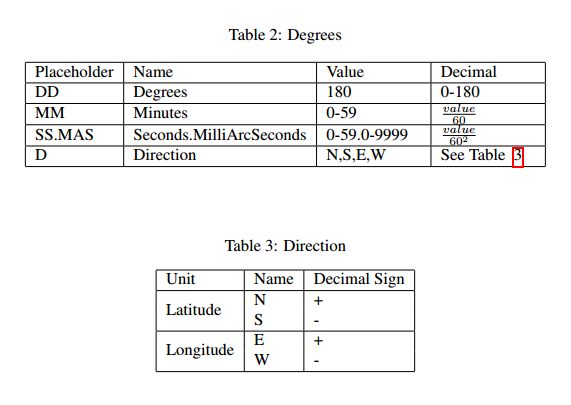
The conversion of the DDD-MM-SS.MASD string is shown in Table 2. The formula to convert a sexagesimal degree measurement to a digital degree measurement is shown below. degrees decimal = DDD + MM/60 + SS.MAS/60 2 Note that the is derived from the information in Table 3 above. 1.4 Functions 1.4.1 float sexag2decimal(char *degreeString); Description: Convert the sexagesimal input string of chars to a decimal degree based on the formula in Tables 2 and 3. Special Cases: If a NULL pointer is passed to this function, simply return 0.0. Similarly, if the DD-MM-SS.MASD fields have invalid or out-of-range data, return 0.0. Caveat: Even though the valid range of Degrees is from 0 to 180, the data files for the Continental US and Florida are from 0 to 99. Make sure that the conversion can handle all valid cases correctly.
Hint: Take care to make sure the values for each numeric component are within their valid ranges. Refer to Table 2 for the ranges. Returns: A floating point representation of the calculated decimal degrees or 0.0 in the special cases mentioned above. 1.4.2 void sortByLocID(lListAirPdata *airports); Description: Sorts the airports alphabetically by the string named Loc ID. Remember that the Loc ID has been filtered to three or four letters. Special Cases: Remember the helipads! In other words, it is recommended to skip airports whose Loc ID begin with a number, or start with either FL or X followed by two digits. Therefore, it is recommended to discard any airport whose LocID is not three or four letters. Caveat: Since the sorting options are mutually exclusive, this function can destructively manipulate the input list to produce the desired results. Returns: Nothing. However the input data should be seriously modified by this process. 1.4.3 void sortByLatitude(lListAirPdata *airports); Description: Sorts the airports by latitude from South to North. Think of this as an Escape from Key West to Georgia. Special Cases: Remember the helipads! In other words, it is acceptable to skip airports whose Loc ID begin with a number, or start with either FL or X followed by two digits. Remember, it is recommended to discard any Loc ID that does not contain three or four letters only. Output: Output the airports data per the output file specification derived from walking thru the AVL tree until reaching the maximum latitude for the Florida border. For the purposed of this exercise, assume 31 degrees North. Caveat: Since the sorting options are mutually exclusive, this function can destructively manipulate the input list to produce the desired results. Hint: Remember to use the the converted Latitude as a measurement criteria for building an AVL tree. Returns: Nothing. However the input data could be seriously modified by this process.
2 Outputs The outputs of the program will be populated Struct airPdata data. This data will be formatted so as to provide output as defined in the following sections. 2.1 Data Structure The structure struct airPdata is described below. Please note the correlation with the data files Field Names refer to Table 1 on page 3 for more information. NB The Javascript APIs and many other APIs for plotting geographic data REQUIRES that longitude is before latitude.
typedef struct airPdata{ char* LocID; //Airports Short Name, ie MCO char* fieldName; //Airport Name char* city; //Associated City float longitude; //Longitude float latitude; //Latitude } airPdata;
2.2 File output The file output for this assignment is stdout, aka the console. Make sure there is a headline that names each column. For example: code,name,city,lat,lon DAB,DAYTONA BEACH INTL,DAYTONA BEACH,29.1797,-81.0581 FLL,FORT LAUDERDALE/HOLLYWOOD INTL,FORT LAUDERDALE,26.0717,-80.1494 GNV,GAINESVILLE RGNL,GAINESVILLE,29.6900,-82.2717 JAX,JACKSONVILLE INTL,JACKSONVILLE,30.4939,-81.6878 EYW,KEY WEST INTL,KEY WEST,24.5561,-81.7594 LAL,LAKELAND LINDER RGNL,LAKELAND,27.9889,-82.0183 MLB,MELBOURNE INTL,MELBOURNE,28.1025,-80.6450 MIA,MIAMI INTL,MIAMI,25.7953,-80.2900 APF,NAPLES MUNI,NAPLES,26.1522,-81.7756 SGJ,NORTHEAST FLORIDA RGNL,ST AUGUSTINE,29.9592,-81.3397 ECP,NORTHWEST FLORIDA BEACHES INTL,PANAMA CITY,30.3581,-85.7956 OCF,OCALA INTL-JIM TAYLOR FIELD,OCALA,29.1717,-82.2239 MCO,ORLANDO INTL,ORLANDO,28.4292,-81.3089 Things to note: Digital degrees are expressed as floating point numbers of varying digits of precision. This is an artifact of Javascript usage by many APIs. In this exercise 4 digits to the right of the decimal point is sufficient. The first line of the file identifies the field names. This is a material fact and will adversely impact the output of the data in the webpage. Capitalization and spelling matter - and must match the first line above. The text shown above has been converted to uppercase as a piece of information to help debugging. String case conversion is not required for this exercise.
3 Processing The primary goal is to provide programmatic access to the data from the input CSV file. This must be accomplished using standard C file IO techniques. Also note that it is vital to utilize the stuct airPdata for all data retrieval/extraction and conversion. Likewise, use of the stuct airPdata is required for the file output. 3.1 Reading the input There are several approaches to read the input. Perhaps the most important consideration is reading the line in for each airport. Please note that there is one line per airport. Also note, that once the line is read into the input buffer it might be advantageous to parse the input buffer based on the comma delimiter. There are several approaches possible. Make sure to test on Eustis as line termination characters/behaviors vary amongst operating systems. Make sure that the output is formatted with decimal degrees. 3.2 Testing The input files used in Homework 1 will be used as an additional testing file. Errors may be induced for the degrees. There will be two files provided for program testing. They are described below.
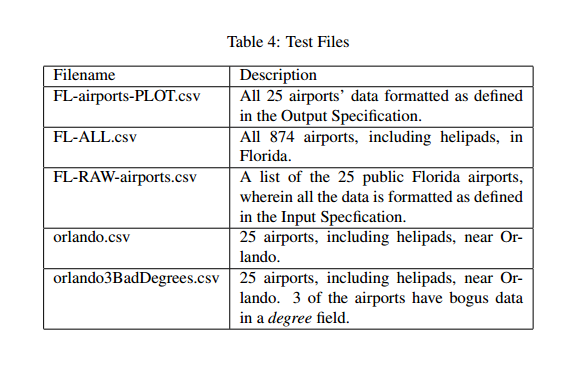
Table 1: Airports Data Fields Field Title FAA Site Number Size Description Contains leading digits fol-Leading digits fol- lowed by a decimal point lowed by a decimal and short text point and zero to two digits and a letter Loc ID The airport's short name, i.e. | 4 characters MCO for Orlando The airport's full name, i.e. 30 characters Orlando International The nearest city State FAA Region Airline Dispatch Office Public or Private DD-MM-SS.MASDirectionDegrees, minutes, Airport Name Associated City State Region ADO Use Latitude 25 characters 2 characters 3 characters 3 characters 2 characters seconds, milliarc- seconds followed by either N or S Longitude DD-MM-SS.MASDirectionDegrees, minutes, seconds, milliarc- seconds followed by either E or W 2 characters No data Airport Ownership Part 139 Public or Private FAA Regulation NPIAS Service Level National Plan Integrated~10 characters Airport Systems Descriptor Intentionally left blank NPIAS Hub Type Airport Control Tower | Y/N Fuel Other Services one character up to 6 characters Fuel types available Collections of tag indicating12 characters INSTRuction, etc Based Aircraft TotalNumber of aircraft (may be Integer number blank) Takeoffs/Landings/etc (mayInteger number be blank) Total Operations
Step by Step Solution
There are 3 Steps involved in it

Get step-by-step solutions from verified subject matter experts
 Study Help